Video resolution analysis
4K or 8K video for social media: which should you film and upload?
Short answer
For social posts, film and export in 4K at most, and upload 1080p vertical to Instagram, Facebook, TikTok, LinkedIn and X: the official pages we read document a 1,920 pixel width ceiling for Instagram Reels and 4,096 pixels for TikTok and LinkedIn, so 8K is beyond every one of them except YouTube. In our tests on three synthetic scenes (none is camera footage), 8K needed 3.3, 9.4 and 54.6 times the bitrate of 4K at the same x264 quality setting, so real footage could fall anywhere, and encoding took 4 to 9 times longer. At a 1080p viewing size, 8K gave no practical SSIM gain on two scenes (0.9926 vs 0.9920 clean; 0.9657 vs 0.9667 noisy) and a small gain on the panning scene (0.9972 vs 0.9948) at 3.3 times the file size; we did not judge by eye. So 8K is worth filming mainly as spare pixels for cropping, and worth its cost for delivery only if you accept that trade.
Key takeaways
- YouTube is the only platform in our table whose official page lists 8K (7680 by 4320) and gives bitrate advice for it. Every other platform we read documents a lower maximum.
- Same quality setting, same scene: 8K was 9.4 times the bitrate of 4K on clean synthetic graphics and 54.6 times on an artificially noisy one. Our panning scene gave 3.3 times. All three scenes are synthetic, so real footage may fall anywhere; we claim no range.
- At a 1080p viewing size we found no practically meaningful SSIM advantage for 8K on two scenes (0.9926 vs 0.9920 clean; 0.9657 vs 0.9667 noisy) and a small one on a panning detailed scene (0.9972 vs 0.9948, x264, our reference favors 8K). Synthetic scenes only; we did not judge by eye.
- If you will crop or reframe, 8K gives 2x of zoom while still delivering 4K. If you will not, the extra pixels are storage and editing cost.
Should you film or upload 4K or 8K for each social platform?
Our suggestion, based on the documented limits in the next sections and the measurements further down, is below. It is a recommendation, not a platform rule. Where a platform has no official statement about what it does with a larger file, we say so.
| Where it goes | Film in | Export or upload | Why |
|---|---|---|---|
| YouTube long-form | 4K, or 8K if you need crop room | 4K (3840 by 2160) | YouTube documents 4K and 8K and a higher bitrate tier for each. The 8K tier is 80 to 160 Mbps for standard frame rates, against 35 to 45 Mbps for 4K. |
| Instagram Reels | 4K if you want to crop | 1080 by 1920 | The Meta API page documents a 1,920 pixel maximum width and 25 Mbps maximum. |
| Facebook Reels | 4K if you want to crop | 1080 by 1920 | Meta recommends 1080 by 1920 and names 540 by 960 as the minimum. We found no larger recommended size. |
| TikTok | 4K if you want to crop | 1080 by 1920 | The Content Posting API page documents 4,096 pixels per side as the maximum, so an 8K file is out of range there. |
| LinkedIn feed video | 4K if you want to crop | 1080 by 1920 or 1920 by 1080 | LinkedIn documents 256 by 144 up to 4096 by 2304 and 30 Mbps maximum. |
| X (Twitter) | 4K if you want to crop | 720 by 1280 or 1080p for subscribers | The X developer page recommends 1280 by 720 or 720 by 1280, and says subscribed accounts can upload 1080p for 1080p playback. |
Our suggestion; limits are from the official pages under Sources.
The row that decides most of it is the YouTube one. If your channel is the only place the full-resolution file will be watched, 4K is the practical ceiling, and we found no official YouTube statement that 8K improves reach or ranking. For short vertical clips, the recommended or documented sizes in the table are 1080 by 1920 or smaller.
What is the real difference between 4K and 8K?
Only the pixel count. The frame sizes below are the standard ones YouTube lists, and the pixel counts are plain arithmetic: width times height. 8K has four times the pixels of 4K and sixteen times the pixels of 1080p, which is why every step up multiplies storage, decoding and editing work.
| Name | Width by height | Pixels | Compared with 1080p |
|---|---|---|---|
| 1080p (HD) | 1920 by 1080 | 2,073,600 | 1x |
| 1440p (2K) | 2560 by 1440 | 3,686,400 | 1.8x |
| 2160p (4K) | 3840 by 2160 | 8,294,400 | 4x |
| 4320p (8K) | 7680 by 4320 | 33,177,600 | 16x |
16:9; sizes from the YouTube resolution page, pixel counts calculated by us.
YouTube adds a note that since 2022 it has been removing playback support for resolutions between 4K and 8K, so a 5K file may no longer play back at 5K. If you export for YouTube, use the standard sizes in the table.
What does each platform accept?
These are the maximums and recommendations on the official pages, read on October 21, 2026. The Instagram, Facebook, TikTok and X rows come from developer documentation for publishing by API; what the Instagram and TikTok mobile apps do with a larger file in practice is undocumented in what we read and not tested by us, and we did not upload a test file to any of them.
| Platform | Largest size documented | Bitrate documented | Source type |
|---|---|---|---|
| YouTube | 7680 by 4320 (8K); 3840 by 2160 (4K) | SDR, standard frame rates: 8K 80 to 160 Mbps, 4K 35 to 45 Mbps, 1080p 8 Mbps. HDR: 8K 100 to 200 Mbps, 4K 44 to 56 Mbps | Help center, upload settings |
| Instagram Reels | Up to 1,920 pixels wide | VBR, 25 Mbps maximum; 300 MB maximum file | Meta developer page (API) |
| Facebook Reels | 1080 by 1920 recommended; 540 by 960 minimum | Not stated on that page | Meta developer page (API) |
| TikTok | 4,096 pixels per side | Not stated on that page; up to 4 GB file | TikTok developer page (API) |
| 4096 by 2304 | 192 Kbps to 30 Mbps | LinkedIn help | |
| X | 1280 by 720 recommended, 1080p playback for subscribers | 2048 Kbps listed for 720p processing; recommended minimum 5,000 kbps | X developer page (API) |
Official pages, read October 21, 2026.
Two reads of this table. First, keep two things apart. What the publishing API (and, for LinkedIn, the help page) accepts is documented in the table. What the Instagram and TikTok mobile apps do with a 4K or 8K file is undocumented in our sources and not tested: it may be accepted and downscaled, so treat 4K and 8K as unproven there. Second, a 25 Mbps cap on Instagram is a small fraction of what an 8K file runs at, as the measurement below shows.
For the general reason platforms re-encode what you send, see our guide to why social media compresses video.
What does 8K cost at the same quality setting?
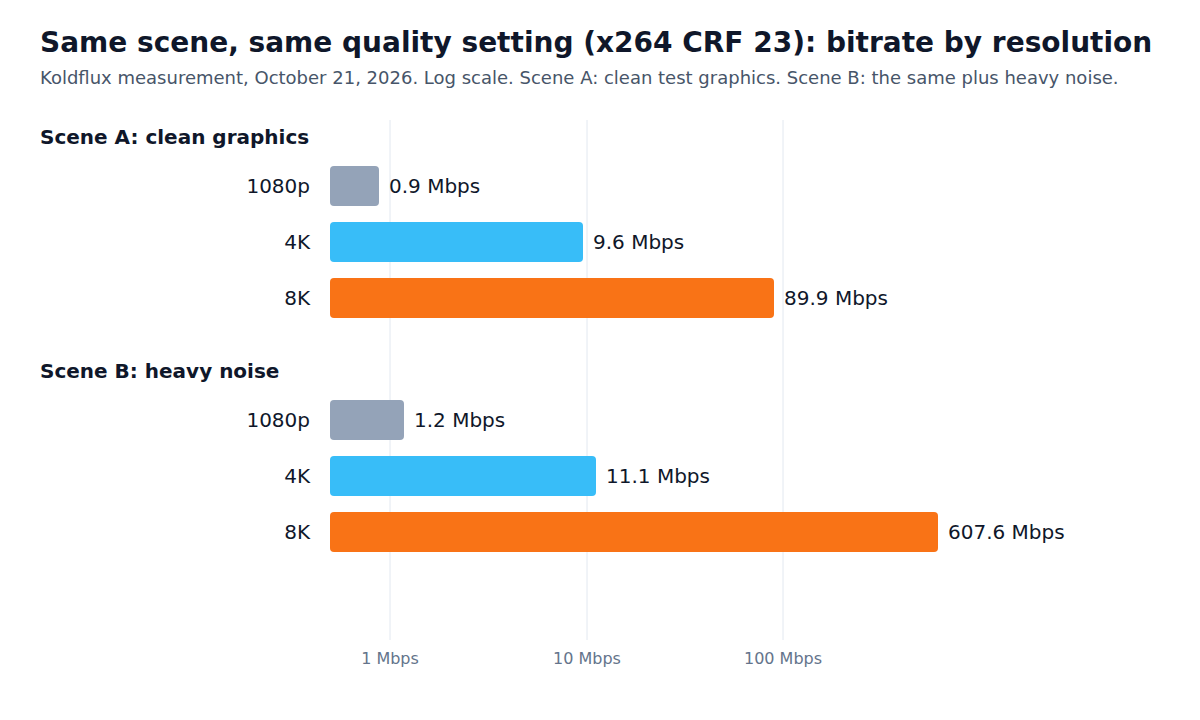
We made two 2-second, 30 fps test scenes at 7680 by 4320 with ffmpeg: scene A is clean test graphics, scene B is the same graphics with heavy synthetic noise. We scaled each to 4K and 1080p and encoded all three with x264 at CRF 23, a constant quality setting, so the encoder chooses the bitrate it needs. The chart and table show what it chose.
| Scene and size | File size | Bitrate | Encode time | Size against 4K |
|---|---|---|---|---|
| A clean, 1080p | 0.22 MB | 884 kbps | 0.9 s | 0.09x |
| A clean, 4K | 2.39 MB | 9,558 kbps | 3.0 s | 1x |
| A clean, 8K | 22.48 MB | 89,907 kbps | 15.0 s | 9.4x |
| B noisy, 1080p | 0.30 MB | 1,195 kbps | 1.9 s | 0.11x |
| B noisy, 4K | 2.78 MB | 11,122 kbps | 8.0 s | 1x |
| B noisy, 8K | 151.91 MB | 607,626 kbps | 70.9 s | 54.6x |
X264 CRF 23, 2 second clips, ffmpeg 6.1.1 on Linux, October 21, 2026.
The spread between the two scenes is the point: how much an 8K file costs depends on the picture, not only on the resolution. Fine detail and noise, which dark or high-ISO footage has, are the expensive part. Our scene B noise is much heavier than a normal camera would produce, so read them as two data points, not a forecast for your camera. The panning scene further down gave a third, 3.3 times.
Multiply a bitrate by 7.5 to get megabytes per minute. At YouTube's recommended 4K bitrate of 35 to 45 Mbps that is roughly 260 to 340 MB a minute; at its 8K recommendation of 80 to 160 Mbps it is roughly 600 to 1,200 MB a minute (arithmetic from the official bitrates).
Does 8K look sharper once it is shown at 1080p?
Not in our test. We chose a 1080p viewing size as our assumption (not measured) and scaled every encode to 1920 by 1080 and compared it with the 1080p master using SSIM, a similarity score where 1.0 is identical. We ran it two ways: the quality setting above, and a fixed 15 Mbps cap so all sizes got the same bits.
| Scene and size | CRF 23 | 15 Mbps cap (achieved) |
|---|---|---|
| A clean, 1080p | 0.9901 | 0.9928 (15.8 Mbps) |
| A clean, 4K | 0.9920 | 0.9924 (16.0 Mbps) |
| A clean, 8K | 0.9926 | 0.9918 (18.4 Mbps) |
| B noisy, 1080p | 0.9661 | 0.9631 (17.4 Mbps) |
| B noisy, 4K | 0.9667 | 0.9648 (14.4 Mbps) |
| B noisy, 8K | 0.9657 | 0.9614 (14.2 Mbps) |
Higher is closer to the master; Koldflux measurement, October 21, 2026.
At the same bitrate cap, 8K scored lowest in both scenes: the encoder spreads the same bits over four times the pixels. At CRF 23 the three sizes are within 0.003 SSIM of each other on the clean scene and 0.001 on the noisy one, at 9.4 to 54.6 times the bits on these two scenes. The achieved bitrates differ from 15 Mbps because the cap was applied to a 2 second single-pass encode; that is a limit of this test.
What this does not show: how an 8K file looks on an 8K or large 4K screen, which is where extra pixels could help. SSIM is also a computed score, not a viewing panel. We did not test that.
What happens with motion, HEVC and AV1?
To get closer to real footage than a static test pattern, we made a 6 second panning scene: a procedurally generated, multi-scale detailed image (not camera footage), moved across the frame at 30 fps. We encoded it at 8K, 4K and 1080p with three encoders, using the same one-setting-per-codec approach, and scored each at a 1080p viewing size. We planned 10 to 30 seconds, but raw 8K masters did not fit our machine beyond 6 seconds.
| Encoder and size | File size | Bitrate | Encode time | SSIM at 1080p view |
|---|---|---|---|---|
| x264 CRF 23, 1080p | 1.06 MB | 1,413 kbps | 2.5 s | 0.9869 |
| x264 CRF 23, 4K | 1.35 MB | 1,797 kbps | 10.1 s | 0.9948 |
| x264 CRF 23, 8K | 4.44 MB | 5,915 kbps | 39.7 s | 0.9972 |
| x265 (HEVC) CRF 28, 1080p | 0.24 MB | 323 kbps | 5.0 s | 0.9872 |
| x265 (HEVC) CRF 28, 4K | 0.51 MB | 681 kbps | 14.5 s | 0.9935 |
| x265 (HEVC) CRF 28, 8K | 1.21 MB | 1,607 kbps | 56.8 s | 0.9961 |
| SVT-AV1 CRF 35, 1080p | 0.26 MB | 347 kbps | 4.4 s | 0.9599 |
| SVT-AV1 CRF 35, 4K | 0.88 MB | 1,171 kbps | 13.2 s | 0.9607 |
| SVT-AV1 CRF 35, 8K | 4.80 MB | 6,396 kbps | 37.2 s | 0.9610 |
Koldflux measurement, October 22, 2026; CRF values are not equivalent across codecs.
Here 8K did score higher at a 1080p viewing size with x264 (0.9972 against 0.9948) and x265 (0.9961 against 0.9935), a small edge that cost 3.3 and 2.4 times the file size and about 4 times the encode time. This contradicts a flat "8K never helps" reading, so we state it. Two caveats cut the other way: our 1080p reference is scaled from the 8K master, which favors the 8K encode, and the AV1 setting we picked produced much lower scores at every size, so its numbers show the cost of resolution, not a fair codec comparison. We had no VMAF tool in this ffmpeg build, so SSIM is the only score, and we did not judge by eye.
Takeaway for this scene: HEVC gave a smaller file than x264 at every size here, but at a different quality setting, so we do not claim one codec is better. Full commands and output are in the test log.
When is 8K worth filming?
When you will crop, reframe or stabilize, and only if your storage and editing machine can take it. Extra pixels let you zoom into the frame and still export a sharp 4K or 1080p file. This is arithmetic on frame sizes, not a measured result.
| Source frame | Keeps 4K (3840 wide) up to | Keeps 1080p (1920 wide) up to | A 9:16 cut at full height is |
|---|---|---|---|
| 8K, 7680 by 4320 | 2x zoom | 4x zoom | 2430 by 4320, so 1080 by 1920 with 2.25x of room |
| 4K, 3840 by 2160 | none (already 4K) | 2x zoom | 1215 by 2160, so 1080 by 1920 with 1.125x of room |
| 1080p, 1920 by 1080 | none | none | 608 by 1080, which must be enlarged about 1.8x to reach 1080 by 1920 |
Calculated by us.
Read the last column as the useful one for social: cutting a vertical clip out of a wide 4K frame already leaves enough pixels for a 1080 by 1920 export, with a small zoom to spare. 8K buys more zoom, not a better 1080 by 1920 file. Camera files also use heavier codecs and bitrates than our tests, and we did not test any camera, so check what yours does before you count on this.
How do you convert 8K to 4K or 1080p?
Scale it down, with a high-quality filter, and re-encode. The ffmpeg command below turned our 8K test encode into a 3840 by 2160 H.264 file in 7.1 seconds (3.19 MB). To go straight to 1080p, change the scale to 1920:1080.
ffmpeg -i in8k.mp4 -vf scale=3840:2160:flags=lanczos -c:v libx264 -crf 18 -preset slow -c:a copy -movflags +faststart out4k.mp4No command line? Our free Compress video tool re-encodes in your browser with nothing uploaded, and its largest preset is 1080p. We ran it on the live site in headless Chromium: a 4K and an 8K H.264 test clip both came out as 1920 by 1080 H.264 (11 and 19 seconds). Its page states a 100 MB per file limit, and our 152 MB 8K file was rejected with the error "Processing failed - a file may be corrupt, too large for your browser, or unsupported". Real 8K camera files are usually larger than that, so for those use the ffmpeg command.
The raw commands and outputs for every run on this page are in the test log below.
Free tool:Compress video in your browser (set the 1080p preset)
Can a 4K screen or a phone play 8K?
A 4K screen shows an 8K file by scaling it down, and the picture cannot be sharper than the screen. Whether a given phone, TV or laptop can decode the file at all depends on its hardware and the codec, which we did not test. If an 8K clip stutters on an older device, exporting a 4K or 1080p copy is the practical fix.
Download the test log
Every command we ran, each exit code and time, and all results in one text file, so you can repeat the measurement.
Limits and how we checked
- Tested by us: the encodes, sizes, times and SSIM scores, the ffmpeg 8K to 4K command and a run of the Koldflux compress tool on the live site in headless Chromium, on October 21, 2026, plus the panning scene with x264, x265 and SVT-AV1 on October 22, 2026, all on one Linux machine (ffmpeg 6.1.1).
- Only read: every platform limit and bitrate figure comes from the official pages under Sources, read on October 21, 2026 (YouTube help in Chromium on a Mac; the Meta, TikTok, LinkedIn and X pages in headless Chromium). The Instagram, Facebook, TikTok and X pages are developer documentation, and the apps may accept or process more. We did not upload any test file to any platform, so what each one actually keeps after upload is not tested.
- Two test scenes are synthetic ffmpeg test graphics (one clean, one with added noise) and only 2 seconds long; the third is a 6 second procedural pan. Real camera footage and camera encoders will give different sizes. The panning scene (6 seconds, procedural, not camera footage) adds motion and the HEVC and AV1 encoders, but only through software x265 and SVT-AV1, not phone or camera hardware encoders. Results change with camera, codec, content and encoder settings.
- The measurements are single runs, not averages, and SSIM at a 1080p viewing size does not measure how 8K looks on an 8K display. We did not test playback on any device.
- We did not cover 5K, 6K or 16K, VMAF scoring, HDR workflows, or camera or phone model comparisons. The recommendations in the first table are our suggestion. Date of checks: October 21, 2026, and October 22, 2026 for the panning scene.
Do it in your browser
Free Koldflux tool, no account needed.
Questions people ask
Is 8K better than 4K for social media?
Not for posting. The official pages we read document 4,096 pixels or less per side for TikTok and LinkedIn and a 1,920 pixel width for Instagram Reels; only YouTube documents 8K. In our tests we found no practically meaningful advantage at a 1080p viewing size (SSIM 0.9926 vs 0.9920 clean; 0.9657 vs 0.9667 on the noisy scene; synthetic scenes only).
Does YouTube support 8K?
Yes. The YouTube help page lists 4320p (8K) at 7680 by 4320 and recommends 80 to 160 Mbps for standard frame rate SDR uploads. It also says it has been removing playback at sizes between 4K and 8K since 2022.
What resolution should I upload to Instagram Reels?
Export 1080 by 1920. Meta's API page documents a maximum width of 1,920 pixels and a 25 Mbps maximum bitrate for Reels. What the app does with a larger file is undocumented in what we read and not tested.
How much bigger is an 8K file than 4K?
Four times the pixels. At the same x264 quality setting our clean synthetic scene was 9.4 times the bitrate and our artificially noisy one 54.6 times; our panning scene gave 3.3 times, and all three are synthetic, so real footage may fall anywhere. Real footage depends on camera, codec and noise.
Why film in 8K if I post in 4K or 1080p?
For crop and reframe room: 8K lets you zoom 2x and still deliver 4K. If you do not crop, you carry the storage and editing cost for no gain on the screen.
How do I convert 8K video to 4K?
Scale it to 3840 by 2160 and re-encode. The ffmpeg command on this page did that for our test clip in 7.1 seconds. Our browser compress tool goes down to 1080p and accepts files up to 100 MB.
Can I play 8K video on a 4K monitor?
The screen shows it scaled down to 4K. Whether the device can decode it depends on its hardware and the codec; we did not test playback.
Related
Sources and how we checked
- YouTube Help: Recommended upload encoding settings (bitrates, 8K and 4K) (checked 2026-10-21)
- YouTube Help: Video resolution and aspect ratios (4320p 8K, 2160p 4K, 2022 playback note) (checked 2026-10-21)
- Instagram Platform: Reel specifications (Meta developer documentation) (checked 2026-10-21)
- Meta for Developers: Reels publishing, video specifications for Facebook Pages (checked 2026-10-21)
- TikTok for Developers: Content Posting API media transfer guide (checked 2026-10-21)
- LinkedIn Help: Video sharing troubleshooting (file requirements) (checked 2026-10-21)
- X Developer Platform: Media upload best practices (checked 2026-10-21)
- FFmpeg Filters Documentation (scale, testsrc2, noise, ssim) (checked 2026-10-21)
We made two 2 second, 30 fps, 7680 by 4320 test scenes with ffmpeg 6.1.1 (testsrc2 graphics, one with added noise) and, on October 22, 2026, a third 6 second panning scene from a procedurally generated detailed image, all synthetic and none camera footage. We scaled them to 4K and 1080p with the lanczos filter, encoded the first two with x264 at CRF 23 and at a 15 Mbps cap, and the panning scene with x264 CRF 23, x265 CRF 28 and SVT-AV1 CRF 35, and read file sizes, bitrates and encode times from the files and the clock. SSIM compared each encode, scaled to 1080p, with the 1080p master. The 8K to 4K command and the Koldflux compress tool (live site, headless Chromium) were run on the same date. The commands and outputs are in the published test log. Platform figures were read from the official pages under sources on October 21, 2026, in Chromium. YouTube, Instagram, Facebook, TikTok, LinkedIn and X are trademarks of their owners; Koldflux is not affiliated with or endorsed by them.