Free tool · Transparent PNG · Runs in your browser
Remove the background from a photo of a person
Short answer
Choose a photo of a person and the tool removes the background in your browser, with no upload. On our test portraits and figures the mask overlapped the true outline by 0.86 on average on plain backgrounds (alpha error 0.03), a little better than the dedicated portrait model we compared it with. If a second person or a large object is in the background, the model may keep it too. Nothing is uploaded.
Nothing is uploaded: the model runs in your browser. The result is the original pixels with a new transparency layer, so nothing else about the picture changes.
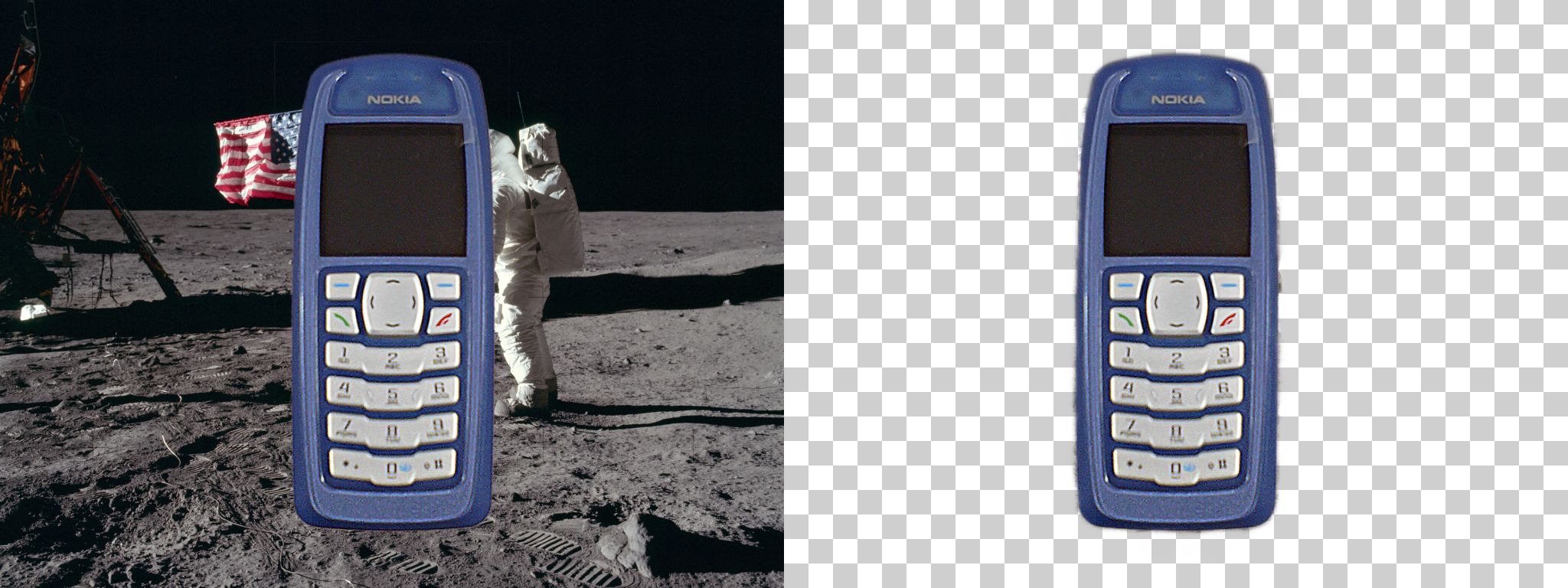
Examples
Key takeaways
- On plain backgrounds the mask overlapped the true subject by 0.84 on average across 16 cutouts: 0.95 for products, 0.86 for people, 0.61 for animals.
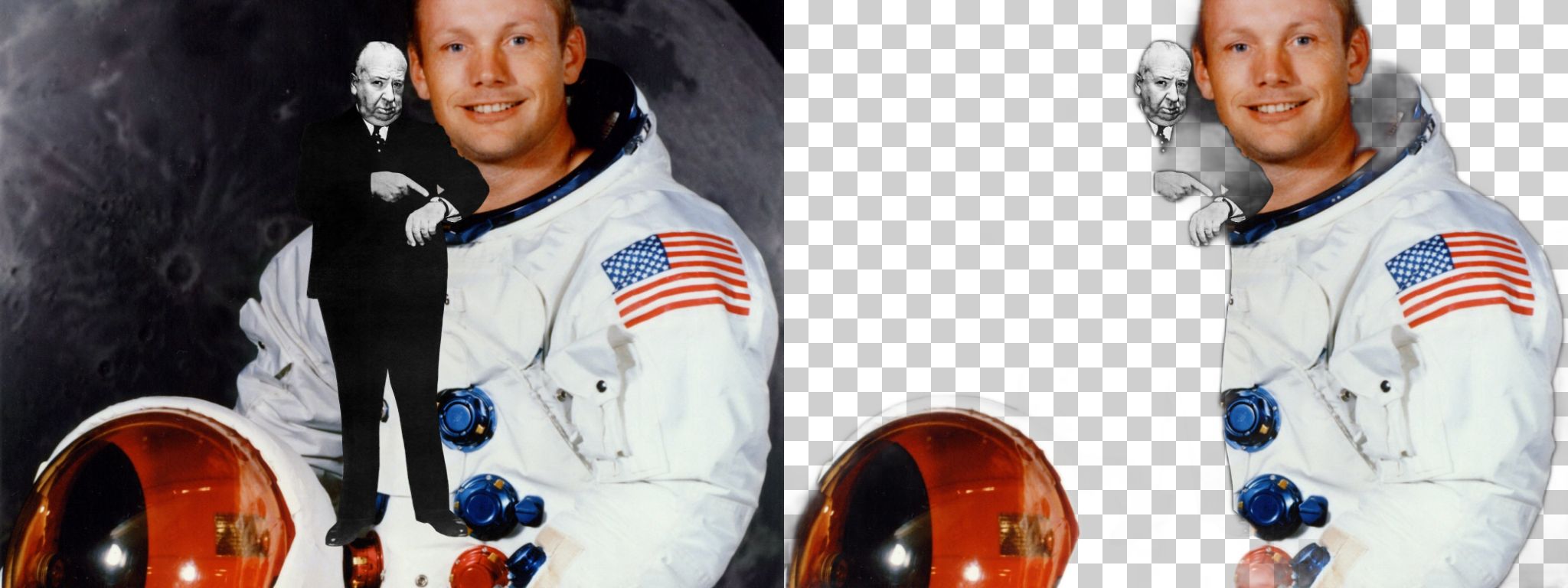
- The model finds the most prominent subject. When the background held a large subject of its own (a portrait photograph), the overlap fell to 0.55, and in the worst case to 0.04.
- It runs in your browser: about 1.6 to 1.9 seconds for a 1024 × 768 picture on a server in headless Chromium, after a one-time download of about 19 MB (14 MB runtime and the 4.6 MB model).
- The result is your original pixels with a new transparency layer, so color, sharpness and size are untouched; download it as a transparent PNG, or as a JPG on white or a color of your choice.
- We also tried a portrait model (MODNet, 25.9 MB). On our cutouts it scored 0.86 on people against 0.86 for the one used here, and 0.25 on products against 0.95, so it is not shipped.
Measured: people and portraits
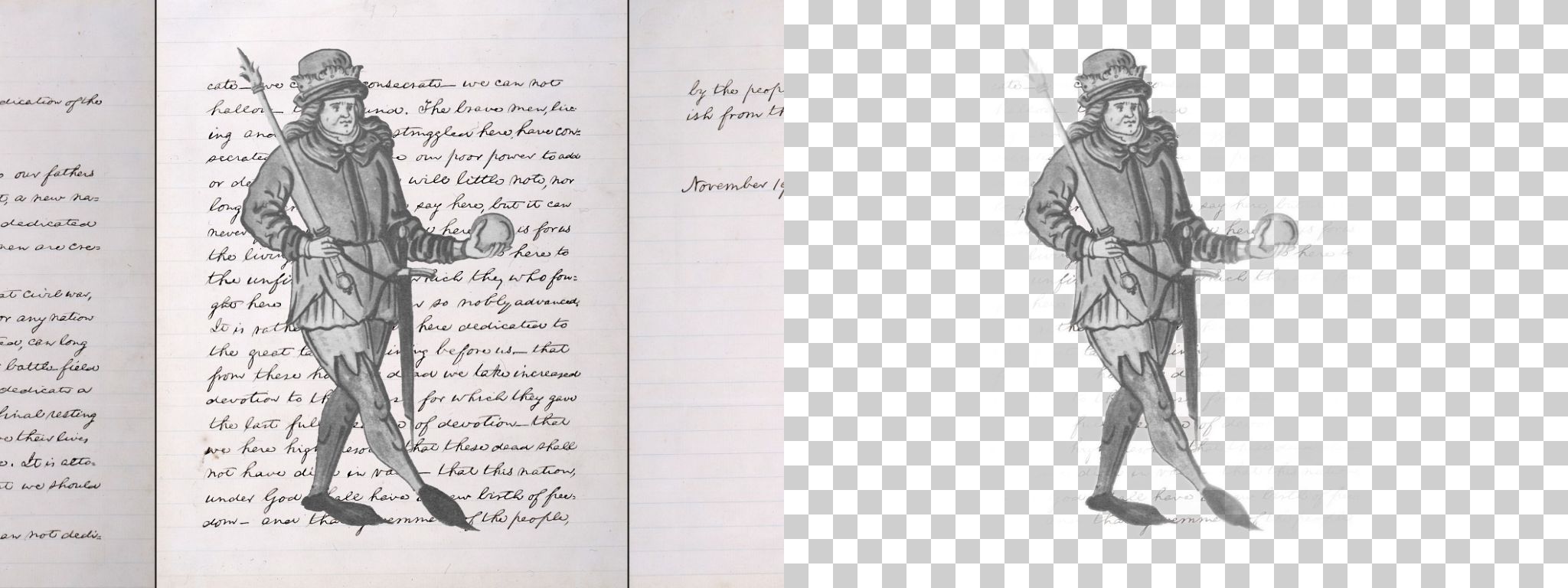
Measured in headless Chromium with the tool's own code: U²-Net-P through ONNX Runtime Web, single thread. 16 public domain or CC0 cutouts with real transparency (products, people, animals, a plant) were placed on three other photographs at 1024 × 768, which gives the true outline of every subject. The model saw only the flat picture. IoU is the overlap between the model's mask (alpha of at least 50%) and the true mask, from 0 to 1; MAE is the average difference in alpha, from 0 (perfect) to 1. Real photographs are harder than composites in some ways (soft hair, motion blur) and easier in others, so treat the numbers as a guide.
| Cutout | License | Busy photograph | Handwriting | Another subject |
|---|---|---|---|---|
| Alfred Hitchcock - 1960, no late admissions (transparent) | Public domain | 0.57 | 0.99 | 0.04 |
| Ephèbe Antikythera NAMA Χ13396 | CC0 | 0.64 | 0.81 | 0.15 |
| Amblett-cutout-left | Public domain | 0.64 | 0.64 | 0.18 |
| Amblett-cutout-right | Public domain | 0.61 | 0.92 | 0.18 |
| Francisco Tavares Proença Júnior (mono crop) | Public domain | 0.98 | 1.00 | 1.00 |
| François-André Vincent - Portrait of a Man - WGA25108-transparent | Public domain | 0.99 | 1.00 | 0.82 |
| Hans-Christian-Steffensen-o | Public domain | 0.97 | 0.99 | 0.99 |
| Dou Gerard - Young Woman in a Black Veil -c 1660-transparent | Public domain | 0.97 | 1.00 | 0.89 |
Each row is one cutout placed on three different backgrounds. The first two columns are plain backgrounds; the last has another large subject.
Models we compared
Segmentation models differ in size and in what they are good at. We ran the same pictures through three. The smallest was the best on every kind of subject we tried, which is why it is the one in the tool.
| Model | Download | IoU, products | IoU, people | IoU, all subjects | Shipped |
|---|---|---|---|---|---|
| U²-Net-P | 4.6 MB | 0.95 | 0.86 | 0.84 | Yes |
| MODNet, float32 | 25.9 MB | 0.25 | 0.86 | 0.65 | No |
| MODNet, uint8 quantized | 6.6 MB | - | - | 0.23 (10 cutouts) | No |
The quantized portrait model, the only one small enough to compete on download size, lost faces in our test, which is a reminder to measure a model after shrinking it.
Measured: how long it takes
| Step | Time in our test |
|---|---|
| Reading the model (4.6 MB, from disk) | 0.8 s |
| Finding the subject in a 1024 × 768 picture | 1.6 to 1.9 s |
The model works on a 320 × 320 version of your picture, so the time does not depend on how large your photo is; scaling the mask up to your photo and writing the PNG add a little. On a phone the run is slower than the headless desktop browser we used.
When it works and when it does not
- Works well: a clear subject against a different background. Products scored 0.95, and a subject on a handwritten page, a very busy background, scored 0.88.
- Struggles: a background with a large subject of its own. The overlap fell to 0.55 when the background was a portrait photograph.
- Struggles: clear glass and plastic, fine hair against a similar color, and subjects whose color matches the background.
- Only the most prominent subject is kept. If two subjects matter, cut them out one by one on separate photos.
- The model decides at a coarse resolution, so the outline can be slightly soft. Zoom in on the edge before you rely on it for print.
Getting a good result
- Shoot the subject so it fills a good part of the frame and is separated from the background in color or light.
- Crop out a second subject before you use the tool.
- Download the transparent PNG for design work. Choose the JPG when the destination does not accept transparency; it is saved on white unless you picked another color.
- If the first result misses part of the subject, crop tighter and run it again.
Free tools:Compress an imageCompress an image to a target sizeConvert any image to PNGRemove the background from an imageRemove the background from a product photo
What is under the hood
The tool runs U²-Net-P, a small salient object segmentation model released under the Apache-2.0 license, through ONNX Runtime Web (MIT), a WebAssembly build of the runtime. Both files come from this site and are loaded only when you use the tool. The model gives a soft mask at 320 × 320, which the tool scales to your photo and applies as the alpha channel of your original pixels. Because the picture is never sent anywhere, there is no queue and no limit on the number of pictures; very large photos (more than 25 million pixels) are scaled down first to fit your device's memory.
Questions people ask
How do I remove the background from an image?
Choose the picture above. The tool finds the subject, removes everything else and lets you download a transparent PNG or a JPG on a color.
Is it free, and is my picture uploaded?
It is free and nothing is uploaded. The model runs in your browser.
How accurate is it?
On 16 cutouts with known outlines, the mask overlapped the true subject by 0.84 on average on plain backgrounds and 0.55 when the background had another large subject. Every cutout is listed on this page.
Why did it remove my subject and keep the background?
The model keeps the most prominent subject. If the background has a larger or more striking subject, it may be kept instead. Crop the picture so your subject is the main thing in it.
Does it work on hair?
It handles hair at a coarse level; fine strands against a similar color are lost. Check the edge when it matters.
Can I get a white background instead of transparency?
Yes. Pick White, Black or a color under the result and download the JPG or the PNG.
How big a picture can I use?
Any size your browser can open; pictures over 25 million pixels are scaled down first.
Does it work with HEIC photos from an iPhone?
Yes. HEIC is decoded in your browser before the model runs.
Related
Sources and how we checked
- U-2-Net (xuebinqin/U-2-Net) on GitHub: Apache-2.0 license (read 2026-10-09)
- MODNet (ZHKKKe/MODNet) on GitHub: Apache-2.0 license (read 2026-10-09)
- ONNX Runtime Web (npm): MIT license (read 2026-10-09)
- Wikimedia Commons: the public domain and CC0 cutouts used as ground truth (each file page names its author) (read 2026-10-09)
Reviewed October 9, 2026. The measurements ran the tool's own code in headless Chromium against cutouts with known outlines. The script, the cutout list with licenses and the results are in data/seo/hub/evidence/2026-10-09/bg.