Captions guide
Closed captions vs open captions: what is the difference?
Short answer
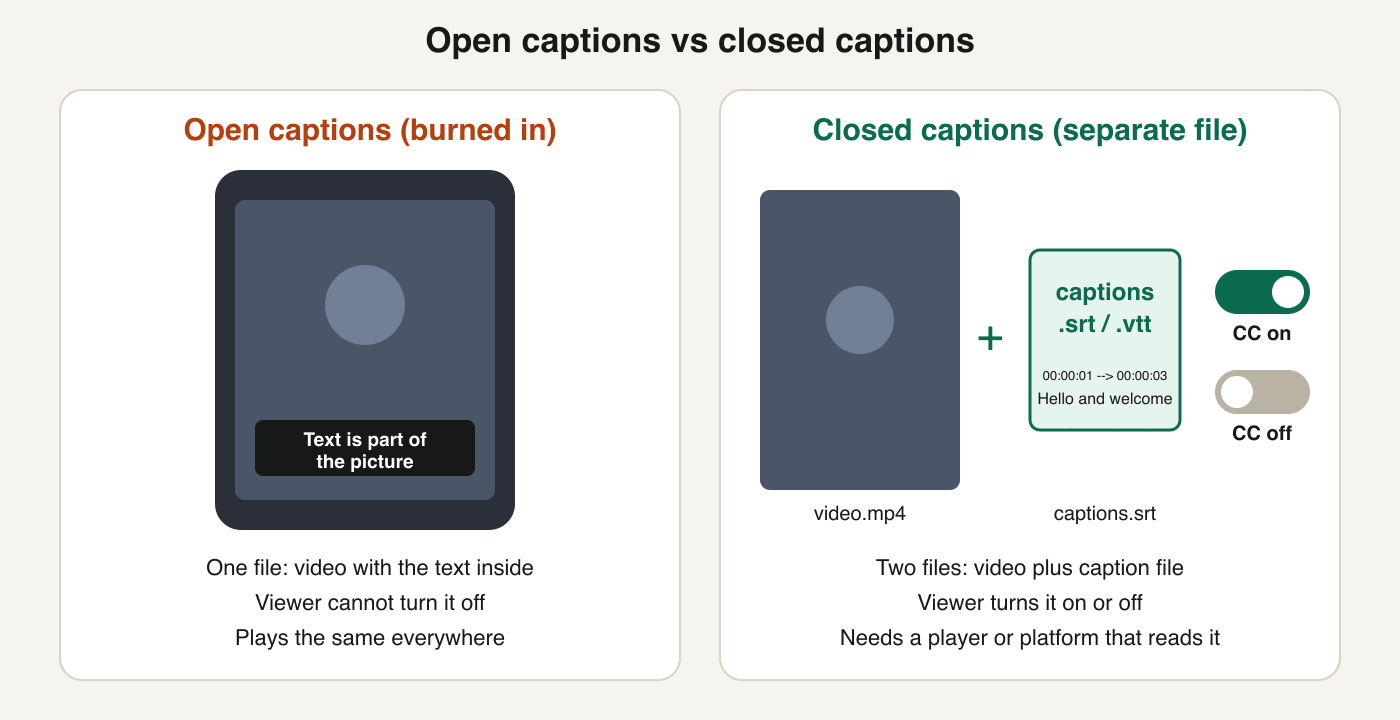
Closed captions are a text track the viewer can turn on or off, usually stored as a separate SRT or VTT file. Open captions are burned into the picture, so they are always visible and cannot be turned off. For a Short or Reel that autoplays muted, burn captions in; for YouTube, Facebook and LinkedIn uploads, add a caption file; for the best reach, do both.
Key takeaways
- W3C wording: most captions are "closed" and can be hidden or shown by viewers; "open" captions are always displayed and cannot be turned off.
- Closed captions live in a file (SRT, VTT) that the platform reads. Open captions are pixels inside the exported MP4.
- YouTube, Facebook and LinkedIn each document SRT upload for closed captions. TikTok and Instagram document speech-recognition captions you can edit or switch off.
- You can have both: upload a caption file for search and accessibility, and burn styled text into the vertical version for muted autoplay.
- Both can be made free with Koldflux: the subtitle generator writes SRT or VTT, and Add subtitles burns them into an MP4 in your browser.
What is the difference between closed and open captions?
The W3C Web Accessibility Initiative defines captions as "a text version of the speech and non-speech audio information needed to understand the content." It then separates the two kinds: most are "closed captions" that "can be hidden or shown by people watching the video," while "open captions" are "always displayed and cannot be turned off" (W3C WAI, page last updated September 17, 2024, read October 20, 2026).
In practice that means a different file setup. Closed captions travel as a text track next to the video, so the player or platform draws them and the viewer controls them. Open captions are rendered into the video frames when you export, so there is nothing to switch and nothing to upload.
Closed captions vs open captions: which one wins on each point?
Neither wins everywhere. This table shows what each gives you and what it costs.
| Closed captions | Open captions (burned in) | |
|---|---|---|
| Where the text lives | A separate caption file or platform text track (SRT, VTT) | Drawn into the video image when you export |
| Viewer can turn off | Yes | No |
| Works on any player | Only where the player or platform reads captions | Yes, because the text is part of the picture |
| Text styling | Limited by the platform (YouTube SRT: no style info recognized) | Full control: font, color, size, position, animation |
| Fixing a typo later | Edit the text and re-upload the file; the video stays the same | Re-render and re-upload the whole video |
| Several languages | One file per language on the same video | One exported video per language |
| Text as real, readable text | Yes, the file holds text | No, it is pixels; screen readers and search cannot read it from the picture |
| Best for | Long videos, courses, accessibility, multi-language, platforms with caption upload | Muted autoplay clips, Shorts and Reels, screens with no caption controls |
The last two rows of the closed column are the reason accessibility guidance leans on closed captions: a caption file keeps real text. Burned-in text has no such text behind it, so if you only burn in, a viewer using a screen reader gets nothing from it.
Which do YouTube, TikTok, Instagram, Facebook and LinkedIn support?
Each platform below was checked on its own help page on October 20, 2026. Where a page does not say something, the cell says so instead of guessing. Any platform will play a video that already has open captions burned in, because the text is part of the picture.
| Platform | Closed captions | What the help page documents |
|---|---|---|
| YouTube | Yes: upload a file or create captions in Studio | Caption files: SubRip (.srt), SubViewer (.sbv or .sub), MPsub, LRC, Videotron Lambda (.cap), and others including WebVTT (.vtt, listed as "in initial implementation"). The SRT must be plain UTF-8 and "no style info (markup) is recognized." YouTube also makes automatic captions and tells creators to review them. |
| TikTok | Yes: automatic captions from speech recognition | Automatic captions "use speech recognition technology" for videos you upload, and creators can edit or delete them from the video. In the editor, the Captions button on the side panel turns speech into text you can review and edit line by line, with font and color changes. The page does not describe an SRT upload. |
| Yes: automatic captions for reels and videos | Instagram uses speech recognition to create captions for reels and videos, per the summary on its help page. We could only read the collapsed summary, so menu paths and regional availability are not described here; check the Instagram app. | |
| Yes: SRT upload | You add captions with a SubRip (.srt) file: edit the post, choose Add captions, then Upload captions. Repeat for each language. The same page says captions can also be added to videos uploaded to a Page. | |
| Yes: SRT upload on desktop | You add closed captions when you share a video on desktop, and you "must have an associated SRT (SubRip Subtitle) file attached to the video before it can be posted." Works for personal accounts and LinkedIn Pages. The page shows "Last updated: 5 years ago," so menu labels may have changed. |
Reading it for a decision: if you post one vertical clip everywhere and viewers scroll with the sound off, burn the text in once and it behaves the same on all five. If you want searchable, switchable captions on YouTube, Facebook or LinkedIn, upload SRT there. TikTok and Instagram are built around their own generated captions, so you edit those inside the app.
Free tools:Auto subtitle generator (SRT or VTT)Add subtitles to a video (burn in)
When should you use open captions?
Use open captions when you cannot rely on the viewer or the player to show a caption track.
- Vertical clips that autoplay without sound: you decide the font, color and position, and no platform setting can hide them.
- Files you hand to others to play on their own equipment, such as a screen at an event, where there are no caption controls.
- Platforms or embeds where you cannot upload a caption file.
- Clips where the caption style is part of the look: highlighted words, large type, brand colors.
Where it does not fit: long videos where you want viewers to choose, anything you must translate into many languages, and any case where the text has to remain readable by software. Also keep text inside the platform safe zones so buttons do not cover it; see our safe zone templates for the figures.
When should you use closed captions?
Use closed captions when the viewer should have control, or when the platform gives you a place to put the file.
- YouTube, Facebook and LinkedIn videos: all three document SRT upload, so the captions stay separate and editable.
- Videos with more than one language: Facebook documents one file per language on the same video.
- Courses, interviews and talks, where some viewers want captions and others do not.
- Anything where you will fix wording later: edit the file, no re-render.
Where it does not fit: a platform with no caption controls, and clips where you want the text styled like part of the design.
Do you need captions by law?
For ordinary social videos from creators, we have no official statement to quote that sets a caption duty, so we do not claim one. What is sourced is narrower. The FCC says closed captioning "displays the audio portion of a television program as text on the TV screen," and that Congress requires video programming distributors such as cable operators to caption TV programming; it also says "The FCC does not regulate captioning of home videos, DVDs or video games" (FCC consumer guide as archived in 2020, read October 20, 2026; the live FCC site blocked automated access that day, so check the current FCC page).
Caption duties depend on the country, the sector and who publishes. This guide does not review other countries' laws and is not legal advice. If you publish for a school, employer or government agency, or you sell to such organizations, check their own accessibility policy.
Which file formats do closed captions use: SRT or VTT?
SRT is the safe default: YouTube, Facebook and LinkedIn all document it. VTT (WebVTT) is the web format with optional styling and positioning; YouTube lists it as in initial implementation, so SRT is still the lower-risk choice for uploads. The timing format differs slightly (SRT uses a comma before milliseconds, VTT a period and a WEBVTT header), and a converter changes one into the other without touching your words.
For the full comparison, read SRT vs VTT: which caption file to use.
Free tools:SRT to VTT converterVTT to SRT converter
How do you make closed captions for a video, free?
Make a caption file once; you can then upload it or burn it in.
- Open the Koldflux auto subtitle generator and choose your video or audio file. It runs in your browser with no upload.
- It writes captions as cues of up to two lines of 42 characters. Download the result as SRT, or as VTT if you need that.
- Proofread. In our own test of this generator (reviewed October 11, 2026) 99.9% of subtitle lines landed at the right moment and 4.8% of the words were wrong, so names, numbers and product terms need a read.
- Upload the .srt on YouTube (Studio, Subtitles), Facebook (Edit post, Add captions) or LinkedIn (desktop, Edit, Select Caption).
Free tool:Auto subtitle generator
How do you burn open captions into a video, free?
Burning in turns your caption file into part of the picture.
- Open Add subtitles to a video and choose your video.
- Add your SRT or VTT file, or let the tool write the subtitles from the speech.
- Download the MP4. The tool draws the subtitles into the picture in your browser with no upload and no watermark; file size is limited by browser memory.
- Play it once to check that the text is readable and clear of the bottom buttons, then upload the MP4 anywhere.
Keep the SRT too. If you find a typo after burning in, fix the file and render again; you do not need to retype anything. For per-app steps see the guides for adding captions to TikTok, Instagram Reels and YouTube Shorts.
Free tool:Add subtitles to a video
Should you use both on the same video?
Yes, when the platform allows it and the video matters. Upload an SRT where YouTube, Facebook or LinkedIn takes it, so the captions are real text with viewer control, and post a separate vertical version with captions burned in for muted autoplay feeds. Do not burn in and also turn on platform captions for the same upload, because viewers then see two sets of text on top of each other.
Do it in your browser
Free Koldflux tools, no account needed.
Auto subtitle generatorAdd subtitles to a videoSRT to VTT converter
Questions people ask
What is the difference between closed and open captions?
Closed captions are a text track that viewers can turn on or off, usually a separate SRT or VTT file. Open captions are always displayed because they are burned into the picture, and they cannot be turned off.
Are burned-in captions the same as open captions?
Yes. Burned-in captions are open captions: the text is rendered into the video frames when you export the video.
Which is better for TikTok, Reels and Shorts?
For muted autoplay clips, burn the text into the video so the style is yours and nothing can hide it. TikTok and Instagram also generate their own captions from speech that you can edit or turn off.
Can viewers turn off open captions?
No. W3C describes open captions as always displayed and impossible to turn off, since they are part of the video image.
Which caption file does YouTube accept?
YouTube lists SubRip (.srt) and SubViewer (.sbv) among its basic file types, and also lists WebVTT (.vtt). The SRT file must be plain UTF-8, and YouTube does not recognize style markup in it.
Can I add closed captions to LinkedIn and Facebook videos?
Yes. LinkedIn documents SRT upload on desktop, and Facebook documents SubRip (.srt) upload for profile and Page videos, one file per language.
Is it free to make closed and open captions?
Yes with Koldflux. The auto subtitle generator writes SRT or VTT in your browser, and Add subtitles to a video burns them in with no upload and no watermark.
Related
Sources and how we checked
- W3C WAI: Media accessibility, captions (updated September 17, 2024) (checked 2026-10-20)
- FCC: Closed Captioning on Television (2020 archive copy; live site blocks automated access) (checked 2026-10-20)
- YouTube Help: Supported caption and subtitle file types (checked 2026-10-20)
- YouTube Help: Add subtitles and captions (checked 2026-10-20)
- Facebook Help: Add or remove captions on your video on Facebook (checked 2026-10-20)
- LinkedIn Help: Add Closed Captions to Videos on LinkedIn (checked 2026-10-20)
- Instagram Help: Manage reels and video captions on Instagram (checked 2026-10-20)
- TikTok Help: Accessibility for your videos (checked 2026-10-20)
We read each help page listed above on October 20, 2026 (Facebook, Instagram and TikTok pages in a headless browser, because their text loads with scripts) and state only what they say. The FCC site blocked automated access, so its wording comes from an archived 2020 copy of the same page. The comparison diagram is our own, and the generator accuracy figures come from our own test.