Scripts guide
How to write a YouTube script that fits the time
Short answer
A script for a YouTube video is four parts: a hook, a setup, the main points and a call to action, and the point of writing it down is that you can time it. The free video script template on this site times each part at 155 words per minute, the median of 21 videos we measured. We wrote a 76 word script, ran it through the tool and recorded it: the tool said 0:29 and the recording was 21.4 seconds, so the word count model ran 8 seconds long. Use it to see whether your script fits the slot, not as a stopwatch.
Key takeaways
- Four parts do the work: the hook says why keep watching, the setup gives the context, the main points carry the value and the call to action says what to do next.
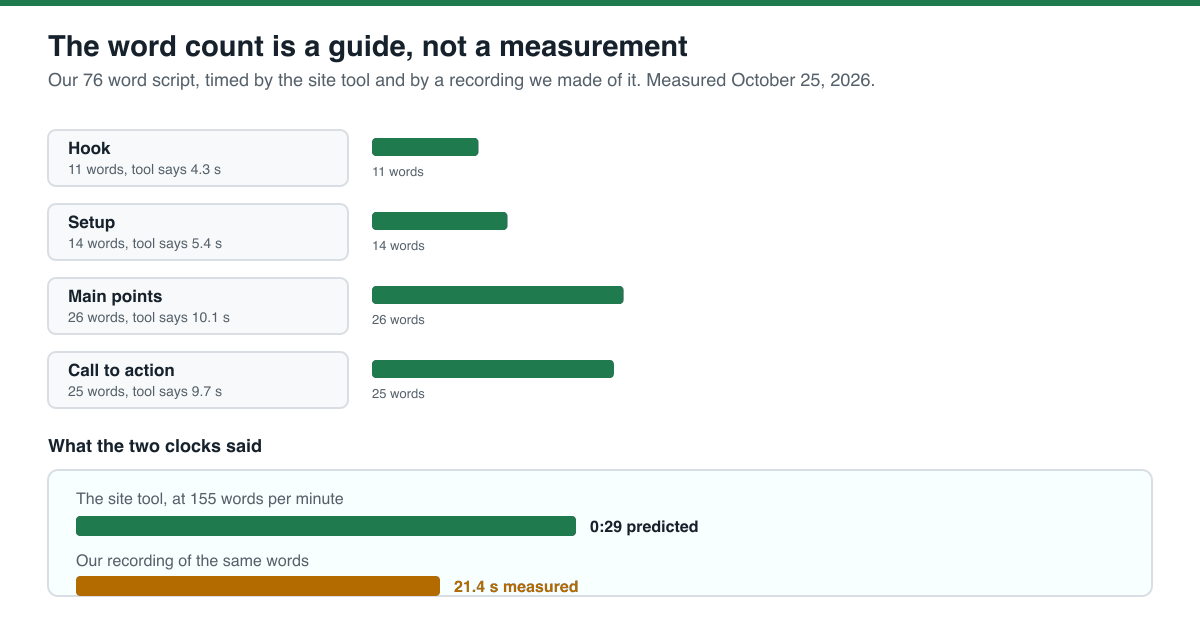
- Our script was 76 words in four parts: 11 in the hook, 14 in the setup, 26 in the main points and 25 in the call to action.
- The tool predicted 0:29 for those words. Our recording of the same words was 21.397 seconds, which is 213 words per minute, 37.5% faster than the model assumes.
- That gap is not a bug in the model. A synthetic voice reads faster than a person. The word count model is a way to compare scripts against each other, not a promise about the recording.
- Write the hook first and time it on its own. Our site measured the first sentence of 10 short videos at a median of 3.0 seconds and 9 words, and 4 of those 10 opened with a question.
- The model at 155 words per minute gives you 38 words for 15 seconds, 77 for 30 seconds and 155 for a minute. Those are the numbers to write against.
What a video script is for
A script for a video is not a film script. It is a short list of sentences in a fixed order, so that you know what you are going to say before you press record, and so that you can cut the video to a length without deciding what to leave out while talking.
The order that works is the same one the free template on this site uses, and the same one our own measurement supports. The hook is the first sentence: why keep watching. The setup is one or two sentences of context or a promise. The main points are the value, one idea per line. The call to action is what to do next: follow, comment, watch part two.
Writing the hook first is the part people get wrong. If the hook cannot be written on its own, the video does not have one yet.
- Hook: the first sentence, why keep watching. One sentence, no preamble.
- Setup: one or two sentences of context, or a promise about what the video answers.
- Main points: the value, one idea per line, in the order you want them heard.
- Call to action: what to do next, in one sentence.
How to write one in five steps
Here is the order we worked in, and the numbers each step produced for our own 76 word script.
- Decide the length first, in seconds. The template offers 15, 30, 45 and 60 second targets and longer ones, and each comes with a word count: 38, 77, 116 and 155 words at the measured pace of 155 words per minute.
- Write the hook on its own. Ours was 11 words and the tool timed it at 4.3 seconds.
- Write the setup and the main points. Ours were 14 and 26 words, timed at 5.4 and 10.1 seconds.
- Write the call to action last. Ours was 25 words, timed at 9.7 seconds.
- Paste all four parts into the free template and read the total. Ours came out at 0:29 for 76 words, which is the number to compare against your target length.
Source: our own run on October 25, 2026 in headless Chromium against the live template, with our four parts typed into the four fields and the one minute target selected. The word counts are ours; the per part timings are the tool's, at its 155 words per minute.
The word count is a guide, not a measurement
We recorded our own script with a local text-to-speech model and compared the length of the recording with the tool's estimate. This is the number to take seriously and the number to be careful with.
Source: our own measurement on October 25, 2026. Method: the script was written by us, the timings came from the live template in headless Chromium, and the recording was made with a local text-to-speech model at its default speed and measured with ffprobe 6.1.1. The recording and the log are shipped with this page.
Read it the right way round. The word count model did not fail: 76 words divided by 155 words per minute is 29.42 seconds, and the tool reported 0:29. The model simply does not know how fast your particular voice reads. Our synthetic voice read at 213 words per minute. For a person reading normally, expect the estimate to be close; for a fast or clipped delivery, expect the real recording to be shorter than the estimate.
The numbers to write against
The template measures the pace of 21 videos and publishes the words that fit a given length at three speeds: the slowest quarter of them, the median and the fastest quarter. Here is the table it prints.
| Length | 135 words per minute | 155 words per minute (median) | 165 words per minute |
|---|---|---|---|
| 15 seconds | 33 | 38 | 41 |
| 30 seconds | 67 | 77 | 82 |
| 45 seconds | 101 | 116 | 123 |
| 1 minute | 135 | 155 | 165 |
| 1.5 minutes | 202 | 232 | 247 |
| 3 minutes | 405 | 465 | 495 |
Source: the live video script template page, which publishes these figures from its own measurement of 21 videos (read October 25, 2026). The same page reports that the first sentence of 10 short videos took a median of 3.0 seconds and 9 words, and that 4 of those 10 opened with a question; it also reports 161 words per minute for short explainers against 125 for briefings, so the pace depends on what kind of video you are making.
Use the slowest column to be safe on a video with a hard length, and the middle column for anything else. If your script is over the number, cut words rather than speed up: the model gives the same advice, that it tells you how many words to cut when you are over your target.
What we did not test
We measured one script and one recording. Here is what that does not cover.
We did not test a person reading. Our recording was synthetic speech from a local text-to-speech model, and it read faster than the model in the template assumes. The comparison tells you how far the estimate can be off, not what your own delivery will be.
We did not test a filmed video. We measured the audio length of the script, not whether a video with that script holds attention, and nobody watched it.
We did not test the 155 words per minute figure itself. It is the site's published measurement of 21 videos, we did not repeat it.
We did not test shorts, live streams or videos with a sponsor read in the middle, and we did not test other writing structures than the four parts above.
What to do next
The situation you are in decides the next step.
- Your script is over the time limit: cut words from the main points first, and keep the hook as it is.
- Your script is under the time limit and the video feels thin: add one more main point rather than padding the hook.
- You do not know how long your delivery takes: record the hook on your phone and time it, then use that as your own baseline.
- The video is for a sponsor and the read has to fit: write the read as its own part and time it separately.
- You want the file to be timed for you: the free template times each part as you type, and keeps the draft in your browser only.
Do it in your browser
Free Koldflux tool, no account needed.
Questions people ask
How long should a YouTube script be?
It depends on the length of the video. At the median pace of 155 words per minute that the site measured on 21 videos, 15 seconds holds about 38 words, 30 seconds 77 words and a minute 155 words. Pick the length first, then write to the word count.
How many words should the hook be?
Short. Our own measurement on the site of 10 short videos found the first sentence took a median of 3.0 seconds and 9 words, and 4 of those 10 opened with a question. Our hook in the test on this page was 11 words.
Is it better to write a full script or bullet points?
A full script for a short video, because it lets you time the result and cut before you record. For a long video, a script for the first 30 seconds and bullets for the rest is a common middle ground; we did not test that.
Do I have to follow the four part structure?
No. It is the structure the free template uses and the one we measured, and it is a good default for a short video because it forces a hook and an ending. If your video is a tutorial, the main points can be numbered steps instead.
Why does my recording come out shorter than the estimate?
Because the estimate assumes 155 words per minute, and some voices read faster. Our own recording of a 76 word script came out at 21.4 seconds, which is 213 words per minute. The estimate is a way to compare scripts, not a stopwatch.
Related
Sources and how we checked
- Koldflux test log: our script, the tool output, the recording and the measured durations (our measurement, October 25, 2026) (checked 2026-10-25)
- Koldflux video script template page: the measured pace, the words that fit each length and the hook measurement (our own measurement, read October 25, 2026) (checked 2026-10-25)
- VidIQ: How to Write a YouTube Video Script, template and examples (third party, read October 25, 2026 for coverage comparison, not run) (checked 2026-10-25)
- Synthesia: How to Write a YouTube Script (third party, read October 25, 2026 for coverage comparison, not run) (checked 2026-10-25)
We wrote a script of our own for this page (76 words, in four parts, about frame rates), typed it into the live Koldflux video script template in headless Chromium and read back the per part timings and the total, then recorded the same words with a local text-to-speech model and measured the recording with ffprobe 6.1.1. The template reported 0:29 for the 76 words and the recording measured 21.397 seconds, which is 213 words per minute. The two competitor pages above were read for coverage comparison and not run; both give script templates and section structures, and neither times a script against a recording of it or publishes the words that fit a given length. The 155 words per minute figure and the hook measurement are the site's own published numbers, which we read on the tool page and did not repeat. YouTube, VidIQ and Synthesia are trademarks of their owners; Koldflux is not affiliated with or endorsed by them.