Planning guide
Social media content calendar: free template, a filled example and how far ahead to plan
Short answer
A social media content calendar is a table with one row per post: date, platform, content pillar, format, status and a note. Download the blank CSV below, open it in Google Sheets or Excel, set 3 to 5 pillars, and fill 4 weeks in one sitting; the filled 4-week example shows the result. Plan topics about 4 weeks ahead (our suggestion), but finish and schedule only 1 to 2 weeks at a time, because native schedulers cap how far ahead you can queue: 30 days on Instagram and Pinterest, 3 months on LinkedIn and 10 days on TikTok (TikTok's launch announcement; other sources report longer, so check the date picker).
Key takeaways
- Use 7 columns: date, weekday, platform, pillar, format, status, notes. Both files below use exactly these.
- The sample is 32 posts over 4 weeks for a fictional plant shop on 3 platforms; our script checked that no pillar repeats back to back on one platform.
- Native scheduling windows (official pages, read October 23, 2026): TikTok 10 days (undated announcement), Instagram 30 days, Pinterest 30 days, LinkedIn 3 months.
- Posting frequency should come from your weekly production hours, not from a rule; a worked formula is below. We give no best-time numbers.
- Pillars, the 4-week topic horizon and the status pipeline are our suggestions, not platform rules.
What does a social media content calendar look like?
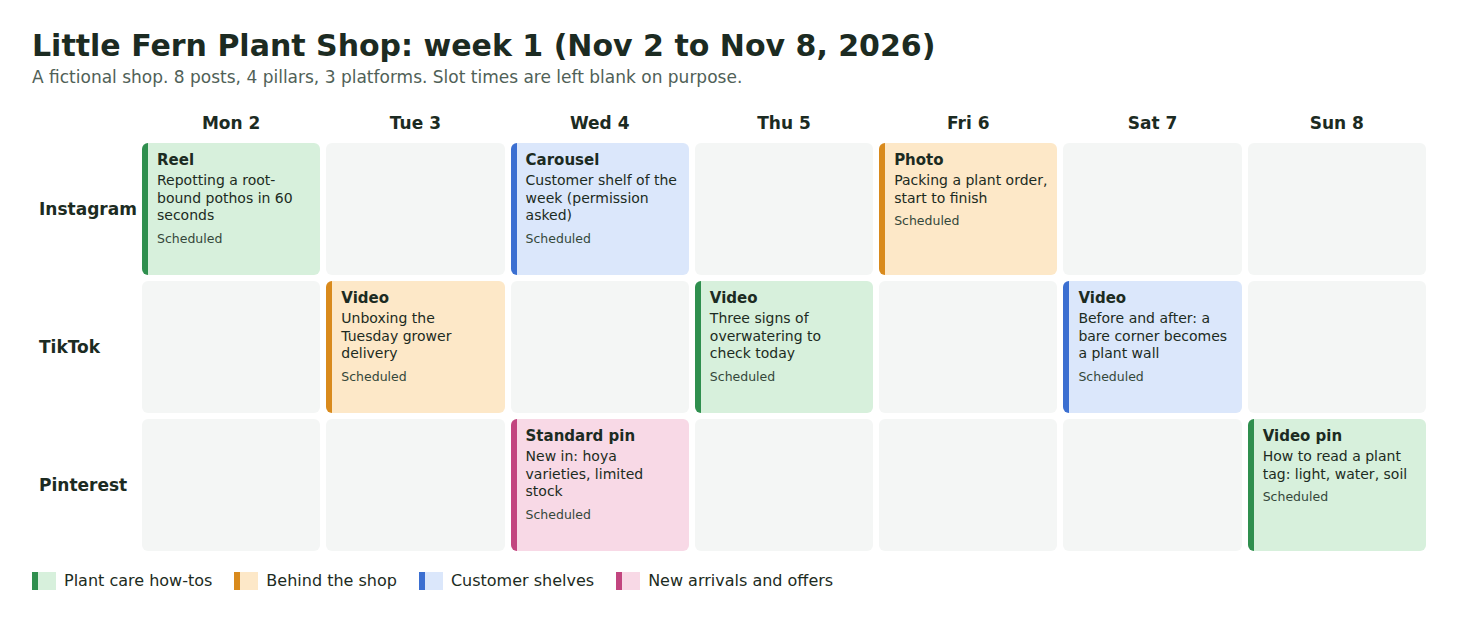
It looks like a spreadsheet with one row for each post you plan to publish. This sample is a fictional plant shop, Little Fern, posting 8 times in its first week: Instagram on Monday, Wednesday and Friday, TikTok on Tuesday, Thursday and Saturday, and Pinterest on Wednesday and Sunday. Each card shows the format, the idea and the status, and the color is the content pillar.
The same data as a table: every row is one post, which makes it easy to sort by platform, filter by status or paste into a scheduler. Slot times are blank on purpose, because the right hour depends on your own audience. For that, see our best time to post guide.
| Column | What it is for | Example from the sample |
|---|---|---|
| date | The day it goes live. ISO format (2026-11-02) sorts correctly in any spreadsheet. | 2026-11-02 |
| weekday | Lets you scan for empty days and clashes. | Monday |
| platform | One row per platform, even when the idea is the same. | |
| pillar | The recurring theme the post belongs to. Keeps the mix balanced. | Plant care how-tos |
| format | Reel, carousel, photo, video, pin, text. Tells you what to produce. | Reel |
| status | Idea, Drafted, Scheduled or Posted. Shows what is blocked. | Scheduled |
| notes | The hook or angle, so you can write the post without rethinking it. | Repotting a root-bound pothos in 60 seconds |
The 7 columns, what each is for and what to put in it.
Where is the free social media calendar template?
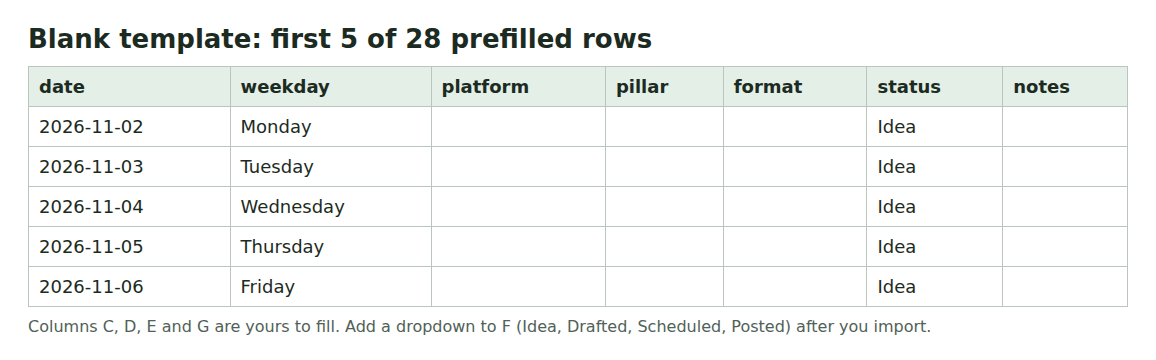
Two CSV files, made by us, no signup. Open them in Google Sheets (File, Import, Upload) or Excel. A CSV carries data, not formatting, so after importing, add a dropdown to the status column (Idea, Drafted, Scheduled, Posted) and freeze the header row. We did not open the files in Sheets or Excel; we checked them with a script (see Limits).
If you do not want to start from a blank sheet, the Koldflux content calendar maker is built to take your platforms, posts a week and pillars and produce the same seven columns. It runs in your browser, sends nothing to a server, and exports a CSV for Google Sheets and an ICS file for calendar apps. We ran it on October 23, 2026 in Chromium at desktop and phone widths: a 4-week plan gave 24 posts, a 25-line CSV and 24 calendar events. We did not test the import into every calendar app, so check the first week after you import it. The maker sets every status to Planned; rename it to Idea if you follow the status pipeline above.
Free tool:Content calendar maker
How do you build a content calendar in 30 minutes?
These steps are our workflow suggestion. The sample took the same path.
- Pick 3 to 5 pillars (next section). The sample uses four: Plant care how-tos, Behind the shop, Customer shelves, New arrivals and offers.
- Pick your platforms and how many posts a week each (section on posting frequency). The sample: Instagram 3, TikTok 3, Pinterest 2.
- Copy the blank template and set the first date. List every posting day for 4 weeks, one row per post, with platform and format.
- Fill the pillar column so the same pillar never lands twice in a row on one platform and never twice on the same day. In the sample, our script checked both rules across all 32 rows.
- Write one line of notes per row: the hook or angle. Aim for rows you could hand to someone else to produce.
- Set status to Idea. Move a row to Drafted when the copy and media exist, to Scheduled when it is queued, to Posted when it is live.
- Once a week, 10 minutes: mark what posted, add next week's rows, and move anything stuck back a day.
What are content pillars and how many do you need?
Content pillars are the 3 to 5 recurring themes your posts fall under, so the feed does not turn into one topic or a pile of unrelated ideas. The count is our suggestion, not a platform rule: with fewer than 3 the feed repeats itself, and with more than 5 you cannot keep each one stocked with ideas.
A good pillar is something you can name 8 post ideas for without strain. The sample plant shop has 32 notes written across its 4 pillars; if you cannot list about 8 for a pillar, merge it with another. Pick pillars from what your audience asks and what you sell, not from what is easy to film once.
| Pillar | Goal it serves | Format that fits | Sample posts in 4 weeks |
|---|---|---|---|
| Plant care how-tos | Teach, earn saves | Reel, short video, carousel | 9 |
| Behind the shop | Show the people and process | Short video, photo | 8 |
| Customer shelves | Social proof (with permission) | Carousel, photo, pin | 8 |
| New arrivals and offers | Sell | Pin, short video | 7 |
Our suggestion), applied to the sample shop.
Counts come from the sample file. The selling pillar is the smallest on purpose; the ratio is our choice for this shop, not a benchmark.
How often should you post? Build the posting schedule from your hours
Platforms do not publish a posting frequency that works for everyone, and we found no official figure to cite, so we do not give one. Our suggestion is to set the number from your production capacity, then keep it for a month before judging it.
Formula: posts per week = production hours per week divided by hours per post. Worked example with assumed numbers: 6 hours a week and about 1.5 hours per post (idea, shoot, edit, caption) gives 4 posts a week. Batching the shoot lowers the hours per post, so measure your own for two weeks first. The sample asks for 8 posts a week, which at 1.5 hours is 12 hours; it fits a shop with a small team, not a solo creator.
For timing within the week, do not copy a table of best hours. Start with weekdays you can reliably publish, then test slots and read your own analytics. Our best time to post guide explains how.
How far ahead should you plan, and how far can you schedule?
Two different questions. Planning is deciding topics; scheduling is queuing a finished post. We suggest planning topics about 4 weeks ahead and finishing and scheduling 1 to 2 weeks ahead. Hootsuite, a scheduler vendor, writes that most teams plan one to four weeks in advance, with bigger campaigns mapped out months ahead (third party, read October 23, 2026).
Scheduling has hard limits set by the platform. This is what each platform's own help page said when we read it.
| Platform | How far ahead | Other limits stated | Source |
|---|---|---|---|
| Up to 30 days | Public account; up to 25 posts a day; Reels, photos and carousels | Instagram Help | |
| TikTok | 15 minutes to 10 days | Desktop web upload page; Business Account; the page is an announcement, so confirm in the date picker | TikTok for Business blog |
| Up to 30 days | Business account; one Pin at a time; up to 10 scheduled Pins at once | Pinterest Help | |
| LinkedIn (personal post) | 10 minutes to 3 months | Times converted to UTC from your device time zone | LinkedIn Help |
| LinkedIn (Page post) | 1 hour to 3 months | Super admin or content admin | LinkedIn Help |
| YouTube | The help page gives no maximum | Video must be set to private or scheduled; a strike freezes the schedule | YouTube Help |
Not read for this page: Facebook, X, Threads and YouTube Shorts-specific rules. Check each platform before you rely on it. Scheduler tools can queue further out than the native tools; vendor claims about longer windows are not verified here.
What this means for the calendar: with a 10 day TikTok limit, a 4-week calendar keeps TikTok rows at Drafted until the last 10 days, then moves them to Scheduled. The sample does this: week 1 is Scheduled, week 2 Drafted, weeks 3 and 4 Idea.
What is the difference between a social media calendar and an editorial calendar?
A social media calendar answers where and when: platform, day, format. An editorial calendar answers what and why: topic, angle, pillar, owner, deadline. Hootsuite discusses the two as separate things; in small teams they are one sheet.
The sample is both. The pillar and notes columns are the editorial part, and date, platform and status are the social part. If your team needs owners and deadlines, add two columns: owner and due date. If you also publish a blog or newsletter, add a channel row for each, so every piece of content on every channel sits in one view.
Spreadsheet, scheduler or project board: which should hold the calendar?
Our suggestion: plan in a spreadsheet, publish with the native scheduler of each platform or a scheduling tool, and keep the sheet as the source of truth.
| Job | Spreadsheet (our CSV) | Native platform scheduler | Third-party scheduler or board |
|---|---|---|---|
| Plan topics and balance pillars | Best fit | No | Possible |
| Publish at a set time | No | Yes, within the windows above | Yes |
| One view across platforms | Yes | No, one platform each | Yes |
| Cost | Free | Free | Check each vendor |
Our suggestion; we did not test third-party tools for this page.
Limits and how we checked
The CSV files were generated by a script and checked by a second script on October 23, 2026 (log: test-results.txt, linked in the sources): UTF-8 with CRLF line endings, 7 columns, 32 rows, every weekday matches its date, no pillar repeats back to back on one platform, no pillar twice on the same day, notes unique. We did not open the files in Google Sheets, Excel or Numbers, so import behavior is not tested.
Scheduling limits were read from the official pages listed below in a headless browser. The TikTok source is a product announcement without an update date, and third-party sites report both 10 and 30 days, so trust your own date picker. The sample shop is fictional. The pillar count, the 4-week topic horizon and the posting formula are our suggestions and have no performance data behind them. We give no engagement or best-time numbers.
Do it in your browser
Free Koldflux tool, no account needed.
Questions people ask
What should a social media content calendar include?
At minimum: date, platform, content pillar, format, status and a note with the hook. Add owner and due date if more than one person works on it.
Can I use Google Sheets or Excel for my content calendar?
Yes. Import the CSV template, add a status dropdown and freeze the header. A spreadsheet plans well but does not publish; use each platform's scheduler for that.
How many content pillars should I have?
Our suggestion is 3 to 5, each with about 8 post ideas you could name today. It is not a platform rule.
How far in advance can I schedule posts?
Per official pages read October 23, 2026: TikTok up to 10 days (undated TikTok announcement), Instagram and Pinterest up to 30 days, LinkedIn up to 3 months. See the table above for conditions.
How many times a week should I post?
Divide your weekly production hours by the hours one post takes. 6 hours and 1.5 hours per post gives 4 posts a week. No platform publishes a frequency that suits everyone.
What time should I post?
This page gives no hours because we have no sourced numbers. Test slots against your own analytics; see the best time to post guide.
Related
Sources and how we checked
- Instagram Help: Schedule posts and Reels on Instagram (up to 30 days, 25 a day, public account) (checked 2026-10-23)
- TikTok for Business: Introducing Video Scheduler (15 minutes to 10 days; undated announcement) (checked 2026-10-23)
- Pinterest Help: Schedule Pins (30 days, up to 10 scheduled) (checked 2026-10-23)
- LinkedIn Help: Schedule posts (10 minutes to 3 months) (checked 2026-10-23)
- LinkedIn Help: Schedule a LinkedIn Page post (1 hour to 3 months) (checked 2026-10-23)
- YouTube Help: Schedule video publish time (no maximum stated) (checked 2026-10-23)
- Hootsuite: How to create a social media calendar (third party; planning horizon of one to four weeks) (checked 2026-10-23)
- Koldflux test log for the template files, October 23, 2026 (checked 2026-10-23)
We generated the sample and blank CSV files and the two preview images ourselves on October 23, 2026, and checked the CSV files with a script (the log is published). We read six official help pages in a headless browser and the Hootsuite page for its planning horizon the same day, and read the Hootsuite, Sprout Social and Buffer calendar guides to see what they cover. The fictional shop Little Fern and its posts were written by us. YouTube, Instagram, TikTok, Pinterest, LinkedIn, Hootsuite and Google are trademarks of their owners; Koldflux is not affiliated with or endorsed by them.