Conversion guide
How to convert a video to a GIF (size, length, quality limits)
Short answer
Pick the 2 to 6 seconds you want, shrink the width to 320 to 480 pixels, drop the frame rate to 10 to 12, and convert with a tool that builds a 256-color palette from your clip. On our 5 second 1080p test clip that gave 1.81 MB at 480 px and 12 fps, against 27.68 MB from a plain full-size conversion. Our free Video to GIF tool does this in your browser, for clips up to 15 seconds and files up to 100 MB.
Key takeaways
- Width costs the most size, frame rate comes second, length third. Cutting a 1080p clip to 480 px wide took our test GIF from 27.68 MB to 1.81 MB.
- X accepts GIFs up to 15 MB, 350 frames and 1280 by 1080 pixels. At 12 frames per second, 350 frames is about 29 seconds.
- A GIF has no sound, at most 256 colors per frame, and is far larger than the same clip as MP4: our MP4 was 90.8% smaller than the Balanced GIF.
- For a long video, convert the best 3 to 6 seconds, not the whole thing. A loop that is short and clean beats a long one that stutters.
How do I convert a video to a GIF?
These steps work for MP4, MOV, WebM and other common video files, and for a clip you saved from YouTube or X to your own device if you have the right to use it.
- Open the Video to GIF tool and choose your file. It stays on your device; nothing is uploaded.
- Set the start time and the length. Keep it to 2 to 6 seconds for a loop; the tool allows up to 15.
- Choose the Balanced preset (480 px wide, 12 frames per second, 256 colors) unless you know where the GIF will be posted. Use Small for chat apps with tight limits and Sharp when detail matters more than size.
- Start the conversion, check the result in the preview and read the file size.
- If it is over the limit of where you will post it, lower the width first, then the frame rate, then shorten the clip, and convert again.
- Save the GIF. It loops forever and has no sound.
If you prefer the command line, this ffmpeg command makes a palette from your clip and uses it, which is what stops the washed-out colors of a one-step conversion: ffmpeg -ss 3 -t 5 -i input.mp4 -vf "fps=12,scale=480:-1:flags=lanczos,split[s0][s1];[s0]palettegen[p];[s1][p]paletteuse" -loop 0 output.gif. Change 3 to your start second, 5 to the length in seconds and 480 to the width.
Free tool:Video to GIF (free, in your browser)
How big will the GIF be?
Far bigger than the video, unless you shrink it on purpose. A GIF stores every frame as a separate paletted image, so size follows pixels per frame times frames per second times seconds.
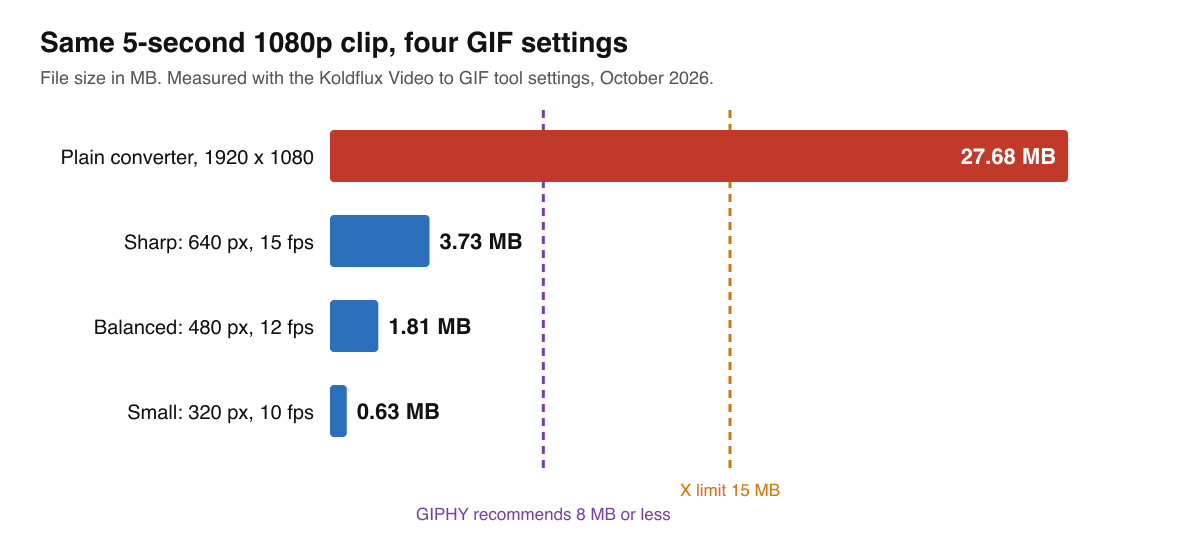
We converted one 5 second 1920 by 1080 clip several ways. Width moves the size most, then frame rate.
| Setting | Frame size | Frames | File size | Per second of clip |
|---|---|---|---|---|
| Plain conversion, no resizing | 1920 × 1080 | 152 | 27.68 MB | 5,537 kB |
| Sharp: 640 px, 15 fps, 256 colors | 640 × 360 | 75 | 3.73 MB | 746 kB |
| Balanced: 480 px, 12 fps, 256 colors | 480 × 270 | 60 | 1.81 MB | 362 kB |
| Small: 320 px, 10 fps, 128 colors | 320 × 180 | 50 | 0.63 MB | 127 kB |
Your clip will differ: footage with a lot of motion, grain or gradients compresses worse than a screen recording with flat colors. Treat these as proportions, not promises, and always read the size of your own result.
What does width, frame rate and color count change?
At 256 colors, these are all nine width and frame rate combinations we measured. SSIM is a similarity score against the source frame (1.0 is identical); each GIF is compared at its own size, so it shows quality loss from the GIF format, not from shrinking.
| Width | 8 fps | 12 fps | 15 fps |
|---|---|---|---|
| 320 px | 0.68 MB | 0.87 MB | 1.05 MB |
| 480 px | 1.40 MB | 1.81 MB | 2.16 MB |
| 640 px | 2.39 MB | 3.06 MB | 3.73 MB |
Colors matter less than width. At 480 px and 12 fps, 64 colors gave 1.10 MB, 128 gave 1.44 MB and 256 gave 1.81 MB, and the similarity score moved from 0.84 to 0.89. Going from 15 fps to 8 fps at the same width cuts roughly a third of the size and is rarely noticeable on a looping reaction clip.
How long can a GIF be on X, GIPHY and Discord?
X documents animated GIF recommendations of at most 15 MB, 350 frames and 1280 by 1080 pixels, and warns that a GIF can still fail at post creation within the size limit. Frames are the limit that surprises people: at 12 frames per second, 350 frames is about 29 seconds.
GIPHY's guidance (read 2026-10-20) limits uploads to 15 seconds and 100 MB, though it recommends no more than 6 seconds, 8 MB or less and fewer than 200 frames. Discord's file attachments help (read 2026-10-20) says that as of August 2026 the free upload limit is 20 MB, up from 10 MB, and that Discord is still experimenting with upload limits. Platforms change these numbers, so check the source links below if a post fails.
Here is how long a clip can run at each preset, using the size per second we measured:
| Preset | Size per second | X (15 MB, 350 frames) | Discord (20 MB) | GIPHY (8 MB, 15 s upload) |
|---|---|---|---|---|
| Small (320 px, 10 fps) | 127 kB | 35 s (frame limit) | 158 s | 15 s |
| Balanced (480 px, 12 fps) | 362 kB | 29 s (frame limit) | 55 s | 15 s |
| Sharp (640 px, 15 fps) | 746 kB | 20 s (size limit) | 27 s | 11 s |
How do I turn a long video or a YouTube clip into a GIF?
You do not convert the whole thing. A GIF of a 10 minute video would be hundreds of megabytes and unplayable on most platforms. Cut the 3 to 6 seconds that carry the point, make sure the last frame flows into the first so the loop does not jump, then convert.
For a clip from YouTube, X or another site, use your own recording or a file you have the right to reuse. Koldflux does not download other people's videos. If you want the moving image to play on a platform that supports video, upload the MP4 itself instead, as explained in the next section.
Is a GIF better than an MP4 for this?
Usually no. The same 5 second clip as an MP4 at 480 px and 12 fps was 165,558 bytes, 90.8% smaller than the 1.81 MB Balanced GIF, and it keeps full color and can carry sound. Use a GIF when the place you are posting only accepts GIFs, when you need an image that loops with no player controls (email, some chat apps, GitHub and forum comments), or when a tool expects the .gif extension.
Where MP4 works, post MP4. For the reverse job, see our guide on publishing a GIF as a video post.
Why does my GIF look grainy or have banding?
A GIF cannot show more than 256 colors in one frame, so gradients (skies, skin, shadows) band and fine texture turns into a dither pattern. A tool that builds the palette from your own clip, as this one and the ffmpeg command above do, keeps the 256 colors you actually use instead of a generic set.
- Pick a clip with flat colors or high contrast when you can.
- Do not upscale. A 480 px GIF stretched to 1080 px looks soft and does not get bigger in detail.
Do it in your browser
Free Koldflux tools, no account needed.
Questions people ask
Can I convert MP4 to an animated GIF for free?
Yes. The Koldflux Video to GIF tool is free, runs in your browser and does not upload your file. It takes files up to 100 MB and clips up to 15 seconds.
Why is my GIF so big?
A plain conversion keeps the full size and frame rate of the video. Our 5 second 1080p clip became 27.68 MB that way and 1.81 MB at 480 px, 12 fps and 256 colors.
How do I make a GIF smaller without it looking bad?
Reduce the width first, then the frame rate, then the length. On our clip, 480 px at 12 fps was 1.81 MB and 320 px at 10 fps was 0.63 MB.
How long can a GIF be on X?
X recommends at most 15 MB, 350 frames and 1280 by 1080 pixels. At 12 frames per second, 350 frames is about 29 seconds.
Does a GIF have sound?
No. The format has no audio, so the sound of your video is dropped. Post an MP4 instead if you need sound.
Is my video uploaded to a server?
No. The tool processes the file in your browser. The first run downloads an engine of about 30 MB once per visit.
Related
Sources and how we checked
- X API documentation: Media upload best practices (animated GIF recommendations) (checked 2026-10-20)
- GIPHY Support: GIF Creation Best Practices (checked 2026-10-20)
- Discord Support: File Attachments FAQ (checked 2026-10-20)
- FFmpeg Filters Documentation (palettegen, paletteuse, scale, fps) (checked 2026-10-20)
We converted one 5 second 1920 by 1080 clip with the same ffmpeg settings the tool uses and recorded file size and SSIM for each setting (tool page reviewed October 9, 2026). X, GIPHY and Discord limits were re-read on October 20, 2026 (GIPHY and Discord through their help center article feeds, because their web pages block automated access). The ffmpeg command was run on October 20, 2026.