Podcast gear guide
Podcast equipment: what you actually need at each budget
Short answer
To record a podcast you need three things: a microphone you can speak into from 2 to 6 inches, headphones, and a recording app. A single USB or USB/XLR dynamic microphone covers a solo show; two people at one table need two microphones and a two-input interface or mixer; remote guests need only their own mic and headphones. Add a camera and three lights only if you publish video.
Key takeaways
- Start with one dynamic microphone and wired headphones. Room and mic distance change the sound more than a pricier microphone does.
- A USB/XLR hybrid microphone lets you start on USB today and move to an interface later without buying a new microphone.
- Two people in one room need two microphones, two headphones and a two-input interface or mixer, so each voice lands on its own track.
- Upgrade in this order: space and mic distance, headphones, interface or mixer, microphone, then video gear.
- Fix levels and noise in software afterwards: Apple Podcasts expects about -16 dB LKFS, true peak not above -1 dBFS.
What equipment do you need to start a podcast?
The shortest working kit has four parts. Everything else is an upgrade.
- A microphone. A dynamic microphone with a cardioid pattern ignores more of the room than most beginners expect; Samson describes its dynamic Q2U as less sensitive to background noise and made for untreated rooms.
- Wired headphones, so you hear yourself and nothing leaks into the microphone.
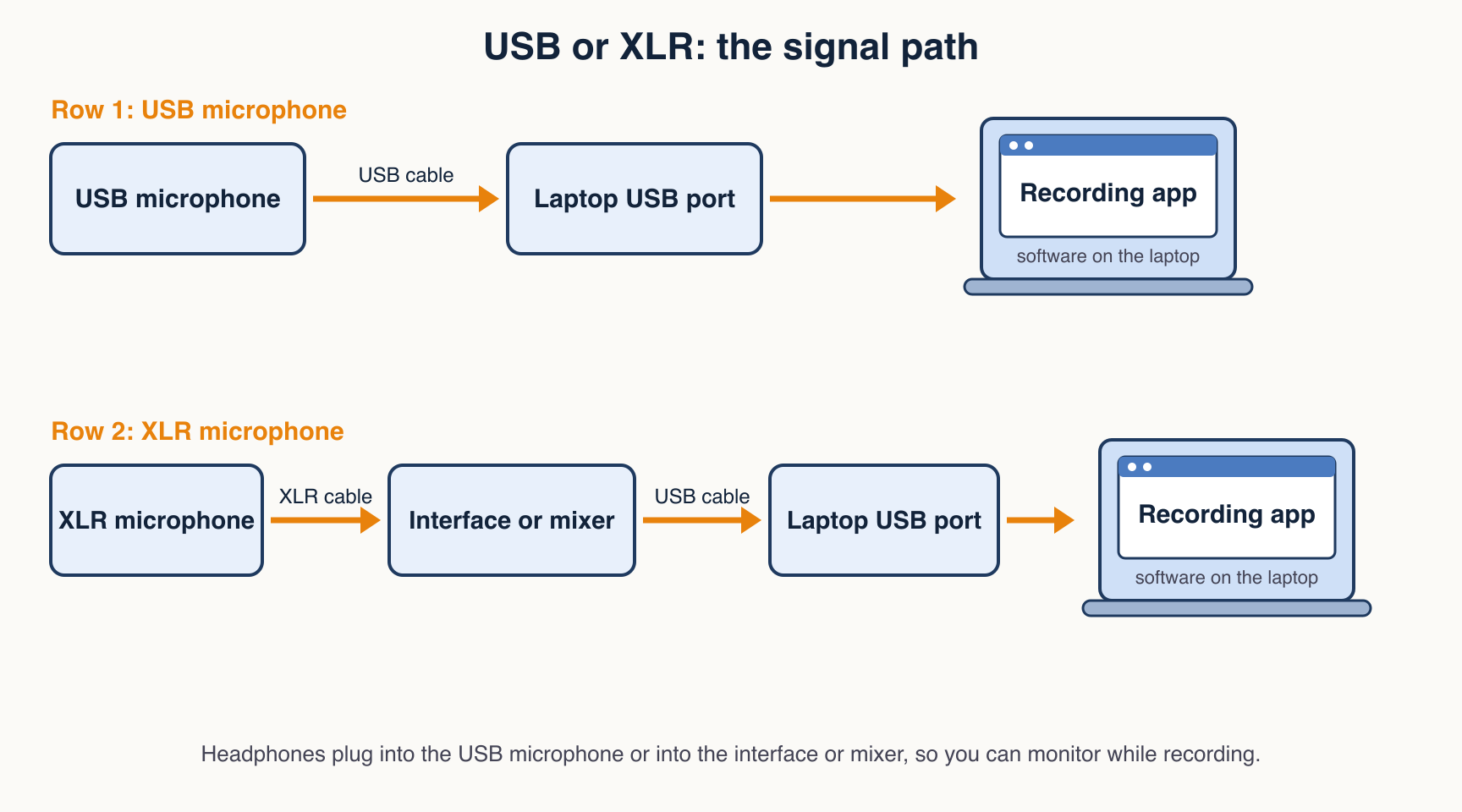
- A computer and a recording app. Any app that records the microphone input works; the diagram below shows where it sits in the chain.
- A quiet room with soft surfaces: curtains, a rug, a couch. This costs nothing and does more than any gadget.
Which setup fits your show: solo, two people or remote guests?
| Your show | Minimum gear | What people forget |
|---|---|---|
| Solo, audio only | One microphone, wired headphones, a computer with a recording app | A pop filter or off-axis mic position for plosives |
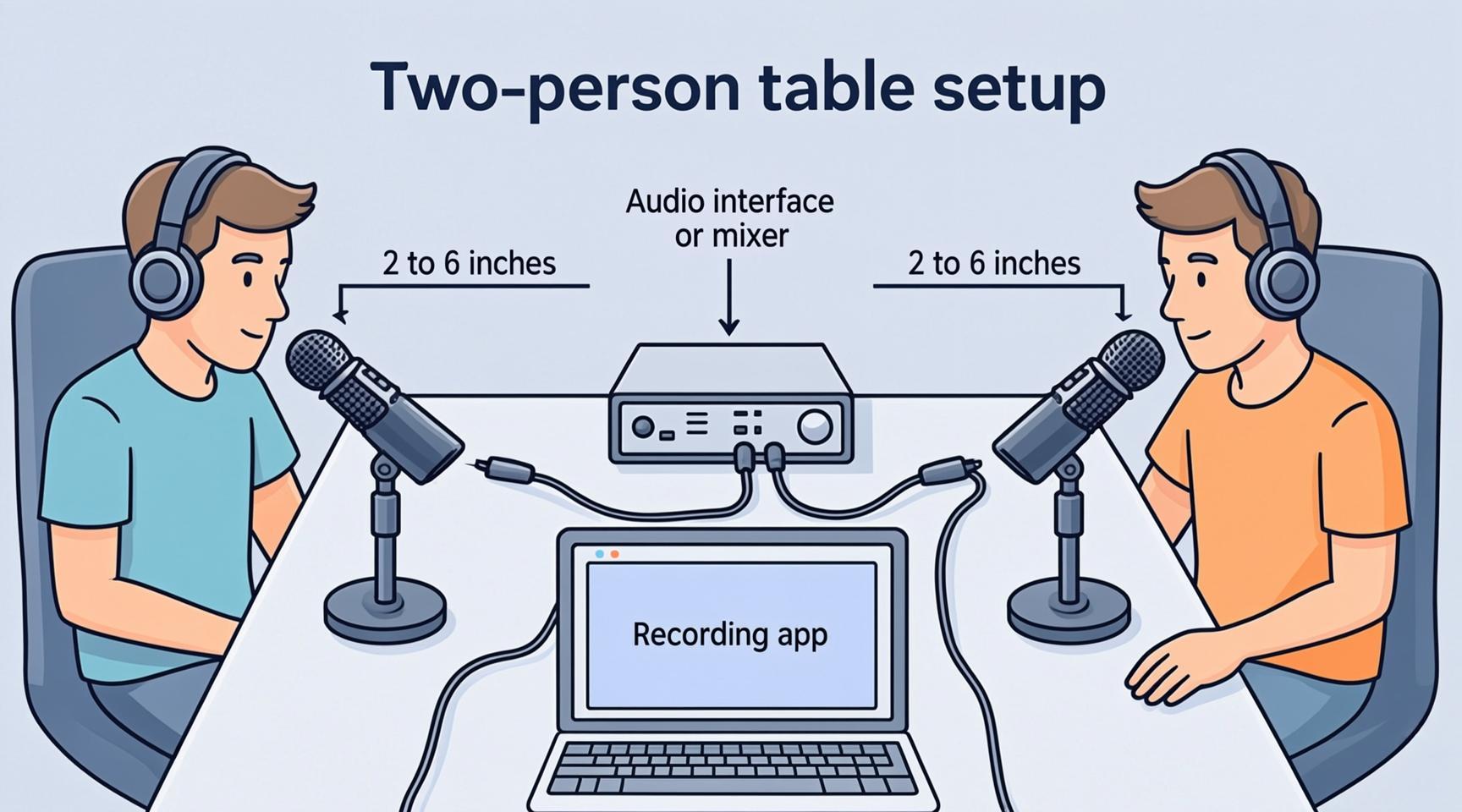
| Two people, same table | Two microphones, two headphones, a two-input interface or a mixer with multitrack recording | Separate tracks per voice, and each person close to their own microphone |
| Remote guest | Your own microphone and headphones; the guest needs a microphone (a headset is fine) and wired headphones | Wired headphones for the guest: speakers leak your voice back into their microphone |
| Video podcast | The audio kit above, plus a camera, three lights and a plain background | Light first, camera second: a phone with good light beats a better camera in a dim room |
USB or XLR: which microphone type should you buy?
USB microphones plug straight into the computer and are the simplest start. XLR microphones need an audio interface or mixer, but they scale: you can add a second microphone, a mixer or a better preamp without replacing the microphone. Several current dynamic microphones offer both outputs, so you do not have to choose up front.
| Type | How it connects | Strengths | Watch out for |
|---|---|---|---|
| USB dynamic | USB cable to the computer | Cheapest and fastest start, no extra box | One microphone per computer input; hard to grow to a two-person table |
| USB/XLR hybrid dynamic | USB today, XLR into an interface later | Start simple, upgrade without replacing the microphone | Using both outputs at once is for special cases, not the default |
| XLR dynamic | XLR cable to an interface or mixer | Rejects room noise; works with multi-person setups; sit 2 to 6 inches from the grille | Needs an interface or mixer with enough gain |
| XLR condenser | XLR cable to an interface | Can sit roughly 6 to 12 inches back (RODE) | Check the maker spec sheet for power and pickup pattern before buying |
| Lavalier or headset | Wired or wireless to a recorder or interface | Small clip-on microphone, less visible on camera; mount it about a hand-span from the mouth (RODE) | Check the maker spec sheet for connection type and pickup pattern |
What are the three budget kits, by component?
Each kit lists parts by type. The named models are examples with a manufacturer page we checked on October 19, 2026; they are not a ranking, and other models with the same specs work as well. We list no prices because a price is only true on the day you buy.
Kit 1: Solo, minimum
- Microphone: a dynamic cardioid with USB, or USB and XLR. Example: Samson Q2U (dynamic, cardioid, 50 Hz to 15 kHz, USB and XLR outputs, headphone output with level control) or Shure MV7+ (USB-C and XLR outputs, LED touch panel).
- Headphones: any wired pair you already own.
- Software: a free recording app, then our free tools for cleanup.
- Extras: a pop filter or a desk stand, and a soft room.
Kit 2: Two people at one table
- Microphones: two matching XLR dynamics. Example: RØDE PodMic (dynamic, cardioid) or the PodMic USB, which has both XLR and USB-C outputs.
- Interface: two mic inputs with phantom power and a headphone output per person. Example: Focusrite Vocaster Two (2 mic inputs, 70 dB gain range, phantom power control, USB-C, 2 headphone outputs).
- Headphones: two wired pairs, plus stands or boom arms so nobody holds a microphone.
- Cables: two XLR cables and the USB cable that comes with the interface.
Kit 3: Mixer, small team or recording away from a computer
- Mixer: a standalone mixer that records on its own. Example: RØDECaster Duo (5.5-inch touchscreen, multitrack or stereo recording to a microSD card, USB storage or computer, two headphone outputs, dual USB-C, Bluetooth phone calls).
- Microphones: XLR dynamics, one per voice.
- Why choose it: no computer needed at the table, so there is no chance of the laptop dropping a take.
- Where it does not fit: a solo beginner who records at one desk. Kit 1 does that job with fewer parts.
How do you set up two people at one table?
Put each person on their own microphone and their own track. Dynamic microphones belong 2 to 6 inches from the mouth; a condenser can sit 6 to 12 inches back. Keep the microphones pointed away from the other speaker and the laptop fan.
What is the setup checklist before you press record?
- Pick the quietest room and turn off fans, fridges and notifications.
- Place each microphone 2 to 6 inches from the mouth (dynamic) and slightly off-axis to lower plosives.
- Connect the microphone to the interface or computer, put on wired headphones and select the microphone as the input in your recording app.
- Say a loud sentence and a quiet sentence. Set the gain so the loud one stays clear of the red.
- Record 20 seconds of silence for noise cleanup later.
- Record one minute, play it back and listen for hum, pops and echo before the real session.
- After recording, normalize loudness and remove noise; then create a transcript.
What mistakes make podcasts sound amateur?
- Sitting too far from the microphone. The RØDE guidance is 2 to 6 inches for a dynamic microphone; further back, the room takes over.
- Speaking directly into the capsule. Hard P and B sounds overload it; angle the microphone slightly off-axis or add a pop filter.
- Recording two people on one microphone. You cannot fix one voice later without touching the other.
- Using speakers instead of headphones, so the microphone records the room playback.
- Skipping a test recording. A 30-second test catches most hum and level problems.
- Buying a better microphone before treating the room. Soft surfaces lower echo for free.
What should you upgrade first?
- The room and your distance to the microphone. Free.
- Headphones, so you can hear echo, hiss and pops while you record.
- A stand or boom arm, so the microphone stays in the right place without a hand on it.
- An interface or mixer, once you add a second voice or want XLR.
- The microphone itself, last. A dynamic microphone you already own usually limits you less than the room.
What do you need for a video podcast?
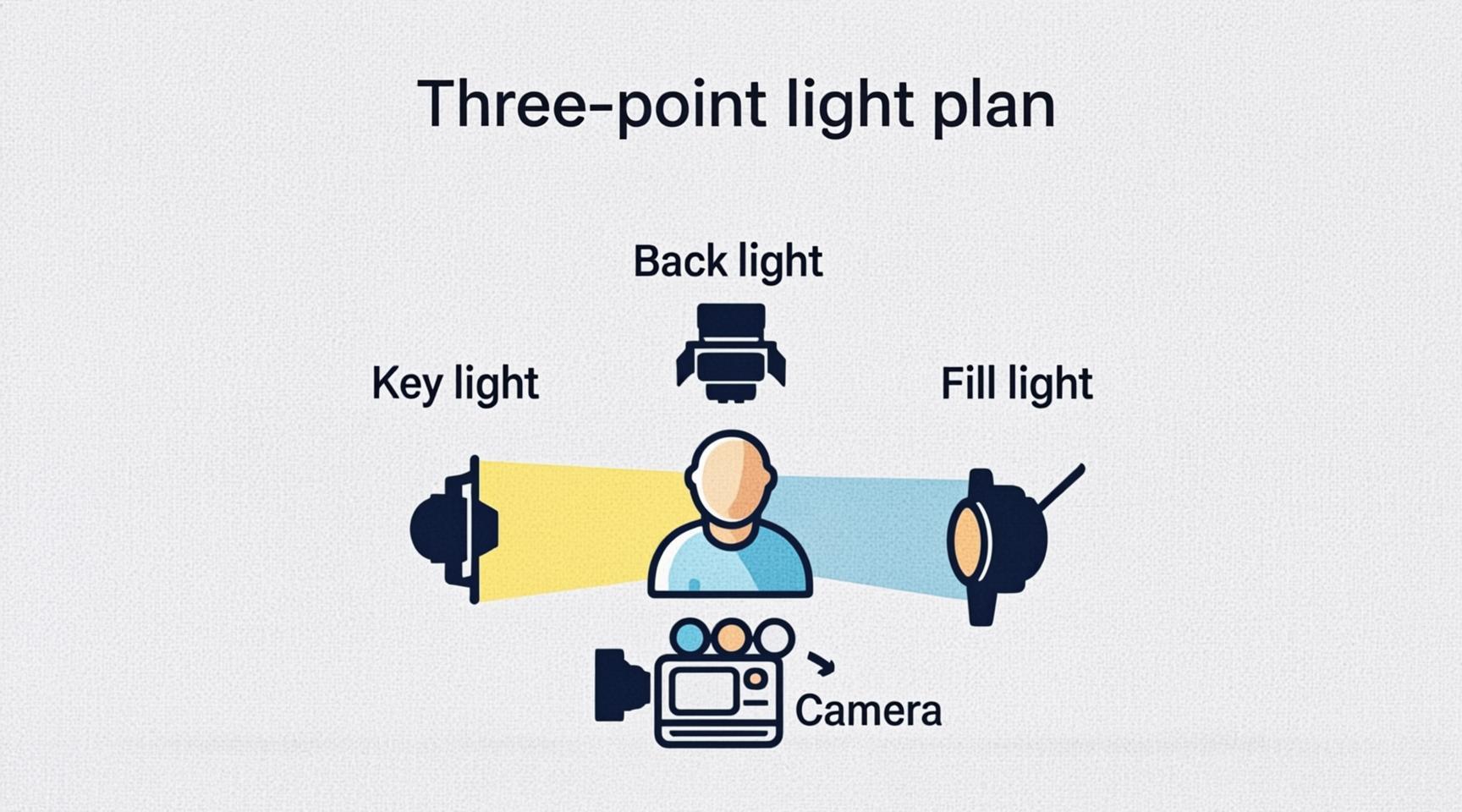
Video adds three things: a camera, light and a backdrop. Start with the phone you have; good light matters more than camera model. A three-point plan uses a key light on one side of the face, a fill light on the other to soften shadows, and a back light behind you that separates you from the background.
Keep the microphone just out of frame, above or below the line of sight. Use a teleprompter app if you read intros. Then cut the long episode into vertical clips with our podcast to shorts workflow.
Free tools:Podcast to shortsTeleprompter
How do remote guests fit in?
A remote guest needs a microphone and wired headphones, nothing else. A headset or a USB microphone is fine. Ask them to sit in a quiet room and wear headphones so your voice does not leak into their microphone. The best remote setup records each side locally and joins the files after; the equipment you need as host stays the same as in Kit 1 or Kit 2.
How loud should the finished episode be?
Apple Podcasts asks for audio that stays around -16 dB LKFS with a tolerance of 1 dB, with a true peak that does not exceed -1 dB FS. Record with headroom, then use the normalizer to land on the target instead of recording hot.
Free tool:Normalize audio
Do it in your browser
Free Koldflux tools, no account needed.
Remove noiseNormalize audioPodcast transcriptPodcast to shortsTeleprompter
Questions people ask
What basic equipment do you need for a podcast?
A microphone, wired headphones, a computer or recorder with a recording app, and a quiet room. A single USB or USB/XLR dynamic microphone is enough for a solo show.
What podcast equipment do I need for two people?
Two microphones, two pairs of wired headphones and an interface or mixer with at least two microphone inputs, so each voice is recorded on its own track.
Is a podcast equipment bundle worth it?
A bundle saves shopping time, but check each part against the specs above: microphone type, number of inputs, headphone outputs. Buy by component if a bundle has a part you would replace.
Do I need an audio interface?
Not for a solo USB microphone. You need one when you use an XLR microphone, or when two or more people record into the same computer.
Can I record a podcast with just my phone?
Yes. A phone and a wired headset work for a first episode. Move to a dedicated microphone when you want less room noise and more control.
What is the difference between a USB and an XLR microphone?
USB goes directly into a computer. XLR goes into an interface or mixer first, which lets you add more microphones and better preamps later.
How far should the microphone be from my mouth?
RØDE recommends 2 to 6 inches from the grille for dynamic microphones and roughly 6 to 12 inches for condensers.
What podcast equipment do I need for video?
The audio kit, plus a camera (a recent phone works), three lights and a simple backdrop. Light the face first.
Related
Sources and how we checked
- Samson Q2U product page (checked 2026-10-19)
- Shure MV7+ product page (checked 2026-10-19)
- RØDE PodMic product page (checked 2026-10-19)
- RØDE PodMic USB product page (checked 2026-10-19)
- Focusrite Vocaster Two product page (checked 2026-10-19)
- RØDECaster Duo product page (checked 2026-10-19)
- RØDE: tips on microphone technique (checked 2026-10-19)
- Apple Podcasts: audio requirements (checked 2026-10-19)
Specs come from each manufacturer product page, read on October 19, 2026. Models are examples, not a ranking, and we list no prices. The three diagrams were made by us: two with an image model that we checked label by label, and the signal chain drawn by hand. Distances follow RØDE guidance; loudness follows Apple Podcasts.