Editing guide
What is B-roll? Meaning, shot types and a tested edit
Short answer
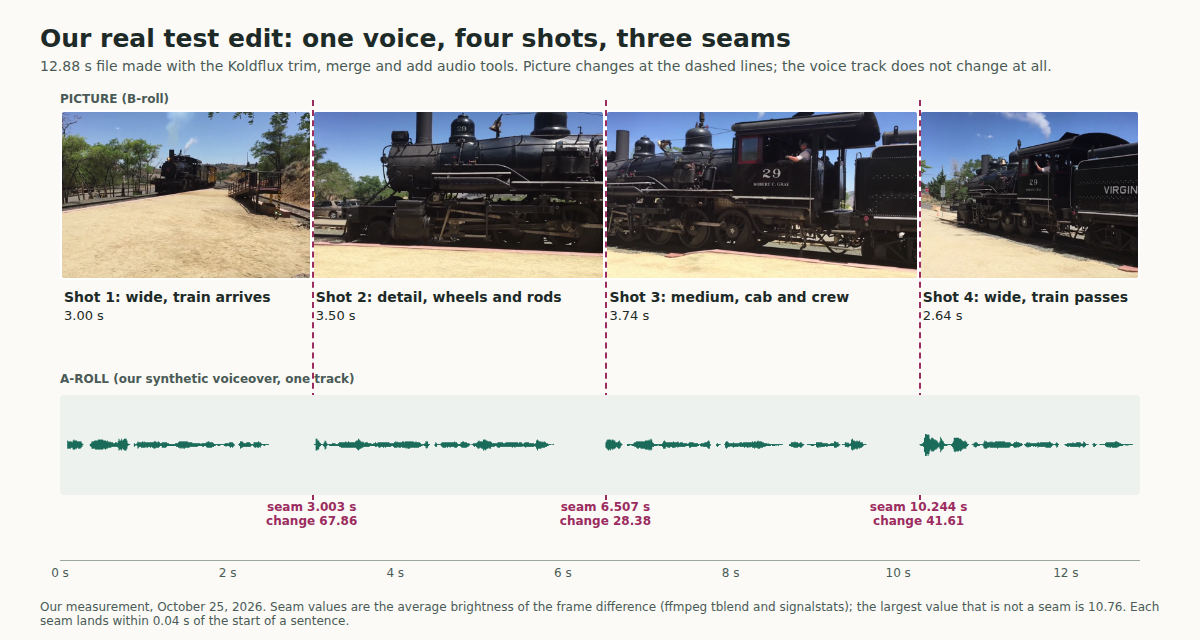
B-roll is supplementary footage cut in over the main shot, called A-roll, so the picture can show what the voice is talking about. It does not replace the A-roll: the voice or the speaker carries on underneath. In our test we cut four shots over one unbroken voiceover in a browser, and the three picture changes landed within 0.04 s of the start of a sentence while the voice track stayed untouched.
Key takeaways
- B-roll means supporting or alternative footage intercut with the main shot. The name comes from film editing: the main shots lived on roll A, the extra shots on roll B.
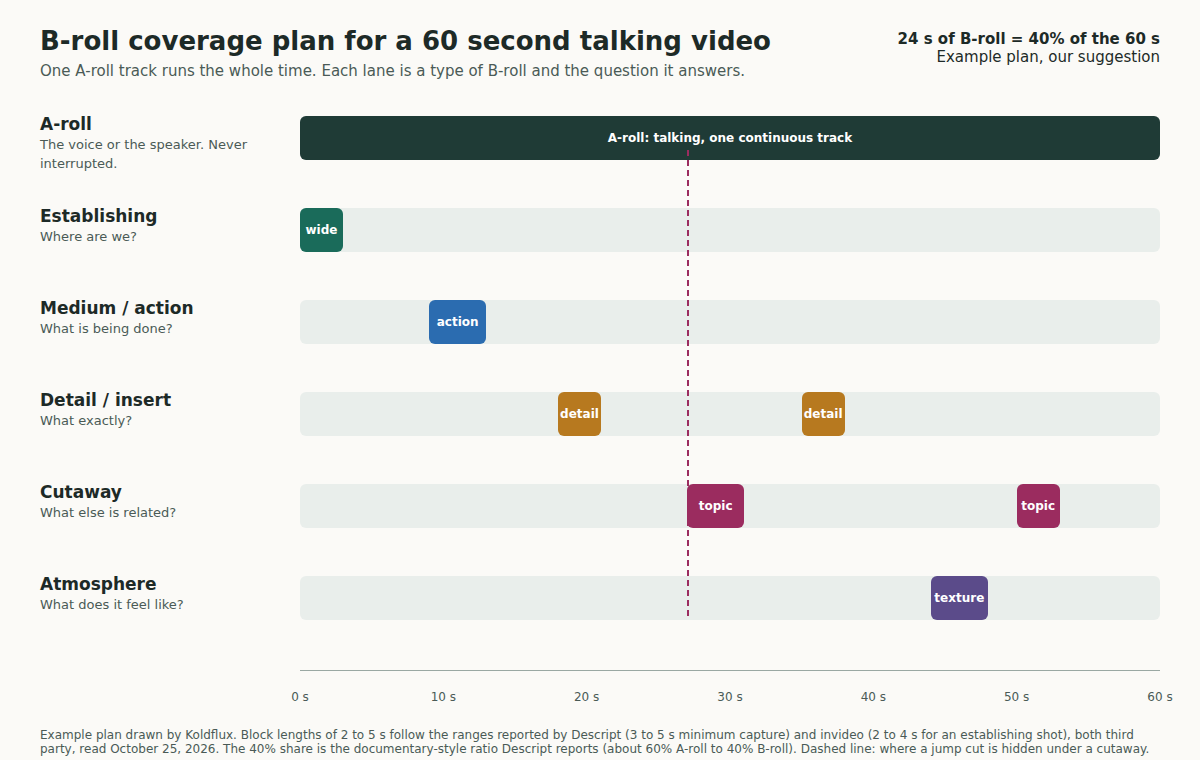
- There are five jobs a B-roll shot can do: establish the place, show the action, show a detail, point to a related topic, or set the mood. The coverage chart below turns them into a plan for a 60 s video.
- Sources quote clip lengths of 2 to 4 s for an establishing shot and at least 3 to 5 s per clip captured; documentary style is about 40% B-roll. These are third-party figures, not rules.
- Our test edit used 12.88 s of a 35.85 s CC0 source, four shots of 2.64 to 3.74 s, and the join cost no length: the merged file is 12.880 s, the same as the four trims added up.
- The three seams were the three largest frame changes in the file (67.86, 41.61 and 28.38 against 10.76 for the next one), so each cut is a real cut, not a glitch.
- Free B-roll exists, but "free" has terms. CC0 asks for nothing; Pexels and Pixabay allow free use with limits on brands, people and reselling.
What does B-roll mean?
Wikipedia defines it as "supplemental or alternative footage intercut with the main shot" (third party, read October 25, 2026). In plain terms: the main footage is a person talking, a voiceover, an interview or an action; B-roll is every other shot you cut to while that goes on.
The B does not stand for a word. It is the second roll. In 16 mm film editing, the same article explains, editors put the odd-numbered shots on one roll and the even-numbered shots on another, joined by black leader so the splices stayed hidden when printed. Roll A held the main footage, roll B the rest. The term later moved into television news and linear video editing, and now means any cutaway or supporting shot.
So "b roll footage", "b roll video", "b roll shots" and "b roll clips" all point at the same thing: footage that is not the main take but supports it. A B-roll shot usually has little or no sound of its own, because the sound you hear while it is on screen belongs to the A-roll.
What is the difference between A-roll and B-roll?
A-roll is what carries the story. B-roll is what illustrates it. The table puts the two side by side with the same example.
| Compare | A-roll | B-roll |
|---|---|---|
| Job | Carries the message: the speaker, the interview, the voiceover | Shows what the message is about, or covers a cut |
| Sound | The sound you keep | Usually muted or low, so it never competes with the A-roll |
| Length on screen | The whole video, continuous | Short cutaways, a few seconds each |
| Example in our test | One synthetic voiceover, 12.9 s, never interrupted | Four shots of a steam locomotive, 2.6 to 3.7 s each |
| If you remove it | The video has no message | The video still works, but is one static or jumpy picture |
Source: the definitions follow Wikipedia (A-roll as the main footage, B-roll as the supplement; read October 25, 2026). The last two rows are our own description of the test edit below. On the proportion, Descript reports that documentary-style videos often use about 60% A-roll to 40% B-roll (third party, read October 25, 2026); that is a description of one style, not a rule you must hit.
Why is B-roll important?
Three reasons come up in every source we read, and we could check one of them ourselves.
First, it shows instead of tells. Descript advises showing what the speaker describes rather than generic stock, and covering voiceovers or off-camera interviews with visuals that support the narration (third party, read October 25, 2026). Second, it hides cuts: Descript lists B-roll as a way to hide jump cuts in interviews and talking-head videos. Third, it controls pace, because every cutaway is a new picture and a new reason to keep watching.
The one we measured is the cut itself. In our test the picture changed three times while the voice did not, so the viewer never loses the thread. Our guide on the jump cut shows what the same cut looks like when nothing covers it.
What are the types of B-roll shots?
Sources slice the list differently (Adorama names five, Descript more than ten). We merged them into five jobs, because the job is what you choose when you plan a shot list. The chart shows where each job sits in a 60 s example plan.
| Job | Question it answers | Examples | Hold time reported |
|---|---|---|---|
| Establishing | Where are we? | Wide shot of the street, the building, the room | 2 to 4 s (invideo) |
| Action | What is being done? | Hands working, a machine running, a process | 3 to 5 s minimum capture (Descript) |
| Detail or insert | What exactly? | Close-up of an object, a screen, a label, a tool | 3 to 5 s minimum capture (Descript) |
| Cutaway | What else is related? | Something the speaker mentions that is not the main scene | 3 to 5 s minimum capture (Descript) |
| Atmosphere | What does it feel like? | Texture, weather, time-lapse, slow motion, a transition shot | 3 to 5 s for a transition shot (Descript) |
Source: the five jobs are our grouping of the shot types named by Descript, Adorama, Adobe and invideo (all third party, read October 25, 2026); the hold times are the figures those pages report, labelled in the last column; Adorama gives no seconds for these types. The 60 s plan in the chart is our suggestion, not a measurement.
What does a real B-roll edit look like?
To check that the idea survives contact with real footage, we built the smallest honest example: one voiceover as the A-roll, four shots as the B-roll, all made with the free Koldflux browser tools on a real clip we did not make.
The footage is a CC0 clip from Wikimedia Commons, Steam Engine Pulling into Virginia City Station by Thomas Farley (dedicated to the public domain, read October 25, 2026). The voiceover is our own text read by a local synthetic voice, one sentence per shot.
- Write the A-roll first. We wrote four sentences and generated the voice: 12.885 s, with sentences starting at 0, 3.040, 6.490 and 10.236 s.
- Choose a shot for each sentence, so the picture shows what the voice says: wide as the train arrives, the wheels and rods, the cab with the crew, the whole train passing.
- Cut each shot with the free trim tool. We cut 0 to 3, 14.5 to 18, 20 to 23.75 and 30 to 32.65 s, so each shot ends where the next sentence starts.
- Join the four shots with the free merge tool, in order, in the 16:9 shape.
- Put the voice on with the free add audio tool, set to replace the original sound. The picture is copied, the voice goes on top.
- Check it: the picture should change within a blink of each sentence start, and the voice should not move.
The cuts land where the sentences start because we chose the trim ends from the voice timings, not by eye. That is the one habit worth copying from this test: write or record the A-roll first, read its timings, and cut the B-roll to them.
What did we measure in the test edit?
Every file was checked with ffprobe 6.1.1 and ffmpeg 6.1.1. The seams were found by taking the difference between each frame and the one before it and reading its average brightness: inside a shot the number is small, at a cut it jumps.
| Check | Result |
|---|---|
| Four trimmed shots | 3.003, 3.504, 3.737 and 2.636 s (90, 105, 112 and 79 frames), 1920x1080 |
| Merged file | 12.880 s, 386 frames, 1920x1080: no length lost at the joins |
| Size of the three picture changes | 3.003 s = 67.86, 10.244 s = 41.61, 6.507 s = 28.38; next largest change 10.76, median 5.13 |
| Voice track after the edit | Pauses between sentences identical to the original within 0.001 s: not shifted, not cut |
| Cut versus sentence start | Picture changes 0.037 s early, 0.017 s late and 0.008 s late |
| Picture copied by the add audio step | Decoded picture checksum identical before and after adding the voice |
| Final file | 12.971 s: the audio runs 0.092 s past the picture |
| Footage used | 12.88 s of a 35.85 s source, 36%, a shooting ratio of 2.8 to 1; mean shot 3.22 s |
Source: our own run on October 25, 2026, in headless Chromium against the live trim, merge and add audio tools; the full commands, ffprobe lines and per frame values are in the published log. The median of 5.13 is high because the source was filmed handheld, so every frame moves a little; the three cuts still stand well above it. The 0.092 s tail is something we measured, not something the tool page promises: it says the result is as long as the video, and the container came out 0.092 s longer.
We also ran the trim tool on the original WebM (VP9 with Opus sound) without converting it first. It worked and returned H.264 with AAC, and it kept the clip's own sound. If you want B-roll muted, mute it first with the free mute tool or cut a version without sound.
Free tools:Trim a video by timestampMerge videosAdd audio to a video
How long should B-roll clips be, and how much do I need?
There is no standard. What the sources report: Descript says to capture each clip for at least 3 to 5 s so you have room in the edit, that transition shots run 3 to 5 s, and that slower documentary-style pieces may hold 10 s or more. invideo gives 2 to 4 s for an establishing shot. Adobe suggests counting ten in your head while you film a stationary or moving shot, so you have material to trim (all third party, read October 25, 2026).
Our test used 2.6 to 3.7 s per shot, which sits inside those ranges, because each shot only had to carry one sentence. Our suggestion is to let the sentence decide: the shot should be on screen from the first word of what it illustrates to the end of that thought. For how much, start from the 40% documentary figure only if your video is that style; for a short explainer, plan the shot list around the sentences, not around a percentage.
How do I shoot B-roll with a phone?
We did not test this on a phone and did not film with one, so the points below are advice reported by third parties, not our results. They agree across Adobe, Descript and invideo (read October 25, 2026; invideo through a search summary).
- Make a shot list before you shoot: location, the action you want, the viewpoint and the shot size (Adobe, invideo).
- Vary the size: if the main shot is wide, get medium, close-up and detail shots too (Descript, invideo).
- Hold each shot longer than you think you need, so the editor can trim it (Adobe: count ten; Descript: at least 3 to 5 s).
- Keep camera movement slow and stable; too much movement distracts (Descript).
- Match the conditions of the A-roll where you can, such as the light and the time of day (invideo).
- Shoot the shots that show what the speaker says, not generic scenery (Descript).
Phone footage is often variable frame rate and sometimes HDR, and we did not test what our browser tools do with either. Our test used constant frame rate footage from a camera, and the trim tool kept 29.97 fps through all four trims.
Where can I get free B-roll footage?
Your own footage is the safest, but if you need stock, these are the free routes we checked. Read the licence of the exact file, not only the site.
| Source | What the licence says | Check before you use it |
|---|---|---|
| Wikimedia Commons, files marked CC0 | CC0 lets anyone use the work, including commercially, without asking; it does not affect trademark or patent rights and leaves privacy and publicity rights unchanged | The licence on the file page (it differs file by file) and whether recognizable people or brands appear |
| Pexels | All photos and videos are free to use, attribution not required, modification allowed; do not imply endorsement, do not show identifiable people in a bad light, do not sell unaltered copies | The people and brands in the shot |
| Pixabay | Free use, attribution not required, may be adapted; no standalone resale, no commercial use of recognizable trademarks or brands, no misleading use | The page says some content can carry other rights such as copyright, trademark or privacy; you may need consent |
Source: Creative Commons CC0 1.0 deed, Pexels Licence and Pixabay Content Licence Summary (all official, read October 25, 2026). "Royalty free" and "free" do not mean free of every right: a clear face or a logo in the shot is a separate question from the footage licence. Only the CC0 file in our test was verified at file level (licence read from Commons on October 25, 2026); we did not review individual Pexels or Pixabay clips. This is not legal advice.
If you need B-roll for a Reel, Short or TikTok, cut it in the shape you will publish. The merge tool offers 9:16 (1080x1920), 16:9 (1920x1080) and 1:1 (1080x1080) and pads rather than stretches, so a 16:9 shot in a vertical frame gets bars. Crop it first if you want it to fill the frame.
How do I add B-roll in CapCut, Premiere Pro or DaVinci Resolve?
We did not run any of these applications, so this page gives no menu steps for them. What is the same everywhere: put the A-roll on the base video track, put the B-roll on the track above it, and place each shot where the sentence it illustrates begins. Descript describes the same idea as dropping B-roll over a cut without rebuilding the timeline (third party, read October 25, 2026).
If you do not want an editor at all, the browser route in the test edit above does the job for a short sequence: trim, merge, add the voice. Its limit is that the shots play one after another, so the picture is B-roll only. To show a speaker on camera with B-roll cutting in and out, you need an editor with two video tracks.
What we did not test
We tested one idea on one real clip. Here is what that leaves open.
Our A-roll was a synthetic voiceover, not a person speaking to camera. The technique is the same, but we did not test a talking-head clip, lip sync, or cutting away from a speaker and back.
We tested one source clip, filmed handheld in daylight, and made every shot from it. A real project mixes clips from different cameras, and we did not test mixed frame rates, mixed frame sizes, vertical footage, HDR or a file near the 100 MB limit.
We did not test an editing application or a phone, and we did not run the free sources beyond reading their licence pages and one Commons file.
The coverage chart is our suggestion, built from third-party figures. We did not measure what viewers watch, so we make no claim that more B-roll keeps people watching longer.
Wikipedia, Descript, Adobe, Adorama, invideo, Pexels, Pixabay, Creative Commons, Wikimedia Commons, CapCut, Premiere Pro and DaVinci Resolve are trademarks of their owners; Koldflux is not affiliated with or endorsed by them.
What to do next
Pick the line that matches your situation.
- You have a talking video with visible jump cuts: place a cutaway over each cut, and see our jump cut guide for what an uncovered cut looks like.
- You are planning a shoot: write the shot list from your script first, with one shot per sentence, and use the coverage chart to check you have an establishing, an action and a detail shot.
- You need footage today: check the licence on the exact file, avoid recognizable people and brands, and keep a note of the source URL.
- You have the shots and a voice file: trim, merge and add the audio in the browser, then check the first second after every cut.
- You want the voice for your A-roll: see how to add audio to a video, and our storyboard guide for planning shots before you film.
Do it in your browser
Free Koldflux tools, no account needed.
Trim a video by timestamp (free, in your browser)Merge videos (free, in your browser)Add audio to a video (free, in your browser)
Questions people ask
What does B-roll stand for?
It does not stand for a word. It is the second of two rolls: in 16 mm film editing the main shots were on roll A and the supporting shots on roll B, so the supporting footage became "B-roll".
Is a cutaway the same as B-roll?
A cutaway is one kind of B-roll: a shot of something related that you cut to and then back from. B-roll is the wider term and also covers establishing shots, inserts and atmosphere shots.
Does B-roll need its own sound?
Usually not. The sound you hear is the A-roll, so B-roll is normally muted or kept low. Our test clip came with its own sound, and the trim tool kept it, so we removed it before editing.
Do I have to credit free B-roll?
CC0 asks for no credit, and Pexels and Pixabay say attribution is not required but appreciated. Other Commons licences differ by file, and some require credit, so read the licence on the file page.
Can I use the example clip from this page?
The source clip is CC0 on Wikimedia Commons, so the footage is free to use. Our edit adds a synthetic voiceover we made ourselves. Check the file page for the current licence before you rely on it.
Can B-roll be a still photo?
Yes, many editors use stills as cutaways, but we did not test stills in our edit, so we give no steps or timings for them.
Related
Sources and how we checked
- Koldflux test log: commands, ffprobe output, per frame differences and the browser tool runs (our measurement, October 25, 2026) (checked 2026-10-25)
- Wikipedia: B-roll (third party, read October 25, 2026) (checked 2026-10-25)
- Descript: Using B-roll, a beginner's guide (third party, read October 25, 2026) (checked 2026-10-25)
- Adobe: What is B-roll (vendor guide, read October 25, 2026) (checked 2026-10-25)
- Adorama: How to Take B-Roll for Video (third party, read October 25, 2026) (checked 2026-10-25)
- invideo: B-roll 101, the complete guide for beginners (third party, read via a search summary October 25, 2026) (checked 2026-10-25)
- Creative Commons: CC0 1.0 Universal (official, read October 25, 2026) (checked 2026-10-25)
- Pexels: Licence (official, read October 25, 2026) (checked 2026-10-25)
- Pixabay: Content Licence Summary (official, read October 25, 2026) (checked 2026-10-25)
- Wikimedia Commons: Steam Engine Pulling into Virginia City Station, CC0, by Thomas Farley (our test footage, read October 25, 2026) (checked 2026-10-25)
- FFmpeg Filters documentation: tblend and signalstats (official, read October 25, 2026) (checked 2026-10-25)
We read Wikipedia, Descript, Adobe and Adorama on October 25, 2026 and took the shot types, hold times and shooting advice they agree on, labelled by source; invideo's figure was read from a search summary because the page itself was not opened. The Masterclass and StudioBinder pages could not be loaded from our network and are not used. We then ran one real test: a CC0 steam locomotive clip from Wikimedia Commons (35.8 s, 1920x1080) was converted to H.264 without sound, cut into four shots with the live Koldflux trim tool, joined with the merge tool and given a synthetic voiceover with the add audio tool, in headless Chromium. We checked each download with ffprobe 6.1.1 and found the seams by measuring the difference between every frame and the one before it with ffmpeg tblend and signalstats. The competitor pages explain the types and the craft; none of them ships a measured edit built from free footage, and none gives the voice and cut timings so you can check them. Licence terms are quoted from the official Creative Commons, Pexels and Pixabay pages and are not legal advice.