Audio guide
How to add audio to a video (music or voiceover, one MP4 out)
Short answer
Open the free Koldflux add audio to video tool, choose your video and your music or voiceover, pick Replace or Mix, and download the MP4. It runs in your browser, nothing is uploaded, and the picture is copied without re-encoding (the decoded picture matched the original in all three of our runs). The one thing that surprises people is length: the tool makes the result as long as the video, and with ffmpeg a single flag decides whether you lose the end of your picture.
Key takeaways
- Fastest path: Koldflux add audio to video tool, two files in, one MP4 out, up to 100 MB per file (limit as stated on the tool page). No account needed, and the picture in the result matched the original exactly, so nothing is drawn over it.
- Replace removes the original sound. Mix keeps it and lays the new audio on top, with a volume slider for each. In our mix run, 100% music over the original read -11.0 dB, so lower the music when you want speech to stay clear.
- If your audio is shorter than the video, tick "Repeat the audio" or the last part is silent. If it is longer, it is cut at the end of the picture.
- In ffmpeg, always write -map 0:v -map 1:a. Without it, our run kept the original soundtrack and silently dropped the new music.
- Adding audio to a video you own is covered here. Check you hold the rights to the music you add.
How do I add audio to a video for free without uploading it?
Use the Koldflux tool. It runs ffmpeg inside your browser tab, so both files stay on your device. The first run downloads the converter engine, so it is slower than later runs.
- Open the add audio to video tool and choose your video (MP4, MOV and other video files; 100 MB limit as stated on the tool page).
- Choose the audio: MP3, M4A, WAV, AAC, OGG or FLAC.
- Under "What to do with the original sound", pick Replace (new audio only) or Mix (new audio over the original).
- Set the volume of the new audio from 0 to 200%. In Mix mode a second slider sets the original sound.
- Leave "Repeat the audio if it is shorter than the video" ticked unless you want silence after the audio ends.
- Press Add the audio, then Download MP4.
| Run | Result length | Level at 0 to 2 s | Level from 10 s on | Picture vs source |
|---|---|---|---|---|
| Replace, 8 s music, repeat on | 12.006 s | -11.4 dB | -11.4 dB | Identical |
| Replace, 8 s music, repeat off | 12.004 s | -11.4 dB | -91.0 dB (silence) | Identical |
| Mix, 20 s music at 100% over original sound | 12.000 s | -11.0 dB | -11.0 dB | Identical |
Three runs of the Koldflux tool, October 21, 2026 (ffprobe and volumedetect on each downloaded file).
We ran this on October 21, 2026, in headless Chromium against a local development build, with files we generated ourselves (a silent 12 second video, an 8 second and a 20 second music file, and a 12 second video with its own sound). Each run, including page load and the first engine download, finished in 12.5 to 14.9 seconds. That is a small test: we did not time 100 MB files, Safari or phones.
Free tools:Add audio to video (free, in your browser)Download the 12 second silent test video (MP4)Download the 8 second test music (MP3)
What happens when the audio and the video are different lengths?
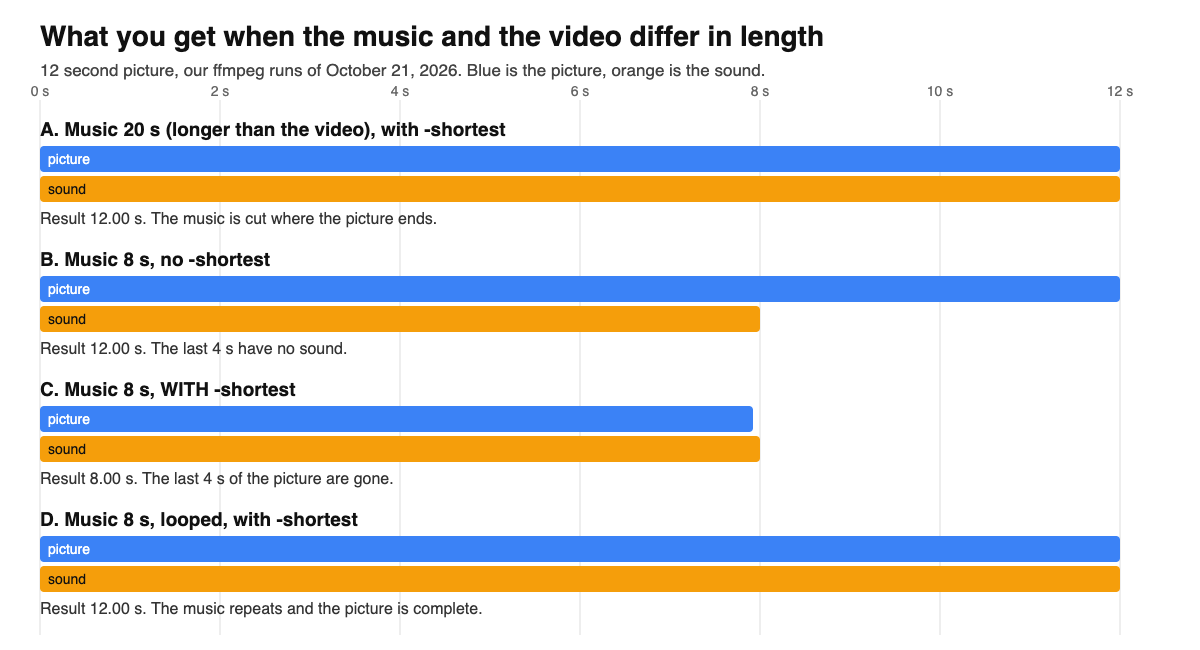
This is where results go wrong, so we measured it with ffmpeg 6.1.1 on a 12 second picture. The sound either ends early, gets cut, or, with one common flag, takes the end of your picture with it.
| Case | File length | Audio stream length | Picture matches source | What you hear |
|---|---|---|---|---|
| A. 20 s music, -shortest | 12.000 s | 11.981 s | Yes | Music from 0 to 12 s, cut at the end |
| B. 8 s music, no -shortest | 12.000 s | 8.000 s | Yes | Music, then 4 s with no audio |
| C. 8 s music, -shortest | 8.000 s | 8.000 s | No: picture ends at 7.92 s | File is 4 s short, picture lost |
| D. 8 s music looped, -shortest | 12.000 s | 11.983 s | Yes | Music repeats to the end |
Our test, October 21, 2026.
The Koldflux tool applies the safe choice for you: the result is as long as the video, and the Repeat box switches between case D (on) and case B (off). In the browser runs the repeat-off result measured -91.0 dB, silence, from 10 s on.
Looping repeats the file from its first sample, so a track that does not end where it starts will have a jump. Pick music with a clean loop point or fade it out instead (see the ffmpeg section).
Replace or mix: how loud is the result?
Levels are mean volume from the volumedetect filter on our test files. The original sound is a 180 Hz tone and the music a synthetic arpeggio, so your numbers will differ; the pattern is what matters.
| Setting | Mean level | What it means |
|---|---|---|
| Original sound alone | -21.0 dB | Starting point (ffmpeg run on the video with sound) |
| Music alone (Replace, 100%) | -11.4 dB | The original is gone; music is 9.6 dB louder than the original was |
| Mix, music at 30% plus original at 100% (ffmpeg amix) | -18.4 dB | Original stays audible, music sits underneath |
| Mix, music at 100% plus original at 100% (Koldflux tool) | -11.0 dB | Music dominates: the louder source sets the level |
Our runs, October 21, 2026.
For speech over music, start with music at 30% and listen. The tool slider goes from 0 to 200% and the filter does not rescale levels, so loud sources add up.
How do I add audio to a video with ffmpeg?
ffmpeg is free, open source and runs on Windows, Mac and Linux. Every command below was run by us on October 21, 2026 with ffmpeg 6.1.1; the exact commands and output are in the published test log. Replace video.mp4 and music.mp3 with your file names. The -map 0:v -map 1:a part says "picture from the first file, sound from the second" and is not optional (see the traps table).
| Command | Result | Level (volumedetect) |
|---|---|---|
| Mix, music 30% over the original | 12.000 s, picture identical | -18.4 dB at 0 to 2 s (original alone -21.0, music alone -11.4) |
| Delay 3 s plus 2 s fade out | 12.000 s, picture identical | -91.0 dB at 0 to 2 s (silence before the music), -16.8 dB from 10 s (fade) |
| Copy AAC, no re-encode | 12.000 s, audio 8.000 s, 156,779 bytes | -11.0 dB |
Ffmpeg 6.1.1, October 21, 2026.
ffmpeg -i video.mp4 -i music.mp3 -map 0:v -map 1:a -c:v copy -c:a aac -b:a 192k -shortest out.mp4ffmpeg -i video.mp4 -stream_loop -1 -i music.mp3 -map 0:v -map 1:a -c:v copy -c:a aac -b:a 192k -shortest out.mp4ffmpeg -i video.mp4 -i music.mp3 -filter_complex "[0:a]volume=1.0[a0];[1:a]volume=0.3[a1];[a0][a1]amix=inputs=2:duration=first:normalize=0[a]" -map 0:v -map "[a]" -c:v copy -c:a aac -b:a 192k out.mp4ffmpeg -i video.mp4 -i music.mp3 -filter_complex "[1:a]adelay=3000:all=1,apad=whole_dur=12,afade=t=out:st=10:d=2[a]" -map 0:v -map "[a]" -c:v copy -c:a aac -b:a 192k -shortest out.mp4ffmpeg -i video.mp4 -i music.m4a -map 0:v -map 1:a -c:v copy -c:a copy out.mp4In every command above the decoded picture matched the source, because -c:v copy does not touch it. The last command copies the sound as well, so nothing is re-encoded; it needs audio that is already AAC (we used an .m4a). The others encode the new sound to AAC 192 kbps, which is what the Koldflux tool does according to its page.
Will -c:v copy work with my video, or does the codec need to change?
Copy keeps the picture untouched, but it does not check that your target container or player accepts that picture codec. Check first with ffprobe, then use the table. We made a ProRes MOV, an HEVC MP4 and an H.264 MP4 with ffmpeg 6.1.1 and tried each with -c:v copy (full output in the test log).
| Source picture | Target | Result |
|---|---|---|
| ProRes (.mov) | MP4 with -c:v copy | Failed: "Could not find tag for codec prores ... not currently supported in container", no file written |
| HEVC (.mp4) | WebM with -c:v copy | Failed: WebM supports only VP8, VP9 or AV1 video, and Vorbis or Opus audio, no file |
| H.264 (.mp4) | WebM with -c:v copy | Failed with the same WebM message |
| HEVC (.mp4) | MP4 with -c:v copy | Worked: hevc plus aac, 92,196 bytes. ffmpeg accepting it does not mean every player or site plays HEVC; we did not test players |
| ProRes (.mov) | MP4, re-encode to H.264 | Worked: h264 plus aac, 103,061 bytes |
| H.264 (.mp4) | WebM, re-encode to VP9 plus Opus | Worked: vp9 plus opus, 98,627 bytes |
Our test.
ffprobe -v error -select_streams v:0 -show_entries stream=codec_name -of csv=p=0 video.movffmpeg -i video.mov -i music.mp3 -map 0:v -map 1:a -c:v libx264 -crf 23 -pix_fmt yuv420p -c:a aac -shortest out.mp4ffmpeg -i video.mp4 -i music.mp3 -map 0:v -map 1:a -c:v libvpx-vp9 -crf 35 -b:v 0 -c:a libopus -shortest out.webmTakeaway: if ffmpeg stops with a "codec not currently supported in container" or WebM message, copy is not possible for that pair and the picture must be re-encoded. Re-encoding costs quality and time, so do it only then. The Koldflux tool copies the picture and always writes MP4; we did not test it with ProRes or HEVC sources.
Why did my new audio not show up, or the file get shorter?
We reproduced the three most common mistakes. Each row is a run, not a guess.
| Mistake | What we measured | Fix |
|---|---|---|
| No -map on a video that already has sound | Output kept the original soundtrack (-21.0 dB) and dropped the new music; ffmpeg printed no error and exited with code 0 | Add -map 0:v -map 1:a. With the map the output measured -11.4 dB, the music |
| -shortest with music shorter than the video | File shrank from 12.000 s to 8.000 s and the picture stopped at 7.92 s | Loop the audio (-stream_loop -1) or leave -shortest off and accept silence at the end |
| Copying a WAV file into MP4 (-c:a copy) | ffmpeg accepted it and wrote 729,053 bytes with PCM audio, against 156,779 for AAC. We did not test which players play PCM in MP4 | Encode to AAC (-c:a aac) for MP4. Use WAV only if you have a reason |
Ffmpeg 6.1.1, October 21, 2026.
How do I add audio to a video in Clipchamp on Windows?
Microsoft's Clipchamp help page "How to add audio or music to videos" (read in a browser on October 21, 2026) describes these steps for personal accounts. We did not run Clipchamp ourselves.
- Click My media in the left sidebar and drag your audio file in, or use Import media (computer, OneDrive, Google Drive, Dropbox or Xbox on personal accounts).
- Hover over the audio asset and click the add to timeline button, or drag it onto the timeline.
- Move, split or trim the audio clip on the timeline. (Microsoft's page ends here; export is the normal last step in the editor, our addition.)
Microsoft also lists a stock music library (Content library, then Music), a text to speech voiceover and an audio recorder. If a file does not load, the same page says to check that it is a supported audio format. The page does not state whether free exports carry a watermark or what resolution they use, so check the export screen.
How do I add music to a video on iPhone in iMovie?
Apple's iMovie guide for iPhone ("Add music and soundtracks in iMovie on iPhone", read October 21, 2026) says: open a movie project, tap Add Media, tap Audio, then choose Soundtracks, or My Music for songs synced to the device. You can also import audio from iCloud Drive. Apple notes that a song shorter than 1 minute behaves like a sound effect (blue clip) instead of background music (green clip), and that using a song you bought from the iTunes Store requires being the copyright holder or having express permission.
We did not run iMovie (it is a native app, so we could not capture it). The Koldflux tool above is the no-install option, but we only tested it in desktop Chromium, not on a phone.
Which method fits which job?
| If you want to | Use | Why |
|---|---|---|
| Put a track on a finished video, once, no install | Koldflux tool | Two files in, picture untouched, nothing uploaded |
| Control start time, fades or several tracks | ffmpeg (above) or a timeline editor | The Koldflux tool has no start offset or fade: it starts the audio at 0 |
| Edit visually on Windows | Clipchamp | Timeline with trim and split, per Microsoft's help page |
| Edit on an iPhone with soundtracks | iMovie | Built-in soundtracks and My Music, per Apple's guide |
| Take the sound from one video and put it on another | Extract first, then add | See the extract audio guide linked below |
Our suggestion, based on the tests above and the vendors' pages as read on October 21, 2026.
Many online editors do this too. VEED's page for this job says free exports include a watermark (read October 21, 2026). Canva and Adobe Express blocked our automated read, so we state nothing about them.
Can I use any song, and what about copyright?
Adding a song to your own video does not give you the right to publish it. This is general information, not legal advice: platforms and rights holders decide what stays up, and a track you bought or downloaded is not automatically licensed for video. Use music you made, own or have a license for, and check the license terms of any stock library. The US Copyright Office (copyright.gov) publishes the basics. We did not test any platform's music matching, so this page makes no claim about what a given site will flag.
Limits and how we checked
- Tested by us on October 21, 2026: ffmpeg 6.1.1 on Ubuntu with files generated by ffmpeg (a 12 second silent test video, an 8 and a 20 second synthetic music arpeggio, a 12 second video with a 180 Hz tone). Duration and codecs read with ffprobe, levels with the volumedetect filter, the picture compared by an MD5 of the decoded video stream. Full commands and output are in the test log linked under Sources.
- Tested by us: the Koldflux browser tool, three runs in headless Chromium on a local development build with the page security policy relaxed for the development build only. A production build does not need that. We did not test Safari, Firefox, phones or files near the 100 MB limit.
- Read, not run: the Clipchamp and iMovie steps come from Microsoft and Apple help pages. Menu names can differ by version and region.
- Not covered: replacing the audio of a video already published on YouTube, Instagram or TikTok, lip sync or dubbing tools, and music that has to be downloaded from other sites. Synthetic test tones are not music, so level numbers will differ on your files, and we measured levels, not listening quality.
- Last checked October 21, 2026.
Do it in your browser
Free Koldflux tool, no account needed.
Questions people ask
How do I add audio to a video for free?
Open the free Koldflux add audio to video tool, choose a video and an audio file, pick Replace or Mix, and download the MP4. It runs in your browser and nothing is uploaded. The limit is 100 MB per file as stated on the tool page.
Does adding audio lower the video quality?
Not in the tool or the ffmpeg commands on this page: the picture is copied, and in our runs the decoded picture matched the original exactly. Only the new sound is encoded (to AAC).
What if my music is shorter or longer than the video?
Longer audio is cut where the picture ends. Shorter audio leaves silence unless you loop it: tick Repeat the audio in the tool, or use -stream_loop -1 in ffmpeg. With ffmpeg, -shortest on shorter audio also cuts your picture to the audio length.
How do I keep the original sound and add music?
Choose Mix in the Koldflux tool and lower the music volume, or use the amix command in the ffmpeg section. In our test, music at 100% over the original read -11.0 dB, so start lower, for example 30%.
Why does ffmpeg ignore my new audio?
Without -map, ffmpeg picks streams itself. In our run on a video that already had sound it kept the original sound and dropped the new music with no error. Add -map 0:v -map 1:a.
How do I add audio to a video on iPhone?
In iMovie, open a project, tap Add Media, then Audio, and choose Soundtracks or My Music (Apple's guide, read October 21, 2026). We did not run iMovie ourselves.
How do I add audio to a video on Windows?
In Clipchamp, drag the audio into My media, add it to the timeline and export (Microsoft's help page, read October 21, 2026). Or use the browser tool or ffmpeg.
Can I start the music at a later time?
Not in the Koldflux tool, which starts the audio at 0. In ffmpeg, adelay does it: our run with adelay=3000 gave silence for the first 2 seconds we measured, as expected for music that starts at 3 seconds.
Related
Sources and how we checked
- Koldflux test log: every command, ffprobe, volumedetect and browser-tool result (ffmpeg 6.1.1, October 21, 2026) (checked 2026-10-21)
- Microsoft Support: How to add audio or music to videos (Clipchamp), read in a browser (checked 2026-10-21)
- Apple Support: Add music and soundtracks in iMovie on iPhone (iMovie 3.0.4 guide, copyright 2026) (checked 2026-10-21)
- Apple Support: Add sound effects in iMovie on iPhone (iMovie 3.0.4 guide, copyright 2026) (checked 2026-10-21)
- FFmpeg documentation: ffmpeg tool options (-map, -shortest, -stream_loop) (checked 2026-10-21)
- FFmpeg Filters documentation: amix, adelay, afade, apad (checked 2026-10-21)
- VEED: Add audio to video (third party, free exports include a watermark) (checked 2026-10-21)
- US Copyright Office: copyright basics (general information, not legal advice) (checked 2026-10-21)
We generated a 12 second silent video, 8 and 20 second music files and a 12 second video with its own sound with ffmpeg 6.1.1 on October 21, 2026, ran each command shown here, and read the results with ffprobe and volumedetect. We then ran the Koldflux browser tool three times in headless Chromium on a development build and checked the downloaded files the same way. The Clipchamp and iMovie steps were read from the vendors' help pages in headless Chromium on the same day. No third-party media was used. The test files are linked in the first section; the diagram is our own drawing. Clipchamp, Microsoft, iMovie, Apple, VEED, Canva and Adobe Express are trademarks of their owners; Koldflux is not affiliated with or endorsed by them.