Music licensing guide
Royalty-free music for videos: what each license allows and what to credit
Short answer
For a monetized YouTube video, the YouTube Audio Library is the one source YouTube says will not be claimed through Content ID. Music from any other library is safe only to the extent its license covers your use, so read the license, copy the credit text it asks for and paste it into the video description. "Royalty-free" is a label, not protection: YouTube says Content ID might still flag music labeled free.
Key takeaways
- YouTube Help says copyright-safe music from the YouTube Audio Library "won't be claimed by a rights holder through the Content ID system". It says only Audio Library music is "known to YouTube to be copyright-safe".
- Creative Commons BY needs credit, a link to the license and a note of changes. BY-NC bans commercial use, and Creative Commons itself says it "cannot advise you on what is and is not commercial use" (quoted by Free Music Archive), so a monetized channel should skip NC tracks. CC0 needs no credit.
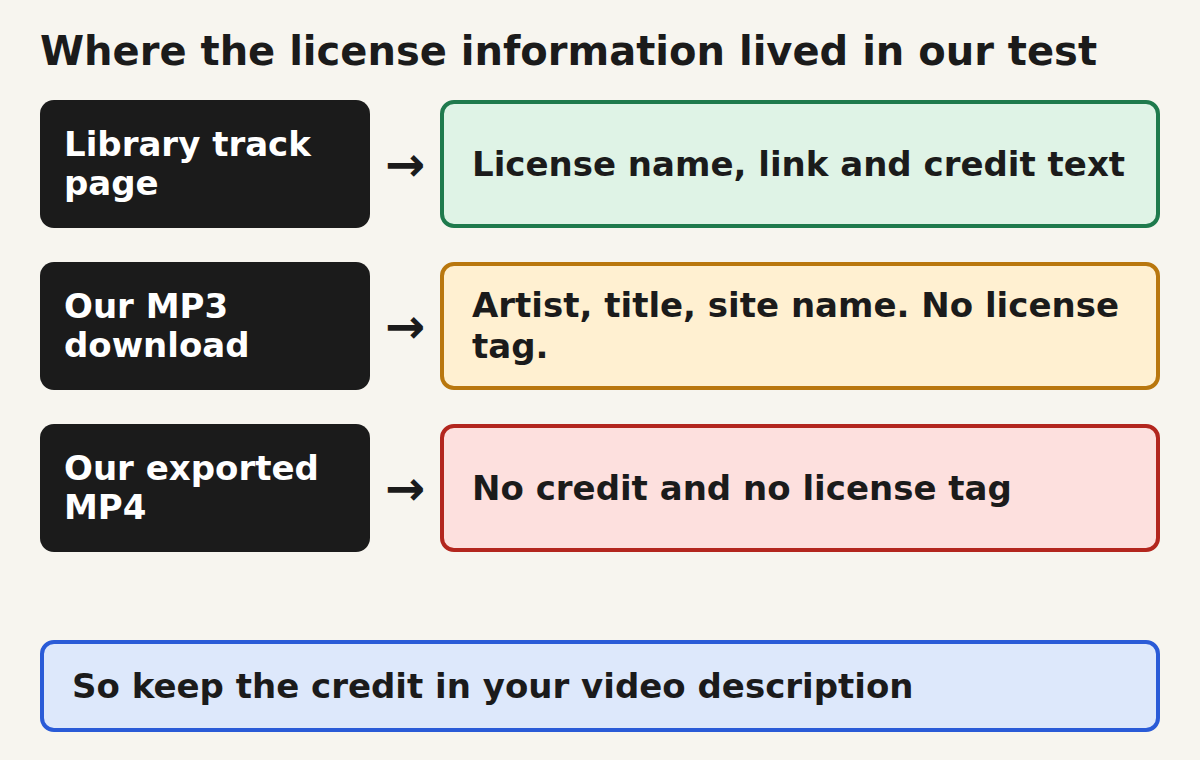
- In our test the credit did not travel with the audio: the downloaded CC BY track had artist and title tags but no license tag, the CC0 track had no tags, and the MP4 exported by the Koldflux Add audio tool had none of them, even when we wrote a license tag into the source ourselves.
- Keep the credit text in the video description and keep a small license log (track page URL, license, date). A log is your evidence if a claim lands.
- A copyright claim is not a strike. YouTube says claims "usually don't impact your channel or account", and the claimant has 30 days to answer your dispute.
What does "royalty-free" mean for a video, and does it keep Content ID away?
In the sources we read, "royalty-free" is how a library describes its music. What you may actually do comes from the license text attached to each track: a library license, a Creative Commons license or a public-domain dedication. YouTube is explicit that the label does not control Content ID: its Help page on safe music says "Even if you find music online that's labeled "free," Content ID might still flag it".
The same page adds that Content ID "also doesn't know if you bought the rights to the music on other websites or offline". So a license you hold is not visible to YouTube's matching system, and the way to settle a mistaken claim is the dispute process covered below.
Source: YouTube Help, Tips to find safe music, read October 27, 2026. The page shows no update date.
Which free music sources allow monetized videos, and what must you credit?
The table lists what each source says on its own pages about credit and monetized use. It is a documentation comparison, not a ranking: we did not upload test videos to YouTube, so we did not observe Content ID behavior for any of these sources.
| Source and license | Credit required | What the source says about monetized use |
|---|---|---|
| YouTube Audio Library (YouTube Audio Library license; some tracks are Creative Commons) | Only for tracks with a Creative Commons license: credit the artist in the video description | Partner Program members can monetize videos with Audio Library music. YouTube says the music "won't be claimed by a rights holder through the Content ID system". |
| Pixabay (Pixabay Content License) | No. The license page lets you use Content "without having to attribute the author", and says credit is appreciated | Allows use for free and modifying the Content. Bans selling the Content "on a Standalone basis". The page does not mention YouTube or Content ID. |
| Incompetech, Kevin MacLeod (Creative Commons BY 4.0) | Yes, credit with the track title, the artist and a license link | His FAQ answers "for YouTube videos?" with "Yes, AND you can monetize the videos. Be sure to credit me." |
| Free Music Archive (a Creative Commons license chosen per track) | Depends on the track: BY tracks need credit, CC0 does not | Varies by track. FMA says it "cannot change the terms of the licenses", and for a Content ID flag it advises: "reach out to the artists themselves". |
| Wikimedia Commons audio marked CC0 | No | The CC0 deed says you can use the work "even for commercial purposes, all without asking permission". It does not affect other people's rights in the work. |
Credit and monetized use.
Sources, all read October 27, 2026: YouTube Help, Use music and sound effects from the Audio Library; the Pixabay Content License summary (read through an Internet Archive copy, because the site blocks automated browsers); the Incompetech Music FAQ; the Free Music Archive FAQ; the Creative Commons CC0 deed. Each link is in Sources below. We left Mixkit out because its music license text only opens in a pop-up that our reader could not retrieve, so we could not verify any sentence about it.
What do CC BY, CC BY-NC and CC0 mean on a monetized channel?
Creative Commons publishes a short deed for each license. These are the lines that matter for a video, quoted from the deeds read October 27, 2026.
- CC BY 4.0: "You must give appropriate credit, provide a link to the license, and indicate if changes were made." The deed allows sharing and adapting "for any purpose, even commercially".
- CC BY-NC 4.0: adds "You may not use the material for commercial purposes." Free Music Archive quotes Creative Commons on where that line falls: "CC cannot advise you on what is and is not commercial use." Our suggestion: a channel with ads, sponsors or paid memberships should treat NC tracks as off limits, because nobody on those pages draws the line for you.
- CC0: the deed says "You can copy, modify, distribute and perform the work, even for commercial purposes, all without asking permission." It also says CC0 does not affect "the rights that other persons may have in the work or in how the work is used", so a CC0 recording of someone else's composition can still carry that composer's rights.
The BY deed also warns that its summary "has no legal value" next to the full license and that other rights, "publicity, privacy, or moral rights", can limit how you use material. Read the full legal code when money depends on it.
How do you credit a track, step by step?
Use the credit text the library gives you, unchanged. Kevin MacLeod's track page for "On the Cool Side" shows this attribution code, which we copied from the page on October 27, 2026. Paste it into the video description, with the track title replaced by the one you used.
- Open the track page on the library and copy its attribution text. On YouTube's Audio Library, open the "Attribution required" filter, click the Creative Commons icon in the "License type" column and press Copy.
- Paste it into the video description. YouTube Help says "you must credit the artist in your video's description" for Creative Commons tracks. Incompetech's FAQ says credits "can be placed in the video description or in the video itself", and its Content ID page tells you to add credits before disputing a claim; our suggestion is the description, because it is the place YouTube names.
- If you trimmed, looped or mixed the track, add a short note such as "Edited: trimmed to 12 seconds". CC BY asks you to indicate if changes were made.
- Add one row to your license log (below) with the track page URL, the license and the download date.
"On the Cool Side" Kevin MacLeod (incompetech.com)
Licensed under Creative Commons: By Attribution 4.0 License
http://creativecommons.org/licenses/by/4.0/Does the credit stay inside the music file or the exported video?
No, in the three files and the one tool we tested. We downloaded a CC BY track (On the Cool Side by Kevin MacLeod, Incompetech), a CC0 track (Ambient music test, Yamaha CK61, by Wilfredor, Wikimedia Commons) and a CC BY 4.0 recording (Wedding Day at Troldhaugen by Grieg, played by Harald Vetter, Wikimedia Commons). We read their tags with ffprobe, then added each one to a 12 second silent test clip with the free Add audio tool on this site, driven through its real page in a headless browser. Each run produced a 12.0 second MP4 with one audio stream. One more run used a copy of the CC BY track to which we had written license and copyright tags ourselves: the tool dropped those tags too, so it does not copy tags from the audio file into the MP4. That is a limit of this tool, not a rule for all editors.
| File | Tags that name a license | Tags that name artist or title |
|---|---|---|
| On the Cool Side (MP3, 102.32 s, CC BY 4.0) | None. The only free-text tag is a comment, "incompetech - in E minor" | Yes: artist and title |
| Ambient music test (FLAC, 197.75 s, CC0) | None | None: the file has no tags |
| Exported MP4 with the CC BY track | None | None |
| Wedding Day at Troldhaugen (OGG, 416.02 s, CC BY 4.0, Wikimedia Commons) | None | None: the file has no tags |
| Exported MP4 with the CC0 track | None | None |
| Exported MP4 with the CC BY 4.0 Commons recording | None | None |
| Control: a 20 s copy of the CC BY track that we tagged with license and copyright text ourselves, then exported | Both tags were present before export and absent after | Artist and title present before export, absent after |
Control: before reading the tracks, ffprobe was run on a file we wrote a "license" tag into, and it printed that tag, so an empty result above means the tag is absent, not that the reader missed it. A second control confirmed the silent clip had 0 audio streams before the tool ran and the exports had 1. A positive control, the tagged copy in the last table row, shows the tag reader sees tags that exist and the tool does not carry them over. The full log is in test-results.txt and the script in test-run.sh, linked below.
To check a file of your own, run the command below and look for a license, copyright or url line.
ffprobe -v error -show_entries format_tags -of default=nw=1 yourtrack.mp3Scope: three tracks from two sources, one tool, one afternoon. Other editors may keep or drop tags differently, and we did not test a YouTube upload. The practical point stands anyway: a file does not prove its own license, so the proof is the track page and your log.
Can you write the credit into the exported MP4 as a backup?
Yes, with ffmpeg, and it costs nothing in quality. We copied the exported MP4 with the stream copy option and wrote the Incompetech credit text into its copyright and comment tags. ffprobe read both tags back, the file still had one video and one audio stream, and the picture and audio checksums were identical before and after. This only keeps a copy of the credit with the file for your own records. We did not test whether YouTube, TikTok or any other platform reads these tags, so the video description stays the credit.
ffmpeg -i video.mp4 -c copy \
  -metadata copyright="\"On the Cool Side\" Kevin MacLeod (incompetech.com) / Licensed under Creative Commons: By Attribution 4.0 License / http://creativecommons.org/licenses/by/4.0/" \
  -metadata comment="\"On the Cool Side\" Kevin MacLeod (incompetech.com) / Licensed under Creative Commons: By Attribution 4.0 License / http://creativecommons.org/licenses/by/4.0/" \
video-credited.mp4What should your music license log contain?
A log turns "I think it was free" into something you can show. One row per track is enough. Our template has these columns: track, artist, library, track page URL, license, license URL, date downloaded, credit line used, videos it is used in, and whether the channel is monetized. Download the CSV below and fill a row when you download a track, not months later.
What if Content ID claims a track you have a license for?
Check the claim before changing anything. YouTube Help says "Copyright claims affect videos, but usually don't impact your channel or account", and that depending on the owner's settings a claim can block the video, run ads on it or only track its views. A strike comes only from a valid removal request, not from a claim.
- Fix a missing credit first. Incompetech says a claim "Probably has something to do with the Attribution part of the license" and tells you: "Be sure to add credits BEFORE YOU DISPUTE THE CLAIM."
- Dispute in YouTube Studio. YouTube Help lists three valid reasons, the first being "Having all the necessary rights to the content in your video". The claimant has 30 days to respond. They can release the claim, reinstate it, submit a removal request or let it expire.
- If the library cannot help, go to the artist. Free Music Archive says it cannot change license terms and tells you to contact the artists.
- Keep your log row and screenshots of the track page and license from the day you downloaded.
Sources: YouTube Help, Learn about copyright claims and Dispute a copyright claim; the Incompetech YouTube Content ID page; the Free Music Archive FAQ, all read October 27, 2026. Shorts are not exempt: YouTube's safe-music page says music that is safe in a Short "that's less than 60 seconds may not be safe to use in a longer video", so check the license again when you reuse a Shorts sound in a long video.
Do the same rules apply on TikTok, Instagram and Facebook?
No. Each platform has its own library with its own terms, and a license that is fine on YouTube may not cover a business post on TikTok or a track used outside Meta apps.
- TikTok, business accounts: TikTok's help page says "Businesses cannot use the general music library for commercial usage" and tells businesses to use its Commercial Music Library, described as "a pre-cleared global music library", for organic content, video ads and branded content. It adds that if you use other licensed sounds, you should "consult your legal team to ensure you have obtained a proper license". We did not read TikTok's rules for personal creator accounts.
- Meta Sound Collection: the Sound Collection Terms (last modified March 16, 2022) grant "a non-exclusive, royalty-free license to use the SC Audio Content for commercial or non-commercial purposes in content you create, upload, and distribute on the Meta Company Products" only, and say "You may not perform, distribute, make available or otherwise use the SC Audio Content separately from the Meta Company Products". So a Sound Collection track is for posts on Meta apps, not for the same video on YouTube.
- Our suggestion: if you post the same video on several platforms, pick music whose license covers all of them (CC0, CC BY with credit, or a library license that names each platform), or re-add the music natively on each platform.
Sources: TikTok Ads Help, About the Commercial Music Library; Meta, Sound Collection Terms (read in English), both October 27, 2026. We did not test posting on either platform.
Which source should you use for your video?
Our suggestion, based on the license statements above. It is not legal advice and it is not a ranking of music quality.
| Your situation | Start with | Check before you publish |
|---|---|---|
| Monetized YouTube video, no wish to credit anyone | YouTube Audio Library, "Attribution not required" filter | You are in the Partner Program; the track still has the no-attribution license |
| Any platform, no credit line wanted | Pixabay music or CC0 audio | The track page shows the license; for CC0, that no composition rights are claimed |
| Happy to credit, want a big catalog | Incompetech (CC BY 4.0) or CC BY tracks on Free Music Archive | The credit text is in the description; edits are noted |
| Ads, sponsors or paid memberships on the channel | Anything except BY-NC tracks | The license is not NC |
What are the limits of this page?
Tested: the tag contents of three real tracks and of the MP4s exported by the Add audio tool, with controls. Read, not tested: every license statement above comes from the library or Creative Commons page named next to it. Not tested: uploading to YouTube, TikTok or Meta apps, any Content ID matching, other editors, and music from Mixkit, Epidemic Sound, Uppbeat and other libraries that we did not read. The YouTube Audio Library help page also says YouTube cannot give legal guidance, so when a licensing question has money attached, ask a qualified lawyer.
Do it in your browser
Free Koldflux tool, no account needed.
Questions people ask
Is royalty-free music safe from copyright claims on YouTube?
Not automatically. YouTube Help says "Even if you find music online that's labeled "free," Content ID might still flag it". Only music from the YouTube Audio Library is described by YouTube as music that "won't be claimed by a rights holder through the Content ID system".
Do you have to credit royalty-free music?
It depends on the license. Creative Commons BY and Kevin MacLeod's Incompetech tracks require credit in the video description. Pixabay's license says attribution is not required, and CC0 needs none. YouTube Audio Library tracks need credit only when they carry a Creative Commons license.
Can you monetize a video with Creative Commons music?
With CC BY, yes, if you credit the artist: the deed allows use "for any purpose, even commercially". With CC BY-NC, no: "You may not use the material for commercial purposes", and Creative Commons says it cannot advise what counts as commercial, so avoid NC tracks on a monetized channel.
Does the exported video keep the music credit or license?
Not in our test. The CC BY MP3 carried artist and title tags but no license tag, the CC0 FLAC had no tags, and the MP4s exported by the Add audio tool carried none. Put the credit in the video description and keep a license log.
What should you do if a copyright claim hits a track you are allowed to use?
Add any missing credit, then dispute the claim in YouTube Studio with the reason "Having all the necessary rights to the content in your video". The claimant has 30 days to respond. A claim is not a strike.
Related
Sources and how we checked
- YouTube Help: Tips to find safe music (checked 2026-10-27)
- YouTube Help: Use music and sound effects from the Audio Library (checked 2026-10-27)
- YouTube Help: Learn about copyright claims (checked 2026-10-27)
- YouTube Help: Dispute a copyright claim (checked 2026-10-27)
- Creative Commons: Attribution 4.0 deed (CC BY) (checked 2026-10-27)
- Creative Commons: Attribution-NonCommercial 4.0 deed (CC BY-NC) (checked 2026-10-27)
- Creative Commons: CC0 1.0 deed (checked 2026-10-27)
- Incompetech: Music FAQ (Kevin MacLeod) (checked 2026-10-27)
- Incompetech: YouTube Content ID (checked 2026-10-27)
- Incompetech: On the Cool Side, track page (checked 2026-10-27)
- Free Music Archive: FAQ (checked 2026-10-27)
- TikTok Ads Help: About the Commercial Music Library (checked 2026-10-27)
- Meta: Sound Collection Terms (checked 2026-10-27)
- Pixabay: Content License summary (checked 2026-10-27)
- Wikimedia Commons: Edvard Grieg, Wedding Day at Troldhaugen, played by Harald Vetter (CC BY 4.0) (checked 2026-10-27)
- Wikimedia Commons: Ambient music test, Yamaha CK61 (CC0) (checked 2026-10-27)
License statements were read on October 27, 2026 from the pages linked under Sources, in a headless browser where the page allowed it (Pixabay blocks automated browsers, so its text was read in an Internet Archive copy and each quoted phrase was checked in it). Quotes were matched against the page text by script. Our test used three free tracks, ffprobe 6.1.1 and the live Add audio tool; the log and script are shipped with this page. Mixkit was not read (its license opens in a pop-up we could not retrieve). This page is not legal advice.