Music guide
How to add music to a video (and keep the voice clear)
Short answer
Open the free Koldflux add audio to video tool, choose your video and a music file, pick "Mix the new audio with it", set the music volume and download the MP4. It runs in your browser and the picture is copied untouched. Two things decide whether the result is good: the music must be low under any speech (a fixed slider works, ducking works better), and you may only publish music you own or have a license for.
Key takeaways
- Fastest path: the Koldflux tool, two files in, one MP4 out, up to 100 MB per file (limit as stated on the tool page). In our three live runs on October 23, 2026 the picture matched the source exactly and the job took about 2 seconds.
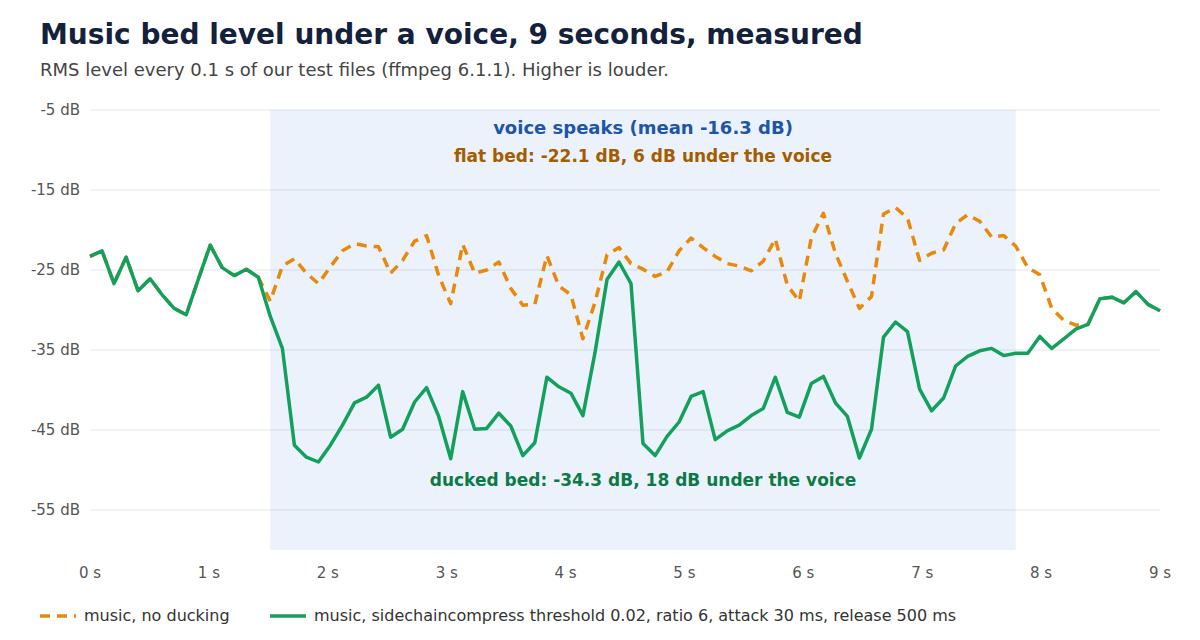
- Under speech, music at the same loudness as the voice buried it: in our test the flat bed sat only 6 dB below the voice. Ducking (a compressor that lowers the music only while the voice speaks) put it 18 dB below the voice and let it return to full level in the pauses.
- The tool has a fixed volume slider and no ducking. At 25% it lowered our music by 12 dB everywhere, pauses included. For real ducking use the one ffmpeg command below (tested) or an editor that has a ducking option.
- On YouTube, YouTube says music from its Audio Library is copyright-safe, and YouTube Studio lets you add music from its library of licensed songs to an uploaded video.
- Licensing basics are on the page. This is general information, not legal advice.
How do I add music to a video for free in my browser?
Use the Koldflux tool. It runs ffmpeg inside the browser tab, so both files stay on your device. The first run downloads the converter engine and is slower than later runs.
- Open the add audio to video tool and choose your video (up to 100 MB).
- Choose the music file: MP3, M4A, WAV, AAC, OGG or FLAC.
- Under "What to do with the original sound", pick "Mix the new audio with it" if the video has speech or sound you want to keep. Pick "Replace it with the new audio" if you want the music only.
- Set "New audio volume". In Mix mode a second slider sets the original sound. Start the music at 25% under speech, then listen.
- Tick "Repeat the audio if it is shorter than the video" so the music does not stop early.
- Press Add the audio, then Download MP4.
| Run | Result length | Picture vs source | Music alone (0 to 1.2 s) | During speech (1.8 to 6 s) |
|---|---|---|---|---|
| Replace, music at 100% | 18.018 s (the video length) | Identical | -27.8 dB | No speech (music only, -27.2 dB) |
| Mix, music at 25% over the voice | 18.000 s | Identical | -39.7 dB | -16.2 dB |
| Mix, music at 100% over the voice | 18.000 s | Identical | -27.8 dB | -16.0 dB |
Three runs of the live Koldflux tool, October 23, 2026 (ffprobe, volumedetect and an MD5 of the decoded picture on each download).
We ran this on the live site on October 23, 2026 (Playwright, headless Chromium) with an 18 second picture, a voice track and a 20 second piano excerpt (public domain composition, CC0 recording). Each job, including page load, took 2.2 to 2.3 seconds. That is a small test: we did not time 100 MB files, Safari or phones, and the tool has no start offset, fade or ducking.
Reading the table: 25% is 12 dB lower than 100% (we measured 11.9 dB between the two music-only windows). The voice alone measured -16.3 dB in this window, so the mix at 100% was only slightly louder than the voice. Whether the music is too loud depends on how far below the voice it sits, which the next section measures.
Free tools:Add audio to video (free, in your browser)Download our 6 second test voice (MP3)Download our 20 second CC0 test music (MP3)
How do I put music behind speech so people can still hear the voice?
Keep the music well below the voice while someone talks and let it come back up in the pauses. That is called ducking. We measured it on a 9 second test: a voice at -16.3 dB mean level speaking from 1.5 s to 7.9 s over a piano bed.
Without ducking the bed sat at -22.1 dB under the voice, 6 dB apart. With ffmpeg sidechaincompress it dropped to -34.3 dB, 18 dB apart, and was back at its normal level in the pauses (-22.9 dB before the voice, -26.7 dB after (9 second test files; the table below uses the 18 second files), against -26.4 dB for the flat bed). The 12 dB of ducking is our setting, not a rule: listen on your own speakers and headphones.
| Method | Music in the pauses | Music under the voice | What you get |
|---|---|---|---|
| Flat bed, 100% (Koldflux tool) | -27.8 dB before the voice, -29.6 dB after | Same as in the pauses | Music close to the voice; speech competes with it |
| Slider at 25% (Koldflux tool) | -39.7 dB before the voice, -41.7 dB after | Same as in the pauses | Voice clear, but the music is 12 dB lower everywhere and feels thin in the pauses |
| Ducking (ffmpeg command below) | -27.8 dB before the voice, -30.0 dB after | Dropped under the voice (see the chart) | Voice clear and full music in the pauses |
Our measurement, October 23, 2026, our own test files.
ffmpeg -i video.mp4 -i music.mp3 -filter_complex "[0:a]asplit=2[sc][voice];[1:a]volume=1.0[bed];[bed][sc]sidechaincompress=threshold=0.02:ratio=6:attack=30:release=500:makeup=1[duck];[voice][duck]amix=inputs=2:duration=first:normalize=0,afade=t=out:st=16:d=2[a]" -map 0:v -map "[a]" -c:v copy -c:a aac -b:a 192k out.mp4ffmpeg -i video.mp4 -stream_loop -1 -i music.mp3 -filter_complex "[0:a]asplit=2[sc][voice];[1:a]volume=1.0[bed];[bed][sc]sidechaincompress=threshold=0.02:ratio=6:attack=30:release=500:makeup=1[duck];[voice][duck]amix=inputs=2:duration=first:normalize=0,afade=t=out:st=16:d=2[a]" -map 0:v -map "[a]" -c:v copy -c:a aac -b:a 192k out.mp4Takeaway: if your video is all speech, a 25% slider is enough and needs no command. If the music should fill the gaps between lines, duck it. Editors with a ducking switch do the same job: see the CapCut, DaVinci Resolve and Premiere Pro pages linked below.
Which ducking settings did we try, and what did they do?
The command above uses threshold 0.02 and ratio 6. We also tried stronger settings on the same files. The numbers are the bed level in the voice window (1.8 to 6.0 s), against -22.1 dB for the flat bed.
| Threshold | Ratio | Bed under the voice | Drop from the flat bed |
|---|---|---|---|
| 0.02 | 6 | -34.3 dB | 12.2 dB |
| 0.02 | 10 | -34.7 dB | 12.6 dB |
| 0.01 | 20 | -39.9 dB | 17.8 dB |
| 0.005 | 20 | -45.6 dB | 23.5 dB |
Ffmpeg 6.1.1, October 23, 2026.
In the one-step command run on a voice video (the voice and the music already in two files), the picture was copied and matched the source, the length was 18.000 s, and the loop version with an 8 second music file also gave 18.000 s. The voice window measured -16.3 dB, the same as the voice alone, so the music did not raise it (voice alone -16.3 dB). The fade-out took the music from -26.5 dB (16.2 to 17.2 s) to -44.2 dB (17.5 to 18 s). Our test voice is clean and steady; a noisy or quiet recording will trigger the compressor differently, so adjust the threshold.
The general ffmpeg traps (-map, -shortest, codecs that cannot be copied) are measured on our add audio to a video guide, linked below.
How do I add music to a video on iPhone and Android?
On iPhone use iMovie, on Android use the editor you have: Google Photos, CapCut or another. The browser tool also works in a phone browser in principle, but we only tested it in desktop Chromium, so it is not tested on phones.
- iPhone, iMovie (Apple guide, iMovie 3.0.4, read October 23, 2026): open a project, tap Add Media, tap Audio, then Soundtracks (some need a download first) or My Music for songs synced to the phone, tap the track and then the Add Audio button.
- Songs shorter than 1 minute behave like a sound effect (blue clip). Background music is green and, by default, iMovie loops it to fit the movie (Apple).
- Music from iCloud Drive: Apple describes a separate "Add background music or other audio from iCloud Drive" route in the same guide.
- Android, Google Photos: TechCrunch reported on December 9, 2025 that the redesigned editor lets you add music to a clip, from the Photos music library, on Android and iOS (third party; we did not run it and found no official steps to cite).
- CapCut, Instagram Reels and YouTube Shorts have their own music sources and rules: see the app pages below.
We did not run iMovie or Google Photos (native apps), so the steps are from the vendor guide and a news report, not our reproduction. Menu names can differ by version and region.
How do I add music to a YouTube video?
Two cases. Before you upload, add the music in a video editor (above) and upload the MP4. After you upload, YouTube Studio on a computer can add a track from its Audio Library to the published video.
Steps from YouTube Help "Add an audio track to your video" (read in a browser on October 23, 2026): sign in to YouTube Studio, choose Content, open the video, click Editor on the left menu, select Audio, search and click Play to preview, click Add, drag the track to set its start, drag the box edges to set its length (zoom for precision), and click Save.
| Limit | What YouTube says |
|---|---|
| Mobile app | You can no longer change the audio track from the YouTube mobile app; use a computer |
| Video length | Only available for videos shorter than 6 hours |
| Views | With over 100,000 views you may not be able to save changes; this does not apply to YouTube Partner Program members |
| Undo | As of June 2025 you cannot undo saved changes with Revert to original |
| Tracks | The editor offers songs from the YouTube Audio Library, which YouTube says you can use in monetized videos |
Official, YouTube Help, read October 23, 2026.
The help page does not say whether you can import your own music file in this editor. We did not run Studio, so we state only what the page says.
Which music am I allowed to use in my video?
Adding a song does not give you the right to publish it. This is general information, not legal advice: platforms and rights holders decide what stays up, and a song you bought, streamed or downloaded is not automatically licensed for video. Use music you made, own or hold a license for.
| Source | What to check | Safe for YouTube? |
|---|---|---|
| Your own recording or composition | You wrote it and own the recording | Yes |
| YouTube Audio Library | Some tracks need a credit in the description (Creative Commons); filter "Attribution not required" to avoid it | YouTube says it is copyright-safe and not claimed through Content ID |
| Public domain or CC0 recordings | The composition and the recording must both be free of rights. CC0 means the owner waived rights; check the file page | Commons marks many of these files as free on the uploader's declaration. Content ID can still match a claim; we have not tested that. |
| Stock library subscription | Read the license: video use, platform, monetization, length of the license | Depends on the license |
| Commercial songs from streaming or stores | Buying or streaming a track does not license it for your video | No. It can lead to a claim or removal. |
YouTube rows are official, others are our summary of the license pages linked in the sources.
Our own test music is Beethoven's 32 Variations in C minor (WoO 80) from a Wikimedia Commons recording: the composition is public domain and the recording is released CC0 by its uploader, a claim we could not verify beyond the file page; the file page and the license are in the sources. YouTube Help says Content ID scans every upload against files submitted by copyright owners and a match can block, monetize or track the video, so check even free music you did not make.
Which app or tool fits which job?
| If you want to | Use | Why |
|---|---|---|
| Put one track on a finished video, no install | Koldflux add audio tool | Two files in, picture untouched, nothing uploaded |
| Duck music under speech and fade it out once | The ffmpeg command above | Tested here; the browser tool has no ducking, fade or start offset |
| Edit visually with a timeline on a computer | DaVinci Resolve or Premiere Pro | See the app pages below |
| Edit on a phone with a library of trending sounds | CapCut | See the CapCut page below |
| Add a platform's own sounds | Instagram Reels or YouTube Shorts | Each app has its own library and rules, see the pages below |
| Change the audio of a video already on YouTube | YouTube Studio editor | Computer only, with the limits in the table above |
Our suggestion, based on the tests and help pages above.
Kapwing, Canva and other online editors add music too and bring their own libraries. We could read Kapwing's page on October 23, 2026 (it covers background music, Spotify, free use and phones) but found no mention of ducking or levels; Canva, Clideo and VEED's equivalent pages blocked our automated read or did not exist, so we state nothing about them.
Limits and how we checked
- Tested by us on October 23, 2026: ffmpeg 6.1.1 on Ubuntu with a Kokoro synthetic voice (our sentence) and a 20 second excerpt of a CC0 piano recording of a public domain composition. Levels were read with volumedetect (mean volume), loudness with ebur128 and the picture with an MD5 of the decoded stream. Commands and output are in the test log linked in the sources.
- Tested by us: the live Koldflux add audio tool, three runs in headless Chromium on the production site. We did not test Safari, Firefox, phones or files near the 100 MB limit.
- Read, not run: the YouTube Studio steps and limits (YouTube Help) and the iMovie steps (Apple) come from the vendors' help pages, read in headless Chromium on October 23, 2026. The Google Photos music feature is from a news report.
- Not covered: Spotify and Apple Music songs (their terms do not license video use, and we do not explain how to rip them), AI music generators, beat-synced editing, and music in live streams.
- Levels depend on your files: a clean synthetic voice and one piano piece are not a podcast or a noisy street clip. We measured levels, not listening quality, and the 12 dB of ducking is our setting.
- Last checked October 23, 2026.
Do it in your browser
Free Koldflux tool, no account needed.
Questions people ask
How do I add music to a video for free?
Open the free Koldflux add audio to video tool, choose a video and a music file, pick Mix, set the volume and download the MP4. It runs in your browser, nothing is uploaded and the picture is copied. The limit is 100 MB per file as stated on the tool page.
How do I put music under a voice so the voice stays clear?
Lower the music, or duck it. In the Koldflux tool a 25% music volume gave music 12 dB lower than 100% in our run. With the ffmpeg command on this page the music dropped 12 dB only while the voice spoke and came back in the pauses.
Can I add music to a video on my phone?
Yes. On iPhone, iMovie: Add Media, Audio, then Soundtracks or My Music (Apple guide, read October 23, 2026). On Android use Google Photos, CapCut or another editor. We did not run the native apps.
Can I add music to a YouTube video after uploading it?
Yes, from a computer: YouTube Studio, Content, the video, Editor, Audio, then pick an Audio Library track and Save. You cannot do it in the mobile app, and limits apply for videos over 6 hours or 100,000 views (YouTube Help, read October 23, 2026).
Can I use any song from Spotify or YouTube Music?
No. Streaming a song does not license it for your video. Use your own music, the YouTube Audio Library, a stock library whose license covers video, or public domain and CC0 recordings. This is general information, not legal advice.
What if my music is shorter than the video?
Tick "Repeat the audio" in the Koldflux tool, or use -stream_loop -1 before the music input in ffmpeg. Without it the last part of the video is silent.
How loud should background music be?
We found no official number to cite. In our test, music 6 dB below the voice competed with it and 18 dB below was clear. Treat these as our suggestion and check on headphones and a phone speaker.
Related
Sources and how we checked
- Koldflux test log: ducking levels, three live runs of the add audio tool, one-step ducking command (ffmpeg 6.1.1, October 23, 2026) (checked 2026-10-23)
- YouTube Help: Add an audio track to your video (official, read in headless Chromium) (checked 2026-10-23)
- YouTube Help: Use music and sound effects from the Audio Library (official) (checked 2026-10-23)
- YouTube Help: How Content ID works (official) (checked 2026-10-23)
- Apple Support: Add music and soundtracks in iMovie on iPhone (iMovie 3.0.4 guide) (checked 2026-10-23)
- TechCrunch: Google Photos launches new video editing tools (third party, December 9, 2025) (checked 2026-10-23)
- FFmpeg Filters documentation: sidechaincompress, amix, afade (checked 2026-10-23)
- Creative Commons: CC0 1.0 Universal public domain dedication (checked 2026-10-23)
- Wikimedia Commons: Beethoven, 32 Variations in C minor WoO 80 (file page: composition public domain, recording CC0 by uploader; our test music) (checked 2026-10-23)
- US Copyright Office: Copyright Basics, Circular 1 (general information, not legal advice) (checked 2026-10-23)
- Kapwing: Add audio to video (third party, read for coverage comparison) (checked 2026-10-23)
We made a 6 second synthetic voice with Kokoro and cut 20 seconds from a CC0 piano recording of a public domain composition, set the voice to -16 LUFS and the music bed to -20 LUFS, mixed them flat and with ffmpeg sidechaincompress, and measured mean levels in fixed windows with volumedetect. We then ran the live Koldflux add audio tool three times in headless Chromium and checked the downloads with ffprobe, volumedetect and a picture MD5, and ran the one-step ducking command on a voice video. The YouTube and Apple steps come from their help pages read in headless Chromium on October 23, 2026. The Google Photos item is a news report and is labeled as such.