Pictory alternatives
Koldflux and four other tools that turn text or recordings into social video, compared on price, free plan and limits from each vendor’s own pricing page. Including where Pictory is still the better choice.
The best Pictory alternative depends on your input. To turn a recording, idea or script into reviewed Shorts and carousel posts, use Koldflux (from $19/month). For blog-to-video with a free plan, Lumen5 (paid from $19/month billed yearly). For AI video inside a full editor, VEED (from $12/month billed yearly). For clips from long videos, OpusClip. For transcript editing, Descript.
· and 3 more
· VEED pricing (checked 2026-09-24) · OpusClip pricing (checked 2026-09-24) · Descript pricing (checked 2026-09-24)Checked by Koldflux · updated 2026-09-24 · prices and limits read from each vendor's pricing page
At a glance
| Tool | Best for | Free plan | Paid from | Entry plan includes |
|---|---|---|---|---|
| Koldflux Studio | turning one recording, idea or script into reviewed Shorts and carousel posts | no free plan; the free browser tools need no account | Lite $19/month | 3 short-video exports, 3 carousel/post exports and 8 source minutes a month, 1080p |
| Pictory | turning scripts, articles, documents and slides into stock-footage videos with AI voiceover | no free plan; a 14-day trial with 15 video minutes, 3 video projects and 720p export | Starter $25/month billed annually ($29 monthly) | 200 video minutes a month, 1080p, no watermark, 60 minutes of ElevenLabs AI voices |
| Lumen5 | turning blog posts, scripts and ideas into branded business videos | 5 videos a month up to 2 minutes, 720p, with a Lumen5 branded outro | Basic $19/month billed yearly | unlimited videos up to 10 minutes at 720p with no Lumen5 branding; 1080p starts on Starter ($59/month billed yearly) |
| VEED | an all-in-one browser editor with subtitles, translation, AI avatars and AI voices | free account; exports carry a VEED watermark | Creator $12/user/month billed yearly ($147 a year) | 6,000 AI credits, unlimited auto subtitles, no watermark |
| OpusClip | automatically cutting many short clips out of one long video | 60 credits a month, clips up to 1080p with a watermark, no editing, exportable for 3 days | Starter $15/month (monthly only); Pro $14.50/month billed annually ($29 monthly) | 150 credits a month on Starter; 300 on Pro, rolling over for 2 months |
| Descript | editing long videos and podcasts by editing the transcript like a document | 60 media minutes a month, 720p export, 100 one-time AI credits | Hobbyist $16/month billed annually ($24 monthly) | 10 media hours a month, 1080p watermark-free export |
· and 4 more
· VEED pricing (checked 2026-09-24) · VEED help: watermark (checked 2026-09-24) · OpusClip pricing (checked 2026-09-24) · Descript pricing (checked 2026-09-24)What Pictory costs and where it limits you
- There is no free plan: the 14-day trial includes 15 video minutes, 3 video projects and 720p export.
- Starter is $29/month or $25/month billed annually, with 200 video minutes a month (2,400 a year upfront on annual). Videos made from a script or URL are capped at 30 minutes.
- The lower Professional price ($35/month billed annually, against $59 monthly) is labeled an exclusive Pictory 2.0 offer.
- Pictory says it does not refund paid subscriptions; you can cancel before renewal.
When Pictory is still the better choice
- You turn articles, documents, PDFs or slide decks into video: Pictory takes URLs, docs, PDFs and PowerPoint as input. Koldflux starts from a recording, an idea or a script.
- You need stock footage and voiceover in one place: every plan includes Getty Images and Storyblocks stock and ElevenLabs AI voices in 29 languages (60 minutes a month on Starter). Koldflux is not a stock library or a text-to-speech product.
- You make longer videos: script-to-video runs up to 30 minutes on paid plans. Koldflux makes Shorts and carousel posts.
- You need volume: Starter’s 200 video minutes a month is far more than Koldflux Lite’s 3 Short exports.
- You want avatars or voice cloning: Professional adds custom avatars and voice cloning.
Koldflux Studio
Best for turning one recording, idea or script into reviewed Shorts and carousel posts. Free plan: no free plan; the free browser tools need no account. Paid from Lite $19/month, which includes 3 short-video exports, 3 carousel/post exports and 8 source minutes a month, 1080p.
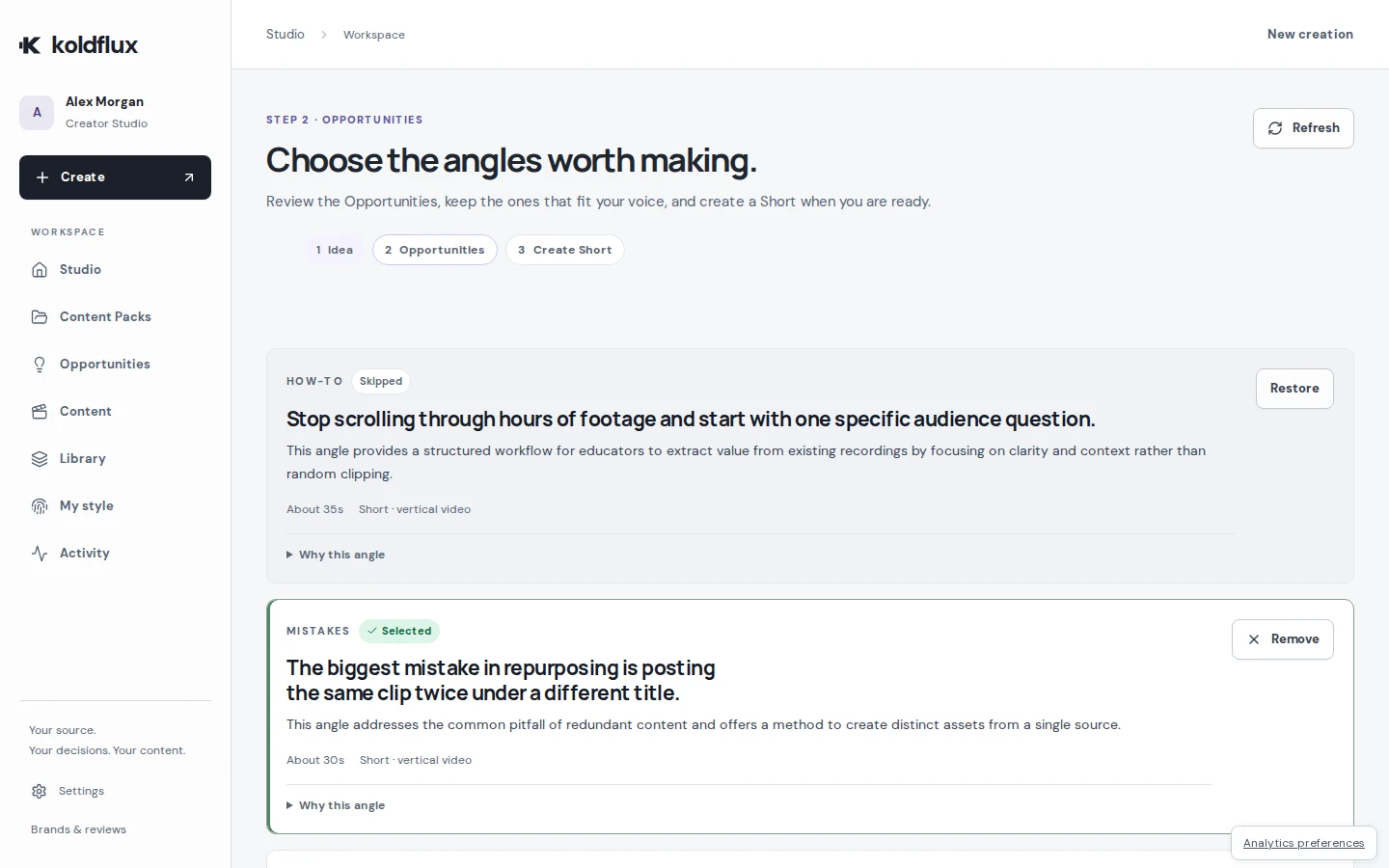
Pictory builds a video from your text with stock footage. Koldflux focuses on social outputs: it suggests Opportunities in your source, makes the Shorts and carousel posts you pick, and has you approve each version before export.
- Starts from a long video, a rough idea or a finished script
- You pick the angles (Opportunities) before anything is generated, then approve the exact version to export
- Makes Shorts and carousel posts from the same source and keeps them together in a Content Pack
- Free browser tools (converter, compressor, trimmer) need no account and add no watermark
- Watch out: not a timeline or text-based editor
- Watch out: far fewer source minutes per dollar than clip tools and editors: it is built for a few finished pieces a month, not hours of footage
- Watch out: no automatic publishing or scheduling to social platforms, and exports stop at 1080p
Choose it if you start from a recording, an idea or a finished script and want social outputs: Shorts and carousel posts you approve one by one. Skip it if you start from articles, PDFs or slides, or need stock footage, avatars or long videos.
Lumen5
Best for turning blog posts, scripts and ideas into branded business videos. Free plan: 5 videos a month up to 2 minutes, 720p, with a Lumen5 branded outro. Paid from Basic $19/month billed yearly, which includes unlimited videos up to 10 minutes at 720p with no Lumen5 branding; 1080p starts on Starter ($59/month billed yearly).
Lumen5 Free allows 5 videos a month up to 2 minutes at 720p with a Lumen5 outro. Yearly billing saves 25%; the monthly price was not shown on the page we read.
- Blog-to-video and idea-to-video workflows designed for business teams
- Automated captions on every plan, including Free
- Licensed stock library and 1,000+ AI voices on paid plans
- Watch out: basic exports stop at 720p
- Watch out: only yearly prices are shown; yearly billing saves 25%
Choose it if you turn blog posts into branded business videos and want a free plan to start. Skip it if you need 1080p on the cheapest paid plan: Basic exports 720p, and 1080p starts on Starter at $59/month billed yearly.
VEED
Best for an all-in-one browser editor with subtitles, translation, AI avatars and AI voices. Free plan: free account; exports carry a VEED watermark. Paid from Creator $12/user/month billed yearly ($147 a year), which includes 6,000 AI credits, unlimited auto subtitles, no watermark.
VEED Creator is $12/user/month billed yearly ($147 a year) with unlimited auto subtitles.
- A browser timeline editor plus subtitles, translation, AI avatars, AI voices and screen recording
- Unlimited auto subtitles from the Creator plan
- Pro ($22/user/month billed yearly) translates into 50+ languages and includes up to 144 hours a year of AI voice
- Watch out: free exports carry a VEED watermark that you cannot move or remove
- Watch out: the pricing page shows yearly prices per user; a monthly price was not shown when we checked
Choose it if you want text-to-video, AI avatars and AI voices inside a full editor. Skip it if you need watermark-free exports on a free plan.
OpusClip
Best for automatically cutting many short clips out of one long video. Free plan: 60 credits a month, clips up to 1080p with a watermark, no editing, exportable for 3 days. Paid from Starter $15/month (monthly only); Pro $14.50/month billed annually ($29 monthly), which includes 150 credits a month on Starter; 300 on Pro, rolling over for 2 months.
OpusClip is built only for long video to short clips; Starter is $15/month for 150 credits.
- Built specifically for turning long videos into short clips, with a Virality Score on each clip
- AI animated captions in 20+ languages and auto-posting to YouTube Shorts, TikTok and Instagram Reels from Starter
- Pro adds a social media scheduler and export to Adobe Premiere Pro and DaVinci Resolve
- Watch out: a clip tool rather than a general editor
- Watch out: free clips carry a watermark and stop being exportable after 3 days
Choose it if you mainly used Pictory’s highlights feature to cut long recordings into clips. Skip it if you start from text rather than video.
Descript
Best for editing long videos and podcasts by editing the transcript like a document. Free plan: 60 media minutes a month, 720p export, 100 one-time AI credits. Paid from Hobbyist $16/month billed annually ($24 monthly), which includes 10 media hours a month, 1080p watermark-free export.
Descript and Pictory both offer text-based editing of recordings; Descript is a full multitrack editor, while Pictory is built to go from text to a finished video.
- Text-based editing: cut video by deleting words in the transcript
- Transcription in 25 languages on every plan, including Free
- Studio Sound, filler-word removal, eye contact and a full multitrack editor
- 4K export from the Creator plan ($24/month annual)
- Watch out: a full editor to learn when all you need is a few clips
- Watch out: media hours and AI credits are separate allowances that run out independently
Choose it if you edit your own recordings by their transcript. Skip it if you want videos assembled from text and stock footage.
Koldflux vs Pictory in detail
| Koldflux | Pictory | |
|---|---|---|
| Core workflow | Pick Opportunities from a recording, idea or script, then approve finished Shorts and posts | Turn a script, URL or document into a video with stock footage and AI voiceover |
| Starting point | A long video, a rough idea or a finished script | Idea, script, URL, document, PDF, PowerPoint, audio, image or a recording |
| Free plan | no free plan; the free browser tools need no account | no free plan; a 14-day trial with 15 video minutes, 3 video projects and 720p export |
| Entry plan | Lite $19/month: 3 short-video exports, 3 carousel/post exports and 8 source minutes a month, 1080p | Starter $25/month billed annually ($29 monthly): 200 video minutes a month, 1080p, no watermark, 60 minutes of ElevenLabs AI voices |
| Carousel / post exports | Included on every plan, from the same source as the Shorts | Not listed on the pricing page |
| Formats | Vertical Shorts and carousel posts | Landscape, portrait and square videos |
| Review step | Approve the exact version before it enters the Content Pack | Edit scenes in the editor |
| Highest export quality | 1080p | 1080p on paid plans, 720p on the trial |
How we compared
Every price, allowance and free-plan limit on this page was read from the vendor’s own pricing page on 2026-09-24, or from its help center where the pricing page was silent; each source is linked with its date. Where a vendor did not state a limit, we say so instead of guessing. We did not run paid tests of the other tools, and there are no ratings or reviews here. Koldflux publishes this page and is listed first; its own numbers come from the same plan list that powers checkout.
Frequently asked questions
Is Pictory AI free?
No. Pictory has a 14-day free trial with 15 video minutes, 3 video projects and 720p export, then paid plans from $25/month billed annually or $29 monthly (checked 2026-09-24).
Is there a free Pictory alternative?
Lumen5 has a free plan: 5 videos a month up to 2 minutes at 720p, with a Lumen5 outro. Koldflux has no free plan; its browser tools for converting, compressing and trimming video are free with no watermark and no account.
Is there a Pictory alternative with no watermark?
Every paid plan in this comparison exports without a watermark, including Koldflux. On free plans, Lumen5 adds a branded outro and VEED a watermark. Microsoft Clipchamp exports up to 1080p free with no watermark, but it is a manual editor rather than a text-to-video tool.
Pictory vs Lumen5: which is better?
Pictory accepts more inputs (URL, documents, PDF, PowerPoint, recordings) and exports 1080p from its first paid plan. Lumen5 has a free plan and a cheaper yearly entry ($19/month), but exports 720p until Starter ($59/month billed yearly).
Pictory vs Descript: what is the difference?
Pictory builds new videos from text and stock footage; Descript edits recordings you already have by editing the transcript. Pick Pictory if you start from words, Descript if you start from footage.
Turn one idea into a week of posts
Koldflux Studio shows you the angles worth making, turns the ones you pick into Shorts and carousel posts, and lets you approve each version before you export the Content Pack.
- 1 · Recording, idea or script
- 2 · Pick the angles
- 3 · Review and approve
- 4 · Export Shorts and carousels
More comparisons
Vendor names are trademarks of their owners. Koldflux is not affiliated with them. Found an outdated price? Tell us.