Vizard AI alternatives
Koldflux and four other tools for turning long videos into short clips and posts, compared on price, free plan and limits from each vendor’s own pricing page. Including where Vizard is still the better choice.
The best Vizard alternative depends on what you need. To pick the angles yourself and approve each Short and carousel post before export, use Koldflux (from $19/month). For the closest match, OpusClip (Pro $14.50/month billed annually). For pay-per-clip pricing, Klap (from $14/month billed yearly). For captions and B-roll on short videos, Submagic (from $19/month). For transcript editing, Descript.
· and 3 more
· Klap pricing (checked 2026-09-24) · Submagic pricing (checked 2026-09-24) · Descript pricing (checked 2026-09-24)Checked by Koldflux · updated 2026-09-24 · prices and limits read from each vendor's pricing page
At a glance
| Tool | Best for | Free plan | Paid from | Entry plan includes |
|---|---|---|---|---|
| Koldflux Studio | turning one recording, idea or script into reviewed Shorts and carousel posts | no free plan; the free browser tools need no account | Lite $19/month | 3 short-video exports, 3 carousel/post exports and 8 source minutes a month, 1080p |
| Vizard | clipping long videos into short clips and scheduling them to social accounts | 60 credits a month (1 credit is 1 minute of uploaded video), 720p export with a watermark, 3-day storage | Creator $14.50/month billed yearly ($29 monthly) | 600 credits a month, 4K export, no watermark, scheduling to 6 social accounts, 100 GB storage |
| OpusClip | automatically cutting many short clips out of one long video | 60 credits a month, clips up to 1080p with a watermark, no editing, exportable for 3 days | Starter $15/month (monthly only); Pro $14.50/month billed annually ($29 monthly) | 150 credits a month on Starter; 300 on Pro, rolling over for 2 months |
| Klap | turning long videos into short clips, priced by the clips you generate | one free video to try it | Basic $14/month billed yearly | 100 clips a month; every plan includes AI clipping, analytics and unlimited social accounts |
| Submagic | animated captions, B-roll and quick AI edits on short videos | free trial with no credit card; the pricing page does not list the trial limits | Starter $19/month billed monthly (annual billing saves up to 41%) | 15 videos a month up to 2 minutes each, 1080p at 30 FPS, no watermark |
| Descript | editing long videos and podcasts by editing the transcript like a document | 60 media minutes a month, 720p export, 100 one-time AI credits | Hobbyist $16/month billed annually ($24 monthly) | 10 media hours a month, 1080p watermark-free export |
· and 4 more
· Klap pricing (checked 2026-09-24) · Klap FAQ (checked 2026-09-24) · Submagic pricing (checked 2026-09-24) · Descript pricing (checked 2026-09-24)What Vizard costs and where it limits you
- Free exports are 720p with a watermark, capped at 10 minutes and stored for 3 days; free uploads are capped at 60 minutes and 1 GB.
- Creator is $29/month, or $14.50/month billed yearly ($174 a year), for 600 credits a month. 1 credit is 1 minute of uploaded video, so a 45-minute podcast uses 45 credits whether you keep one clip or ten.
- Team features (shared workspace, brand kit, extra seats at $5/month each) start on Business: $19.50/month billed yearly ($234 a year) or $39 monthly.
- Paid plans renew automatically at the end of each billing cycle until you cancel.
When Vizard is still the better choice
- You clip a lot of footage: Creator’s 600 upload minutes a month for $14.50/month billed yearly is far more source time than Koldflux Lite’s 8 minutes for $19.
- You want to schedule posts: Creator schedules to 6 social accounts and Business to 20. Koldflux does not publish or schedule.
- You want 4K: Vizard exports 4K on paid plans. Koldflux exports 1080p.
- You want to try before paying: Vizard’s free plan includes 60 credits a month, AI clips, auto subtitles and the full editor. Koldflux has no free plan.
- You want subtitle files: paid plans download transcripts as TXT and SRT.
Koldflux Studio
Best for turning one recording, idea or script into reviewed Shorts and carousel posts. Free plan: no free plan; the free browser tools need no account. Paid from Lite $19/month, which includes 3 short-video exports, 3 carousel/post exports and 8 source minutes a month, 1080p.
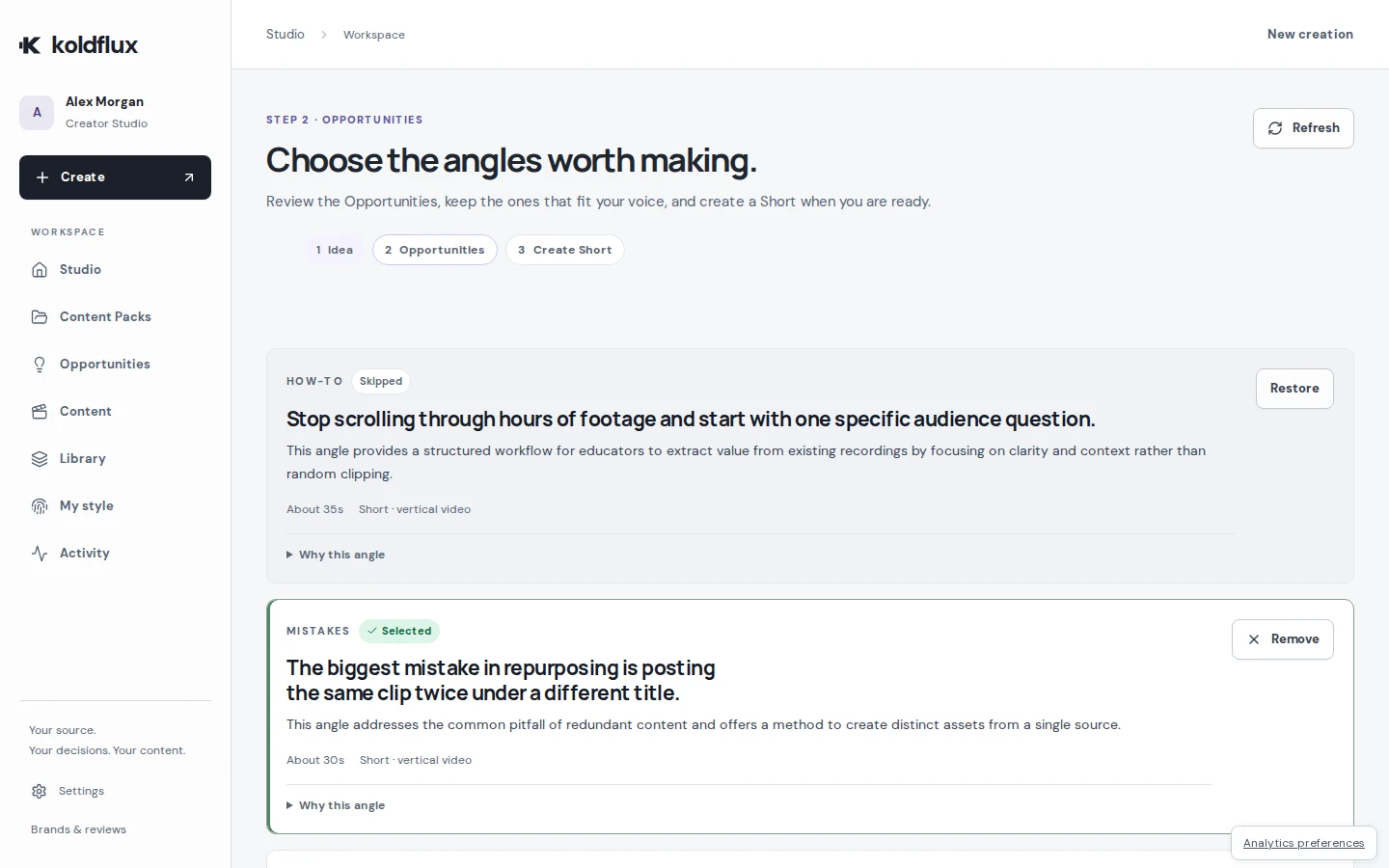
Vizard finds clips for you and charges by upload minute. Koldflux asks you to pick Opportunities first and makes only those, then lets you turn the same angle into a carousel post as well as a Short. You approve each version before it is exported.
- Starts from a long video, a rough idea or a finished script
- You pick the angles (Opportunities) before anything is generated, then approve the exact version to export
- Makes Shorts and carousel posts from the same source and keeps them together in a Content Pack
- Free browser tools (converter, compressor, trimmer) need no account and add no watermark
- Watch out: not a timeline or text-based editor
- Watch out: far fewer source minutes per dollar than clip tools and editors: it is built for a few finished pieces a month, not hours of footage
- Watch out: no automatic publishing or scheduling to social platforms, and exports stop at 1080p
Choose it if you start from a recording, an idea or a script and want to choose which angles get made, approve each Short or carousel post, and export a Content Pack. Skip it if you need many clips from hours of uploads, scheduling, 4K, or a free plan.
OpusClip
Best for automatically cutting many short clips out of one long video. Free plan: 60 credits a month, clips up to 1080p with a watermark, no editing, exportable for 3 days. Paid from Starter $15/month (monthly only); Pro $14.50/month billed annually ($29 monthly), which includes 150 credits a month on Starter; 300 on Pro, rolling over for 2 months.
OpusClip Pro costs the same as Vizard Creator ($14.50/month billed annually, $29 monthly) with 300 credits a month that roll over for 2 months. OpusClip also sells a monthly-only Starter plan at $15, cheaper than Vizard’s $29 monthly price.
- Built specifically for turning long videos into short clips, with a Virality Score on each clip
- AI animated captions in 20+ languages and auto-posting to YouTube Shorts, TikTok and Instagram Reels from Starter
- Pro adds a social media scheduler and export to Adobe Premiere Pro and DaVinci Resolve
- Watch out: a clip tool rather than a general editor
- Watch out: free clips carry a watermark and stop being exportable after 3 days
Choose it if you want an auto-clipper that scores clips, auto-posts from Starter and exports to Premiere Pro or DaVinci Resolve on Pro. Skip it if you want free clips you can still export after 3 days.
Klap
Best for turning long videos into short clips, priced by the clips you generate. Free plan: one free video to try it. Paid from Basic $14/month billed yearly, which includes 100 clips a month; every plan includes AI clipping, analytics and unlimited social accounts.
Klap Basic is $14/month billed yearly for 100 clips a month, with unlimited social accounts and analytics on every plan.
- Priced per clip generated rather than per minute uploaded
- Unlimited social accounts and analytics on every plan
- Watch out: the free trial is a single video
- Watch out: only yearly prices were shown on the pricing page when we checked
Choose it if you would rather budget by clips made than by minutes uploaded. Skip it if you want a free plan: Klap’s free trial is one video.
Submagic
Best for animated captions, B-roll and quick AI edits on short videos. Free plan: free trial with no credit card; the pricing page does not list the trial limits. Paid from Starter $19/month billed monthly (annual billing saves up to 41%), which includes 15 videos a month up to 2 minutes each, 1080p at 30 FPS, no watermark.
Submagic Starter is $19/month billed monthly for 15 videos a month at 1080p with no watermark.
- Caption templates, B-roll and text-based trimming on every paid plan
- Pro ($39/month) adds auto zooms, silence and bad-take removal, clean audio and social publishing
- Business ($69/month) raises videos to 30 minutes and exports 4K at 60 FPS
- Watch out: starter caps each video at 2 minutes
- Watch out: publishing to social platforms starts on Pro
Choose it if you mostly need animated captions, zooms and B-roll on clips you already have. Skip it if you upload long recordings on the entry plan: Starter caps each video at 2 minutes.
Descript
Best for editing long videos and podcasts by editing the transcript like a document. Free plan: 60 media minutes a month, 720p export, 100 one-time AI credits. Paid from Hobbyist $16/month billed annually ($24 monthly), which includes 10 media hours a month, 1080p watermark-free export.
Descript counts media hours instead of clips: Hobbyist includes 10 a month for $16/month billed annually.
- Text-based editing: cut video by deleting words in the transcript
- Transcription in 25 languages on every plan, including Free
- Studio Sound, filler-word removal, eye contact and a full multitrack editor
- 4K export from the Creator plan ($24/month annual)
- Watch out: a full editor to learn when all you need is a few clips
- Watch out: media hours and AI credits are separate allowances that run out independently
Choose it if you want to edit the full recording by its transcript before choosing clips. Skip it if you want clips found and cut for you.
Koldflux vs Vizard in detail
| Koldflux | Vizard | |
|---|---|---|
| Core workflow | Pick Opportunities from a recording, idea or script, then approve finished Shorts and posts | Upload a long video; AI finds and cuts clips |
| Starting point | A long video, a rough idea or a finished script | A video upload (up to 60 minutes on Free, 600 on paid plans) |
| How usage is counted | Short-video exports, carousel/post exports and source minutes, counted separately | 1 credit per minute of uploaded video |
| Free plan | no free plan; the free browser tools need no account | 60 credits a month (1 credit is 1 minute of uploaded video), 720p export with a watermark, 3-day storage |
| Entry plan | Lite $19/month: 3 short-video exports, 3 carousel/post exports and 8 source minutes a month, 1080p | Creator $14.50/month billed yearly ($29 monthly): 600 credits a month, 4K export, no watermark, scheduling to 6 social accounts, 100 GB storage |
| Carousel / post exports | Included on every plan, from the same source as the Shorts | Not listed on the pricing page (AI post suggestions are listed) |
| Subtitles | Captions from the transcript on Shorts | Auto subtitling and translation; TXT and SRT download on paid plans |
| Publishing | No | Direct publishing and scheduling (6 accounts on Creator, 20 on Business) |
| Highest export quality | 1080p | 4K on paid plans, 720p on Free |
How we compared
Every price, allowance and free-plan limit on this page was read from the vendor’s own pricing page on 2026-09-24, or from its help center where the pricing page was silent; each source is linked with its date. Where a vendor did not state a limit, we say so instead of guessing. We did not run paid tests of the other tools, and there are no ratings or reviews here. Koldflux publishes this page and is listed first; its own numbers come from the same plan list that powers checkout.
Frequently asked questions
Is Vizard AI completely free?
No. Vizard has a free plan with 60 credits a month (60 minutes of uploads), 720p exports with a watermark and 3-day storage. Watermark-free 4K export starts on Creator at $14.50/month billed yearly or $29 monthly (checked 2026-09-24).
How much does Vizard AI cost?
Free; Creator $29/month or $14.50/month billed yearly ($174 a year); Business $39/month or $19.50/month billed yearly ($234 a year). Both paid plans start at 600 credits a month.
What is Vizard AI used for?
Turning long videos such as podcasts and event recordings into short clips with subtitles, then editing and scheduling them to social accounts.
Is Vizard AI legit?
Vizard is a real product from Vizard, Corp. with a public pricing page, a help center and a free plan, so you can test it on your own footage before paying. Paid plans renew automatically until you cancel them in the workspace subscription settings.
What is the best free alternative to Vizard?
OpusClip’s free plan (60 credits a month, clips up to 1080p with a watermark, exportable for 3 days) is the closest. Klap lets you try one video. For file jobs such as converting or compressing a video, Koldflux’s browser tools are free with no watermark and no sign-up.
Turn one idea into a week of posts
Koldflux Studio shows you the angles worth making, turns the ones you pick into Shorts and carousel posts, and lets you approve each version before you export the Content Pack.
- 1 · Recording, idea or script
- 2 · Pick the angles
- 3 · Review and approve
- 4 · Export Shorts and carousels
More comparisons
Vendor names are trademarks of their owners. Koldflux is not affiliated with them. Found an outdated price? Tell us.