Formats and sizes
Aspect ratio calculator and the right video size for every platform
Short answer
Divide 1920 and 1080 by their greatest common divisor, 120, to get 16:9. Do the same for any size with the free calculator linked in the first section, and use the size picker below to get the ratio, pixels and safe-zone note for a platform. Vertical short video on TikTok, Reels and Shorts uses 9:16 at 1080 x 1920.
Pick a platform and placement
TikTok, In-Feed ad, standard: 9:16, 1080 x 1920 px
Keep text and logos inside the 840 x 1020 px area that remains after the margins below.
| Edge | Percent | Pixels |
|---|---|---|
| Top | 12.5% | 240 px |
| Bottom | 34.375% | 660 px |
| Left | 11.111% | 120 px |
| Right | 11.111% | 120 px |
Official guidance. Scope: In-Feed ads, standard (no anchor), 9:16. Source: TikTok Auction In-Feed Ads: Safe zone files (TikTok Ads Help), checked 2026-10-03. Published for TikTok In-Feed ads. Organic posts can differ, and the right-hand button column (shaded) is excluded as well.
Formula: pixels = round(percent / 100 x frame side), using the frame height (1920 px) for top and bottom and the frame width (1080 px) for left and right. Ratio = width : height after dividing both by their greatest common divisor. The 1080 x 1920 frame is the 9:16 size short-form apps display; percentages are the platform margins from the source above. Only platforms and placements with verified published margins are listed.
Key takeaways
- 1920 x 1080 and 1280 x 720 are both 16:9; 1080 x 1920 and 2880 x 5120 are both 9:16. The ratio is the shape, not the size.
- To find a missing side, multiply: height = width x ratio height / ratio width (1080 wide at 4:5 is 1080 x 5 / 4 = 1350 tall).
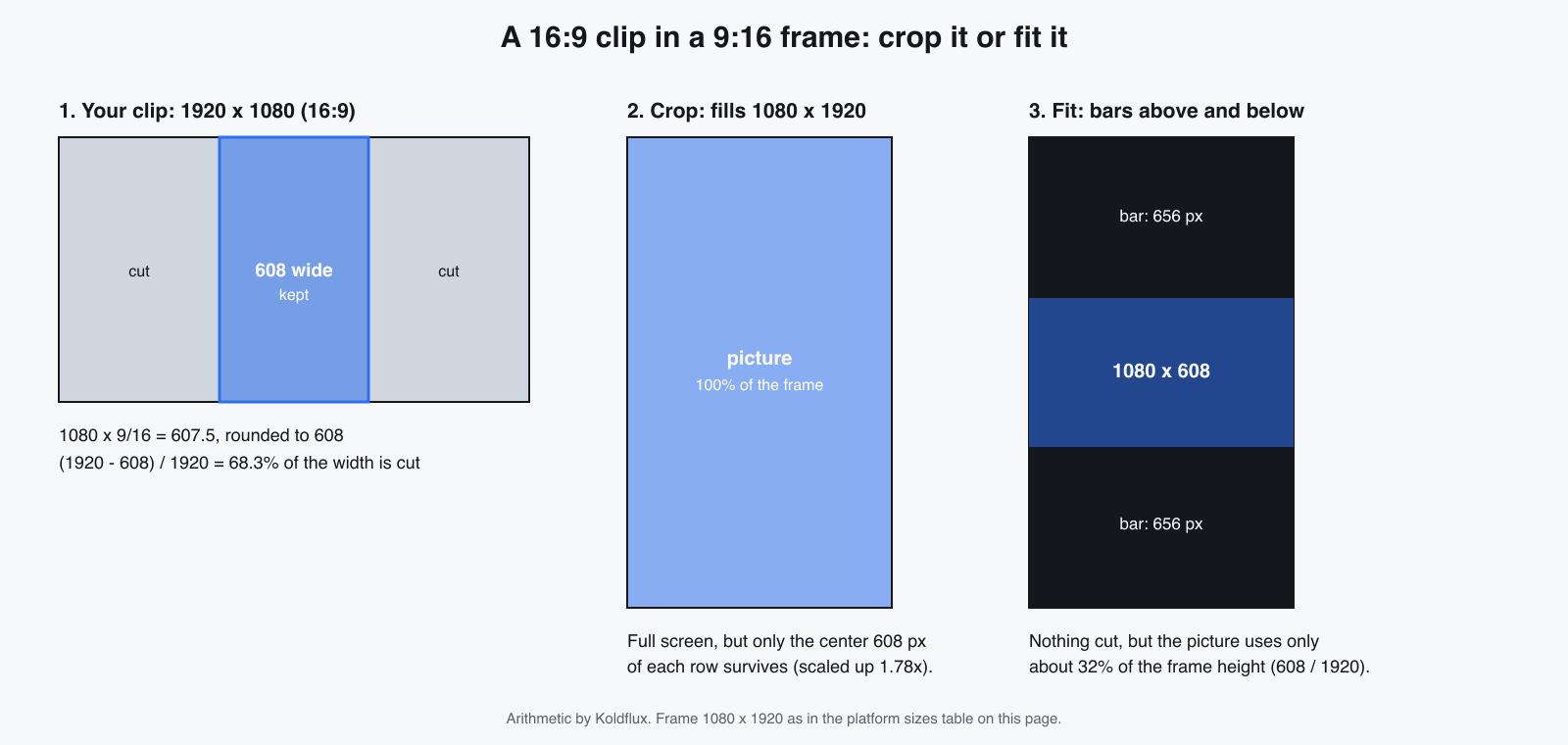
- If the shape does not match the frame you either crop (fills the screen, loses the edges) or fit (keeps everything, adds bars). A 16:9 clip in a 1080 x 1920 frame keeps only 608 of its 1920 columns when cropped, or fills about 32% of the frame height when fitted.
- Platform safe zones are published for ads and can differ for organic posts; the table below gives each margin in percent and in pixels at 1080 x 1920.
How do you calculate an aspect ratio from width and height?
An aspect ratio is width to height written as two whole numbers with the common factor removed. Find the greatest common divisor (GCD) of the two sides, then divide both by it. For 1920 x 1080 the GCD is 120, so the ratio is 1920 / 120 : 1080 / 120 = 16:9.
If you do not want to find a GCD, divide width by height and compare the decimal with the common shapes: 16:9 is 1.778, 4:5 is 0.8, 1:1 is 1 and 9:16 is 0.5625.
| Size | GCD | Reduced ratio | Width / height |
|---|---|---|---|
| 1920 x 1080 | 120 | 16:9 | 1.7778 |
| 1280 x 720 | 80 | 16:9 | 1.7778 |
| 3840 x 2160 | 240 | 16:9 | 1.7778 |
| 1080 x 1920 | 120 | 9:16 | 0.5625 |
| 2880 x 5120 | 320 | 9:16 | 0.5625 |
| 1080 x 1350 | 270 | 4:5 | 0.8 |
| 1080 x 1080 | 1080 | 1:1 | 1 |
| 750 x 1334 | 2 | 375:667 (not a standard ratio) | 0.5622 |
The last row matters: 750 x 1334 is the size of one of the feed ad files TikTok publishes and is not exactly 9:16 (0.5622 against 0.5625). Close ratios are fine to upload, but a calculator that rounds will call them 9:16 while an exact one will not.
Free tool:Free aspect ratio calculator
How do you find the missing width or height for a ratio?
Keep the ratio and change one side: new height = new width x ratio height / ratio width, and new width = new height x ratio width / ratio height. This is what an aspect ratio generator does when you type one side and pick a ratio.
- 4:5 at 1080 wide: 1080 x 5 / 4 = 1350 tall (1080 x 1350).
- 16:9 at 1280 wide: 1280 x 9 / 16 = 720 tall (1280 x 720).
- 16:9 at 1080 tall: 1080 x 16 / 9 = 1920 wide (1920 x 1080).
- 9:16 at 720 wide: 720 x 16 / 9 = 1280 tall (720 x 1280).
- Inches work the same way because a ratio has no unit: an 8 x 10 inch print has GCD 2, so it is 4:5, the same shape as 1080 x 1350 pixels.
If the result is not a whole number, such as 607.5, round to a whole pixel. Video encoders also want even sizes: we tried to encode a 607 x 1080 clip with ffmpeg 8.1.2 (H.264, yuv420p) and it refused with "width not divisible by 2", while 608 x 1080 worked. Round to the nearest even number.
Which aspect ratio and size does each platform use?
Vertical short video is 9:16 at 1080 x 1920 on the vertical-video platforms in the table. Other shapes are for feeds and landscape video. The ratios and sizes below come from official pages and from the safe-zone table we maintain; each row names its source.
| Use | Ratio | Size | Source |
|---|---|---|---|
| TikTok, Instagram Reels, YouTube Shorts, stories | 9:16 | 1080 x 1920 | Ad specs: Google Ads Help and TikTok Ads Help; Instagram API for reels and stories (see sources) |
| YouTube on a computer (standard) | 16:9 | 1920 x 1080 (1080p); 1280 x 720 (720p); 3840 x 2160 (4K) | YouTube Help, checked October 20, 2026 |
| Instagram feed, our recommended size | 4:5 | 1080 x 1350 | Inside the range Instagram accepts (help and API, checked October 5, 2026); size is our recommendation |
| Instagram square post, our recommended size | 1:1 | 1080 x 1080 | Photos up to 1080 px wide are kept (Instagram help, checked October 5, 2026); size is our recommendation |
| Pinterest pin | 2:3 | 1000 x 1500 | Pinterest Help, checked October 20, 2026 |
YouTube says the player adapts to the shape of each video and may add padding for vertical video on a computer; it asks you not to add bars or padding to your own file. Instagram keeps feed photos between 1.91:1 and 3:4 uncropped according to its help page, while its API documents 4:5 to 1.91:1 for feed media. The two pages disagree on the tall limit (3:4 against 4:5); 4:5 is inside both ranges, which is why we recommend it. For Reels and stories its API names 9:16. Pinterest warns that pins taller than 2:3 may be cut off in feeds.
What happens when the ratio does not match the platform?
The platform either crops the picture to fit its frame or shrinks it and fills the rest with bars. Which one you get depends on the app and the placement, so decide yourself before uploading.
The diagram uses a 1920 x 1080 clip in a 1080 x 1920 frame. Cropping to fill needs a 9:16 slice: 1080 x 9 / 16 = 607.5, rounded to 608 columns, so 1312 of the 1920 columns (68.3%) are cut. Fitting keeps the whole clip at 1080 x 608 and leaves 656 px bars above and below, so the picture fills about 32% of the frame height.
| Target | Result before scaling | Cut from each side |
|---|---|---|
| 9:16 | 608 x 1080 (607.5 before rounding) | 656 px, 34.2% of the width |
| 4:5 | 864 x 1080 | 528 px, 27.5% of the width |
| 1:1 | 1080 x 1080 | 420 px, 21.9% of the width |
Cropping 16:9 down to 9:16 and scaling back up to 1080 x 1920 enlarges the slice by about 1.78 times, so start from the sharpest source you have. Reframing in an editor lets you follow the subject instead of always cutting the center; the CapCut guide below shows where the ratio control is.
Where are the safe zones inside a 9:16 frame?
A safe zone is the part of the frame that stays free of the platform interface. These are the verified margins in our table, converted to pixels at 1080 x 1920 (percent of 1920 for top and bottom, percent of 1080 for left and right). They were published for ads and organic posts can differ. The YouTube Shorts margins are measured from Google's overlay image rather than stated as text.
| Placement | Top | Bottom | Left | Right |
|---|---|---|---|---|
| TikTok In-Feed ad, standard | 12.5% (240 px) | 34.4% (660 px) | 11.1% (120 px) | 11.1% (120 px) |
| Instagram Reels ad | 14% (269 px) | 35% (672 px) | 6% (65 px) | 6% (65 px) |
| Facebook Reels ad | 14% (269 px) | 35% (672 px) | 6% (65 px) | 6% (65 px) |
| YouTube Shorts (vertical video ad) | 15% (288 px) | 35% (672 px) | 4.4% (48 px) | 17.8% (192 px) |
TikTok publishes its standard In-Feed file at 2880 x 5120 (9:16) and YouTube its overlay at 1080 x 1920; the percentages scale to any 9:16 size. For other placements the safe-zone guide below has the full table and downloadable overlays.
Free tool:Free aspect ratio calculator
Is this the same as changing resolution?
No. Resolution is the pixel count of the frame; aspect ratio is its shape. 1280 x 720 and 1920 x 1080 are different resolutions with the same 16:9 ratio, so a clip can be resized between them without any cropping. Changing the ratio always changes the picture: it cuts, bars or stretches it. Never stretch, because circles turn into ovals and faces look wrong.
Do it in your browser
Free Koldflux tools, no account needed.
Questions people ask
How do I calculate an aspect ratio?
Divide width and height by their greatest common divisor. For 1920 x 1080 the divisor is 120, giving 16:9.
What is the aspect ratio of 1280 x 720?
16:9. The greatest common divisor of 1280 and 720 is 80, and 1280 / 80 : 720 / 80 = 16:9.
How do I find the height for a width at 16:9?
Multiply the width by 9 and divide by 16. A 1280 wide video is 1280 x 9 / 16 = 720 tall.
What is the best aspect ratio for TikTok, Reels and Shorts?
9:16 at 1080 x 1920. Keep text and faces inside the safe-zone margins in the table above.
Can I use inches or centimeters in an aspect ratio calculator?
Yes. A ratio has no unit, so 8 x 10 inches is 4:5 exactly like 800 x 1000 pixels.
Why does the calculator give an odd result for my phone screenshot?
Many device sizes are not exact standard ratios. 750 x 1334 reduces to 375:667, which is very close to 9:16 but not equal to it.
Related
Sources and how we checked
- YouTube Help: Video resolution and aspect ratios (checked 2026-10-20)
- Pinterest Help: Pinterest product specs (2:3, 1000 x 1500) (checked 2026-10-20)
- Instagram Help: Image resolution of photos you share (checked 2026-10-05)
- Instagram API: IG User Media (reel and story specifications) (checked 2026-10-05)
- TikTok Ads Help: Auction In-Feed Ads safe zone files (checked 2026-10-03)
- Google Ads Help: About video ad specs, vertical safe zone overlay (checked 2026-10-03)
- Meta Ads Guide: Instagram Reels ad specs (checked 2026-10-05)
- Meta Ads Guide: Facebook Reels ad specs (checked 2026-10-05)
The ratio arithmetic (GCD, missing sides, crop widths and bar sizes) was computed and double-checked on October 20, 2026. The 607 versus 608 width result is our own ffmpeg 8.1.2 test. Platform margins come from our verified safe-zone table, converted to pixels at 1080 x 1920; sizes for feed and pins come from the pages in the source list, last read on the date shown for each. We do not list a platform size we could not tie to one of those sources. TikTok, Instagram, Facebook, YouTube and Pinterest are trademarks of their owners; Koldflux is not affiliated with or endorsed by them.