Specs guide
YouTube video size: resolution, file size and upload limits

Short answer
Upload 16:9 video at 1920x1080 for HD or 3840x2160 for 4K, as an H.264 MP4 with AAC audio; YouTube recommends about 8 Mbps for 1080p at 24 to 30 fps. A file can be up to 256 GB or 12 hours, whichever is less, and 15 minutes long until the account is verified. At YouTube's recommended bit rates one minute of 1080p with stereo audio is about 60 MB (1 MB = 1,048,576 bytes), so a 12 hour 1080p file is about 42 GB and the 12 hour limit comes first. Only 4K at 48 to 60 fps and 8K reach 256 GB before 12 hours.
Key takeaways
- YouTube lists these 16:9 sizes: 3840x2160, 2560x1440, 1920x1080, 1280x720, 854x480, 640x360 and 426x240, plus 7680x4320 for 8K (official, read October 30, 2026).
- The upload limit is "256 GB or 12 hours, whichever is less", and videos longer than 15 minutes need a verified account (official, read October 30, 2026).
- File size = (video bit rate + audio bit rate) x seconds / 8. At 8 Mbps video plus 384 kbps audio that is 60 MB a minute and 3.51 GB an hour (our arithmetic, size-table.py).
- In our 20 second test encode at an 8 Mbps target the video came out at 7.97 Mbps, 0.32% under the target, and the total file was 1.63% under the prediction because the 384 kbps AAC track of a test tone measured only 236 kbps.
- A quality setting does not follow the table: our CRF 20 encodes measured 9.53 Mbps and 11.09 Mbps on two clips, above the 8 Mbps YouTube lists for 1080p.
- Our default ffmpeg 6.1.1 MP4 had 2 edit list boxes, and YouTube's page says "No Edit Lists (or the video might not get processed correctly)". Adding -use_editlist 0 removed them.
What resolution and aspect ratio should I upload?
YouTube says "The standard aspect ratio for YouTube on a computer is 16:9", so 1920x1080 is the usual choice for HD and 3840x2160 for 4K. The same Help page lists the sizes it advises encoding at for 16:9 video (official, read October 30, 2026).
| Name | Width x height |
|---|---|
| 4320p (8K) | 7680x4320 |
| 2160p (4K) | 3840x2160 |
| 1440p (2K) | 2560x1440 |
| 1080p (HD) | 1920x1080 |
| 720p (HD) | 1280x720 |
| 480p (SD) | 854x480 |
| 360p (SD) | 640x360 |
| 240p (SD) | 426x240 |
Source: YouTube Help, Change aspect ratio and size (official, read October 30, 2026). For other shapes the same page says the player adapts to the video, and for a vertical video on a computer YouTube may add padding, white by default and dark gray in the dark theme. It advises you to "avoid adding padding or black bars directly to your video" because padding "interferes with YouTube's ability to change the player dynamically". We did not upload a vertical or square file, so we cannot say what the player shows for yours.
How big will my YouTube file be?
The size follows from the bit rate and the length, so you can plan it before you export. The table below applies the formula to the bit rates YouTube recommends for standard dynamic range uploads, with a stereo audio track at the 384 kbps YouTube lists for stereo.
| Video | Video bit rate | One minute | 10 minutes | One hour | 12 hours |
|---|---|---|---|---|---|
| 480p, 24-30 fps | 2.5 Mbps | 21 MB | 206 MB | 1.21 GB | 14.50 GB |
| 720p, 24-30 fps | 5 Mbps | 39 MB | 385 MB | 2.26 GB | 27.08 GB |
| 1080p, 24-30 fps | 8 Mbps | 60 MB | 600 MB | 3.51 GB | 42.16 GB |
| 1080p, 48-60 fps | 12 Mbps | 89 MB | 886 MB | 5.19 GB | 62.28 GB |
| 1440p, 24-30 fps | 16 Mbps | 117 MB | 1.14 GB | 6.87 GB | 82.40 GB |
| 2160p, 24-30 fps | 35 to 45 Mbps | 253 to 325 MB | 2.47 to 3.17 GB | 14.83 to 19.02 GB | 177.95 to 228.24 GB |
| 2160p, 48-60 fps | 53 to 68 Mbps | 382 to 489 MB | 3.73 to 4.78 GB | 22.37 to 28.66 GB | 268.48 to 343.91 GB |
Source: bit rates from YouTube Help, Recommended upload encoding settings, SDR table (official, read October 30, 2026); sizes computed by size-table.py (our arithmetic): bytes = (video bits per second + 384,000) x seconds / 8, shown with 1 MB = 1,048,576 bytes and 1 GB = 1,073,741,824 bytes, the same convention as the Koldflux calculator. The script's control, 8 Mbps plus 384 kbps for 10 seconds, returned the 10,480,000 bytes we worked out by hand first.
These are sizes for an encode that hits the recommended bit rate. YouTube calls its list a recommendation: its page says "No bitrate limit is required", so a file can be smaller or larger.
Which upload limit do I hit first: 256 GB, 12 hours or 15 minutes?
YouTube states one rule: "The maximum file size you can upload is 256 GB or 12 hours, whichever is less." A new account is limited to videos up to 15 minutes long, and a verified account can upload longer ones (official, YouTube Help, Upload videos longer than 15 minutes, read October 30, 2026).
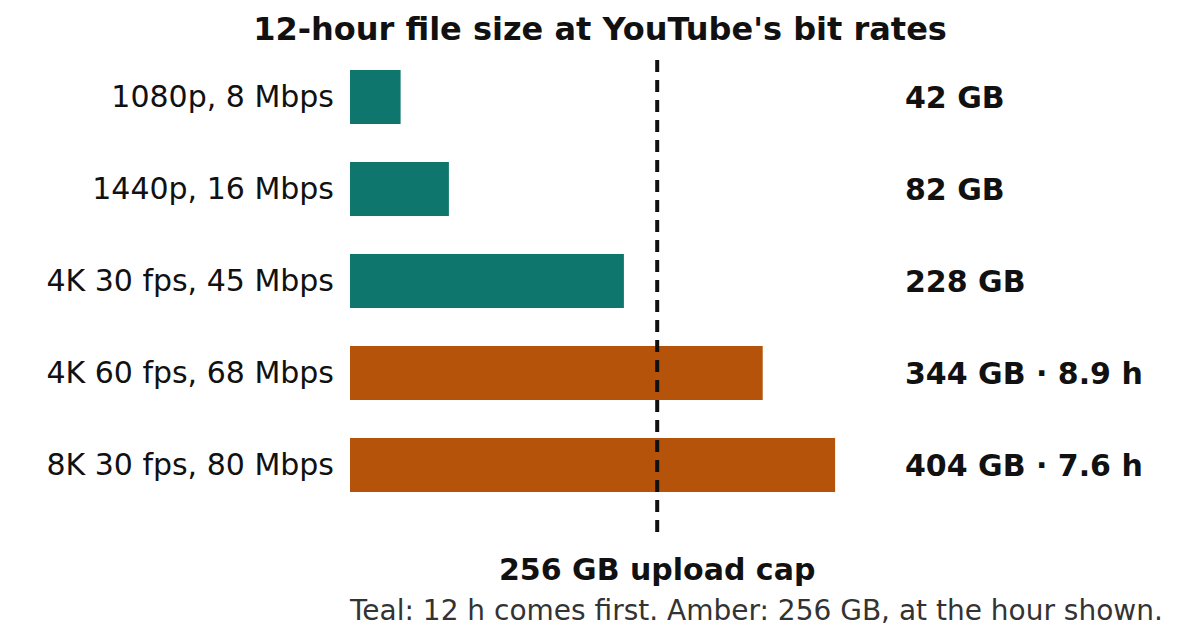
For ordinary uploads the 12 hour limit is the one that applies. A 12 hour file at 8 Mbps plus 384 kbps audio is 42.16 GB, and it would take 72.86 hours of that video to reach 256 GB (counting 1 GB as 2^30 bytes). The size limit starts to matter only at very high bit rates, and the chart shows where.
Source: our arithmetic from the same formula (make-chart.py); video bit rates from YouTube Help, Recommended upload encoding settings (official, read October 30, 2026), plus 384 kbps stereo audio. The hours are for GB = 2^30 bytes. YouTube does not say which gigabyte it means; with GB = 10^9 bytes the 4K 60 fps case reaches the cap at 8.32 hours instead of 8.93 and the 8K 80 Mbps case at 7.08 instead of 7.60 (size-table.py), so the order of the limits does not change.
Does the size formula hold on a real encode?
We encoded 20 seconds of a real 1080p clip (Misty river, Wikimedia Commons, CC0, calm water and reeds in fog, no people) as H.264 High at 30 fps with an 8 Mbps video target and a 384 kbps AAC stereo track, then measured the file with ffprobe 6.1.1. The source has no sound, so the audio is a synthetic 440 Hz tone.
The prediction from the targets was (8,000,000 + 384,000) x 20 / 8 = 20,960,000 bytes. The file was 20,617,305 bytes, 1.63% smaller. The video stream measured 7.974 Mbps against the 8 Mbps target. Most of the gap is the audio: we asked the AAC encoder for 384 kbps and its stream measured 235.8 kbps, and a single steady tone is easy to compress, so we expect a real soundtrack to use more (our assumption, not measured).
The live Koldflux video file size calculator gave the same numbers as our script. We ran it in headless Chromium on four cases. For 8,000 plus 384 kbps for 600 seconds it showed 599.7 MB, and our arithmetic gave 599.67 MB. For 45,000 plus 384 kbps for one hour it showed 19.02 GB, and we computed 19.020 GB. Its control case, 1,000 kbps with no audio for 8 seconds, showed 977 KB, the 1,000,000 bytes we expected counted in 1,024 byte kilobytes.
A quality setting behaves differently from a bit rate target. Encoding the same 20 seconds with CRF 20 instead of a target produced 9.53 Mbps, 19% above the 8 Mbps in YouTube's table, even though the picture is a nearly still foggy scene. A quality setting spends what it decides the picture needs, not what the table says. So for a CRF export the table gives only the order of magnitude, and the way to know the size is to export and read the file.
We repeated both encodes on a second clip, the busy water footage used in our MP4 vs WebM guide (Ocean surface waves 06, Wikimedia Commons, CC0, 1080p, 6.4 seconds, no people). The 8 Mbps target gave 7.947 Mbps, 0.66% under, and the file was 3.25% under the prediction, again with a 235.6 kbps audio track. CRF 20 gave 11.088 Mbps there, 38.6% above the 8 Mbps in YouTube's table.
Source: our measurement on October 30, 2026 with ffmpeg 6.1.1 and ffprobe 6.1.1 on a 20 second excerpt of one clip and 6.4 seconds of a second, and the live calculator at /tools/calculators/video-file-size. Every command and output line is in the published log (test-results.txt, tests T2, T6, T7 and T9). Two clips and one encoder: another clip or encoder will land elsewhere.
How do I check a file against YouTube's recommendations before uploading?
YouTube's encoding page lists the settings it recommends: MP4 container, "Moov atom at the front of the file (Fast Start)", "No Edit Lists (or the video might not get processed correctly)", H.264 video with progressive scan and High Profile, AAC-LC or Opus audio at 48 kHz (official, read October 30, 2026). We turned that list into a short script, yt-check.py, that reads a file with ffprobe and prints OK, DIFF or INFO for each item. DIFF means the file differs from the recommendation; it does not mean YouTube will reject it.
To test the checker we made five files from the same clip, each with one known difference. For the two structural checks we compared its answer with a byte-level control: the count of the string elst in the raw file, and the byte positions of the moov and mdat boxes. Both agreed with the checker. The sample rate and frame size items are read straight from ffprobe.
| File | What we did | Checker output |
|---|---|---|
| good.mp4 | H.264 High, 8 Mbps, AAC 48 kHz, faststart, no edit list | All items OK |
| nofast.mp4 | Same file with the moov box moved to the end | DIFF fast start: moov at byte 20,593,870, mdat at byte 44 |
| editlist.mp4 | Same encode without -use_editlist 0 | DIFF edit lists: 2 boxes |
| audio441.mp4 | Audio resampled to 44.1 kHz | DIFF audio sample rate: 44100 Hz |
| portrait45.mp4 | 4:5 crop, 1080x1350, no audio | INFO: not a listed 16:9 size, no bit rate row for that height |
Source: our test run on October 30, 2026 (test-results.txt, tests T3 to T5). The one surprise is the edit list: the plain ffmpeg 6.1.1 command with libx264 and AAC wrote 2 edit list boxes, so a default export can differ from YouTube's recommendation. We did not upload any of these files to YouTube, so we do not know whether it would have processed editlist.mp4 correctly.
ffmpeg -i input.mov -c:v libx264 -profile:v high -b:v 8M -maxrate 8M -bufsize 16M -pix_fmt yuv420p -r 30 -c:a aac -b:a 384k -ar 48000 -movflags +faststart -use_editlist 0 youtube.mp4
python3 yt-check.py youtube.mp4Does YouTube accept WebM and other formats?
YouTube's troubleshooter lists the accepted upload formats as ".MOV .MPEG-1 .MPEG-2 .MPEG4 .MP4 .MPG .AVI .WMV .MPEGPS .FLV 3GPP WebM DNxHR ProRes CineForm HEVC (H.265)" (official, read October 30, 2026). So MP4 is the recommendation, not the only accepted file. Our checker marks other containers as DIFF for the same reason: it compares your file with the recommendation. Our test on the original WebM source printed DIFF for the container and the VP9 codec.
What size are YouTube Shorts and vertical videos?
YouTube's Shorts help page says "You can upload vertical videos saved to your computer or smartphone as Shorts" and "You can upload Short videos with a maximum resolution of 1080p". It describes its Shorts creation tools as making "short-form videos that are up to 3 minutes long" (official, YouTube Help, Get started creating YouTube Shorts, read October 30, 2026).
The page gives no pixel size for a vertical video. A 9:16 video at the 1080p maximum is 1080 x 1920 (our arithmetic, 1080 x 16 / 9 = 1920). We did not upload a Short, so what the app does with other shapes is untested here.
What we did not test, and what we read and ran
We read five YouTube Help pages and matched every quoted phrase against the page text with a script. We ran ffmpeg, ffprobe, our scripts and the live Koldflux calculator.
We did not upload anything to YouTube. We did not test how YouTube re-encodes a file, how long processing takes, what a vertical or square upload looks like in the player, HDR files (the HDR bit rates are in YouTube's page, and our table covers SDR only), Shorts uploads (we only quote the Shorts help page), or accounts with other limits.
Several top-ranking pages disagree with YouTube on the limits (one says 512 GB for verified accounts; another lists a range of 1920x1080 to 7680x4320 as the resolutions). We did not use them as sources.
What to do before you export and upload
Pick the row that matches your situation.
- Normal 1080p video: export MP4, H.264, 1920x1080, about 8 Mbps at 24 to 30 fps (12 Mbps at 48 to 60 fps), AAC at 48 kHz, then run yt-check.py.
- Planning storage or upload time: take the per-minute size from the table, multiply by the length, and check it with the file size calculator.
- A file over 15 minutes: verify the account first; the upload limit is 256 GB or 12 hours, whichever is less.
- A file that is close to 256 GB: look at the 4K 60 fps and 8K rows; lower the bit rate or split the video.
- A vertical video or a Short: export 9:16 at up to 1080p (1080 x 1920) and read the Shorts help page for the current rules.
- The upload fails or stalls: see the YouTube upload troubleshooting guide for errors and how to resume.
Do it in your browser
Free Koldflux tool, no account needed.
Questions people ask
What is the best resolution to upload to YouTube?
For most videos, 1920x1080 (1080p) in 16:9, which YouTube lists as 1080p (HD). Use 3840x2160 only if your footage and your export are really 4K. YouTube lists sizes from 426x240 up to 7680x4320 (official, read October 30, 2026).
What is the maximum YouTube video file size?
256 GB or 12 hours, whichever is less (official, YouTube Help, read October 30, 2026). At YouTube's recommended 8 Mbps for 1080p a 12 hour file is about 42 GB, so the 12 hour limit applies first.
How long can a YouTube video be?
Up to 15 minutes by default, and up to 12 hours with a verified account, within the 256 GB size cap (official, YouTube Help, read October 30, 2026).
How many MB is one minute of 1080p video?
About 60 MB at 8 Mbps video plus 384 kbps stereo audio (59.97 MB with 1 MB = 1,048,576 bytes). A phone or camera file at a different bit rate will differ; read your own file's bit rate with ffprobe.
Does YouTube accept WebM files?
Yes. YouTube's list of accepted formats includes WebM along with MP4, MOV, AVI, WMV, FLV and others (official, read October 30, 2026). Its recommended container is MP4.
Do I need to remove edit lists from my MP4?
YouTube's encoding page recommends "No Edit Lists (or the video might not get processed correctly)". A default ffmpeg 6.1.1 H.264 and AAC export wrote 2 edit list boxes in our test; the option -use_editlist 0 gave none. We did not test what YouTube does with a file that has one.
Related
Sources and how we checked
- Koldflux test log: size table, 20 second encode, checker on five files, calculator run (our measurement, October 30, 2026) (checked 2026-10-30)
- Koldflux quote check: every quoted phrase matched against the YouTube Help page text (October 30, 2026) (checked 2026-10-30)
- YouTube Help: Recommended upload encoding settings (official, read October 30, 2026) (checked 2026-10-30)
- YouTube Help: Change aspect ratio and size, 16:9 sizes and padding (official, read October 30, 2026) (checked 2026-10-30)
- YouTube Help: Upload videos longer than 15 minutes, 256 GB or 12 hours (official, read October 30, 2026) (checked 2026-10-30)
- YouTube Help: Accepted upload file formats (official, read October 30, 2026) (checked 2026-10-30)
- YouTube Help: Get started creating YouTube Shorts, upload and resolution (official, read October 30, 2026) (checked 2026-10-30)
- Wikimedia Commons: File:Misty river.webm, CC0, the 1080p clip used in the encode test (read October 30, 2026) (checked 2026-10-30)
- Wikimedia Commons: File:Ocean surface waves 06.ogv, CC0, the second 1080p clip (read October 30, 2026) (checked 2026-10-30)
- yt-check.py: the checker script from this page, our own code (October 30, 2026) (checked 2026-10-30)
- size-table.py and test-run.sh: the size table and the full test script, our own code (October 30, 2026) (checked 2026-10-30)
We read five YouTube Help pages in a headless browser on October 30, 2026 and matched every quoted phrase against the page text with a script. We computed all file sizes with size-table.py, whose control (8 Mbps plus 384 kbps for 10 seconds) matched a hand-worked value. We encoded 20 seconds of Misty river (Wikimedia Commons, CC0, 1920x1080 VP9, 50 fps, no audio) and the 6.4 seconds of Ocean surface waves 06 (CC0, 1080p, 25 fps) with ffmpeg 6.1.1 as H.264 High at 30 fps and an 8 Mbps target, measured them with ffprobe 6.1.1, and built four more files with one known difference each to test yt-check.py against a byte-level control. We ran the live Koldflux video file size calculator in headless Chromium on four cases, including a control. We also read three top-ranking third-party pages for coverage; none of them gives file size per minute from the official bit rates with a script, a limit comparison or a file checker, and some state limits that differ from YouTube's own page. YouTube is a trademark of Google LLC; Koldflux is not affiliated with or endorsed by YouTube.