Measured guide
Engagement rate formula: which denominator to use and why two tools disagree
Short answer
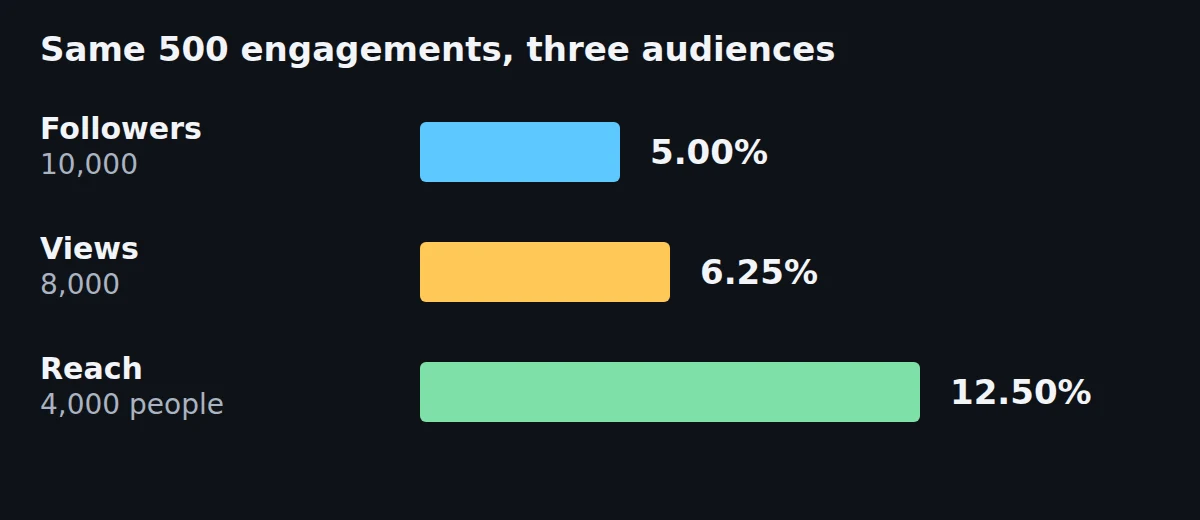
Engagement rate is total engagements (likes + comments + shares + saves) divided by an audience number, times 100. Divide by reach or views to judge one post, and by followers to compare accounts, and always say which one you used. In our example the same 500 engagements are 12.50% of 4,000 people reached, 6.25% of 8,000 views and 5.00% of 10,000 followers.
Key takeaways
- The formula is (likes + comments + shares + saves) / audience x 100. The audience is the part that changes: followers, reach, views or impressions.
- The same 500 engagements gave 5.00% by 10,000 followers, 6.25% by 8,000 views and 12.50% by 4,000 reach. None of the three is wrong; they answer different questions.
- Instagram Help defines Interactions as "likes, comments, saves and shares". YouTube Help lists its engagement metrics as "views, likes, dislikes, and subscriptions". Neither page gives an engagement-rate formula, and the two lists are different.
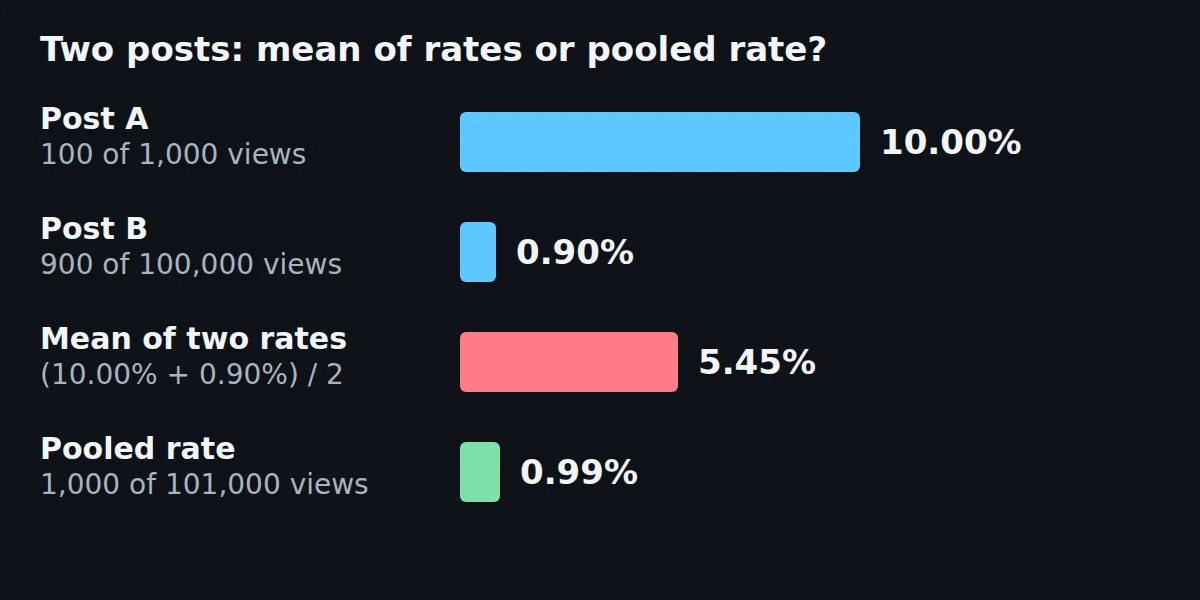
- Averaging per-post rates misleads: a 10.00% post with 1,000 views and a 0.90% post with 100,000 views average to 5.45%, but the pooled rate is 0.99%.
- On real public counts from three organization accounts on Mastodon, counting boosts and replies as well as favourites raised the rate by followers 1.45 to 1.63 times. In this sample the account with 879,119 followers had a rate of 0.05%, against 0.44% and 0.29% for accounts with 34,347 and 25,516.
- We ran the free Koldflux calculator on 10 cases against exact arithmetic: 9 matched and one showed 1.00% where exact rounding gives 1.01%; we fixed that rounding the same day and the 10 cases now all match. Elfsight's free calculator matched on 16 of 20 runs and showed a message instead of a rate on the other 4 (zero values).
How do you calculate engagement rate?
Add up the interactions on a post, divide by the audience number you picked, and multiply by 100. Our example post has 420 likes, 35 comments, 20 shares and 25 saves, which is 500 engagements. Only the audience number changes between the three rows below.
- Add the interactions you can see: likes + comments + shares + saves. Leave a metric out if the platform hides it, and write down that you did.
- Pick one audience number: followers, reach (unique people who saw the post), views (every play or display) or impressions.
- Divide the engagements by that number and multiply by 100.
- Write the result with its denominator, for example "5.00% by followers".
| Audience number | Value | Engagement rate |
|---|---|---|
| Followers | 10,000 | 5.00% |
| Views | 8,000 | 6.25% |
| Reach (unique people) | 4,000 | 12.50% |
Our arithmetic, run by script (page-numbers.py in the test files): 500 / 10,000 = 5.00%, 500 / 8,000 = 6.25% and 500 / 4,000 = 12.50%. Instagram defines Viewers as unique accounts and Views as every play or display, so views are at least the number of viewers and the rate by views is never higher than the rate by reach for the same post. The audience values are an example we chose, not data from a real account.
Free tool:Engagement rate calculator (free, in your browser)
Which audience number should you divide by?
Choose by the question you are asking. This table is our suggestion, based on what each denominator measures.
| Your question | Divide by | Why | Watch out for |
|---|---|---|---|
| How well did this one post land with the people who saw it? | Reach (or views if reach is hidden) | Counts only people the post was shown to | Reach shows in the account owner's own analytics, so you usually cannot compute it for another account |
| How does my video compare with my other videos? | Views | Available on most video analytics screens | Views include repeat plays, so the rate is lower than the rate by reach |
| How does my account compare with a similar account? | Followers | Follower counts are public | Most viewers of short video do not follow you, so the rate can be tiny or very large |
| What do I report to a brand? | Whatever the brand asks for, stated in words | There is no single standard formula | A rate with no denominator cannot be compared |
Pick one denominator for a report and keep it for every post and every month. Changing it midway breaks the comparison, because the same post moves from 5.00% to 12.50% when the denominator moves from followers to reach.
What counts as an engagement on each platform?
The platforms define their own counts, and none of the help pages we could read gives an engagement-rate formula. This is what we found on October 28, 2026.
| Source | What it says | Type |
|---|---|---|
| Instagram Help, About Instagram insights | Interactions: "The number of actions people take when they engage with your content, such as likes, comments, saves and shares." Accounts engaged: "The number of unique accounts that have interacted with your content". Viewers: "The number of unique accounts that have seen your content on screen at least once". Views: "The number of times your content was played or displayed." No engagement-rate formula on the page. | Official |
| YouTube Help, How engagement metrics are counted | "YouTube engagement metrics (views, likes, dislikes, and subscriptions) reflect how many times your YouTube video or channel has been interacted with." The page gives no formula and does not list comments or shares in that sentence. | Official |
| YouTube Help, Understand your YouTube engagement | The Engagement tab lists four reports: Audience retention, Likes (vs. dislikes), End screen element click rate and Top remixed. None is an engagement rate. | Official |
| TikTok Help Center and Creator Academy analytics pages | The Help Center analytics page returned no readable text in our browser, and the Creator Academy page we opened has no metric definitions. We found no official engagement-rate definition. | Not found |
| Socialinsider, How to calculate engagement rate (updated Oct 22, 2026) | Instagram by followers: "Post Engagement (Likes + Comments) ÷ Total Followers × 100". LinkedIn by impressions: "Post Engagement (Likes + Comments + Shares + Clicks) ÷ Post Impressions × 100". TikTok by views: "Post Engagement ÷ Video Views × 100". | Third party |
Instagram's help page marks Viewers and Accounts engaged as "estimated and in-development". The Socialinsider formulas show the problem in one place: its Instagram formula counts likes and comments only, while its LinkedIn formula adds shares and clicks. The two official lists differ too: Instagram counts likes, comments, saves and shares, while YouTube names views, likes, dislikes and subscriptions. Two tools can both be correct by their own definitions and still print different numbers for the same post.
What does one post look like under each platform's own counting?
Here is one invented post per platform, counted the way each source describes. Every count below is made up to show the arithmetic; none is real data. Where the source gives no formula (YouTube and TikTok), the choice of what to count is ours and labelled.
| Platform and counting | Made-up counts | Engagements | Audience number | Rate |
|---|---|---|---|---|
| Instagram Reel, interactions over viewers | 1,180 likes, 64 comments, 210 saves, 146 shares | 1,600 | 9,200 viewers | 17.39% |
| Instagram Reel, interactions over views | Same Reel | 1,600 | 15,400 views | 10.39% |
| Instagram Reel, Socialinsider formula | 1,180 likes and 64 comments | 1,244 | 12,500 followers | 9.95% |
| YouTube video, our choice of counts | 310 likes, 12 dislikes, 24 subscriptions | 346 | 6,400 views | 5.41% |
| TikTok video, Socialinsider formula | 2,300 likes, 118 comments, 260 shares | 2,678 | 41,000 views | 6.53% |
| LinkedIn post, Socialinsider formula | 96 likes, 14 comments, 9 shares, 120 clicks | 239 | 5,400 impressions | 4.43% |
Source: our arithmetic, run by script (worked-examples.py; the output is in worked-examples-results.txt, and its control, 50 engagements over 1,000, printed 5.00%). The Instagram numerator is the interactions list from Instagram Help (likes, comments, saves and shares) and the audience numbers are the ones Instagram Help defines (Viewers, Views); the Socialinsider rows use its formulas as quoted above. YouTube Help lists views, likes, dislikes and subscriptions as the metrics it counts but gives no formula, and Socialinsider's TikTok formula says "Post Engagement" without listing the actions, so the numerators in those two rows are our choice.
The same invented Reel is 17.39%, 10.39% or 9.95% depending on the audience number and on whether saves and shares are counted. Do not compare a rate in one row with a rate in another: each answers a different question, and the guide above says to write the denominator next to every rate.
Where do you find these numbers in the apps?
Both platforms describe the path on their own help pages, read October 28, 2026.
- Instagram: tap View insights under a post or reel. Instagram Help lists Views, Viewers, Interactions and Accounts engaged for that content, for public accounts, with a timeframe you can pick within the past 90 days for the overview.
- YouTube: in YouTube Studio open Content, choose the video, select Analytics, then Engagement in the top menu. YouTube Help names four reports there: Audience retention, Likes (vs. dislikes), End screen element click rate and Top remixed.
- TikTok: we could not read TikTok's analytics help pages, so we cannot give the path.
- Our reading of the Instagram definitions: Interactions is the numerator, Viewers (unique accounts) is the closest audience number to reach, and Views is the audience number for the rate by views.
Why does the same post get a different rate in two tools?
Because the numerator or the denominator differs. We can show the numerator effect with our own post: by followers, likes alone give 4.20%, likes plus comments give 4.55%, and all four interactions give 5.00%. That is a 0.80 point spread from the choice of what to count, before any change of denominator.
Instagram adds a second source of difference. It reports Interactions (actions) and Accounts engaged (unique accounts) as separate numbers. In a made-up example, 120 interactions from 80 accounts on 2,000 viewers is 6.00% if you divide interactions by viewers and 4.00% if you divide accounts engaged by viewers. Both use Instagram's own metrics.
- Ask which interactions are counted: likes only, likes and comments, or all four.
- Ask which audience number is the divisor: followers, reach, views or impressions.
- Ask whether the tool counts actions or unique accounts.
- If the answer is not written down, you cannot compare the two numbers.
How do you average engagement rate across many posts?
Add all the engagements, add all the audience numbers, and divide once. Do not average the per-post percentages. In our example, post A has 100 engagements on 1,000 views (10.00%) and post B has 900 engagements on 100,000 views (0.90%). The mean of the two rates is 5.45%. The pooled rate is 1,000 engagements divided by 101,000 views, which is 0.99%.
The pooled rate is the better summary of what happened across the audience, because post B reached 100 times more viewers. Some tools average per-post rates on purpose, to give small posts the same weight as large ones. If you use one of those, note it next to the number. This is our suggestion; neither method is an official standard.
Does the Koldflux calculator give the right numbers?
Yes on 9 of the 10 cases we ran, and the tenth is off by 0.01 percentage points. We drove the live engagement rate calculator with Playwright on October 28, 2026 (Chromium, the public page) and compared every result with exact fraction arithmetic rounded half up to two decimals. The first two cases are controls whose answers we knew before running them: 500 engagements on 10,000 followers must read 5.00% and 0 engagements must read 0.00%. Both passed.
| Case | Engagements | Tool: by followers / by views | Exact: by followers / by views | Result |
|---|---|---|---|---|
| Control: 10,000 followers, 8,000 views | 500 | 5.00% / 6.25% | 5.00% / 6.25% | Match |
| Control: zero engagements | 0 | 0.00% / 0.00% | 0.00% / 0.00% | Match |
| Exact tie on views (1.875%): 10,000 followers, 8,000 views | 150 | 1.50% / 1.88% | 1.50% / 1.88% | Match |
| Exact tie on followers (1.005%): 20,000 followers, 8,000 views | 201 | 1.00% / 2.51% | 1.01% / 2.51% | Differed by 0.01 point; fixed (see below) |
| 3 followers, 3 views | 1 | 33.33% / 33.33% | 33.33% / 33.33% | Match |
| 5,000 followers, 800 views | 900 | 18.00% / 112.50% | 18.00% / 112.50% | Match |
| 987,654,321 followers, 123,456,789 views | 12,345,678 | 1.25% / 10.00% | 1.25% / 10.00% | Match |
| Zero followers, 100 views | 18 | dash / 18.00% | undefined / 18.00% | Match |
| 1,000 followers, zero views | 18 | 1.80% / dash | 1.80% / undefined | Match |
| Exact tie (0.005%): 20,000 followers, 20,000 views | 1 | 0.01% / 0.01% | 0.01% / 0.01% | Match |
Three things to know from this test. First, the tool shows a dash instead of a rate when the audience number is 0, which is the right behavior for a division by zero. Second, a rate can pass 100%: 900 engagements on 800 views is 112.50%, because one viewer can like, comment and share. Third, the one difference is a rounding case: 201 / 20,000 x 100 is exactly 1.005, which rounds half up to 1.01%. The tool printed 1.00%. In JavaScript, 201 / 20000 * 100 gives 1.005 but its toFixed(2) prints 1.00 (the log has the line), which is the likely cause; we did not read the tool's source. The effect was at most one hundredth of a percentage point and only on exact ties. We fixed it on October 28, 2026: the calculator now rounds whole numbers half up in integer arithmetic, a regression test checks more than 60,000 number pairs against exact fractions, and the same 10 cases run again on the fixed build matched 10 of 10 (test-results-after-fix.txt).
We ran the same 10 cases through a second free calculator that takes typed-in numbers, the Elfsight engagement rate calculator, in its followers mode and its reach mode (20 runs, Chromium, October 28, 2026). It matched exact arithmetic on 16 runs. On the other 4 (zero engagements, and a zero audience number in each mode) it showed a message such as "Enter the number of followers." instead of a rate. On the 1.005% case it showed 1.01%, the exact half-up result, where the Koldflux calculator showed 1.00% before our fix. Both tools count likes, comments, shares and saves, so on ordinary numbers they agree.
Scope: 10 cases, one browser, one day, two calculators. We did not test others, and the sample is too small to rank them. The tests and their output are in the files linked under the sources.
What does engagement rate look like on real accounts?
We read public counts from three organization accounts on Mastodon on October 28, 2026, because Mastodon shows favourites, boosts and replies on every post and the follower count of the account, with no login. It shows no reach, views or saves counts to outsiders, so the only public audience number is followers. These are Mastodon counts, not Instagram, TikTok or YouTube counts, and they show how the arithmetic behaves rather than what a good rate is.
For each account we took its 20 newest original posts (no replies, no boosts) that were at least 7 days old and divided the total by the follower count at the time we read it.
| Account | Followers | Favourites only | Plus boosts | Plus replies |
|---|---|---|---|---|
| @Mastodon on mastodon.social | 879,119 | 0.03% | 0.05% | 0.05% |
| @wikipedia on wikis.world | 34,347 | 0.28% | 0.44% | 0.44% |
| @gnome on floss.social | 25,516 | 0.20% | 0.29% | 0.29% |
Three things show in the log (real-data-results.txt). First, what you count matters: favourites, boosts and replies together came to 1.63, 1.56 and 1.45 times the favourites alone, which is the same numerator effect as the 4.20% to 5.00% in our made-up post. Second, in this sample the larger account had the lower rate: 0.05% at 879,119 followers, against 0.44% and 0.29% at 34,347 and 25,516. Three accounts show a pattern in these accounts, not a rule for all accounts. Third, the posts of one account differ a lot: the 20 Wikipedia posts ran from 0.08% to 1.23% each.
The mean of the 20 per-post rates equalled the pooled rate for every account, because every post has the same denominator, the follower count. The averaging trap above appears only when the audience differs by post, as it does with views or reach.
Limits of this table: the follower count is the one on October 28, 2026, while the posts are up to 16 months older (the Wikipedia posts start on 2025-06-14), so the rates are approximate; counts change after you read them; and three accounts are not a benchmark.
What is a good engagement rate?
There is no official benchmark. Instagram and YouTube Help do not publish one, and we found none from TikTok. Third-party benchmark reports exist, but each defines engagement and audience its own way (see the table above), so a number from one report does not fit another tool's result. We do not quote one.
What the arithmetic does show is that the same engagements make a smaller rate on a bigger audience: 500 engagements are 50.00% of 1,000 followers, 5.00% of 10,000 and 0.50% of 100,000. Whether real accounts behave like that depends on the platform and the account, and our three Mastodon accounts are too few to say. Compare an account with accounts of a similar size on the same platform, over the same period, with the same kinds of posts, counted the same way.
A worked baseline with made-up counts: ten posts, nine of which reached 1,500 to 2,600 people and drew 79 to 140 engagements, and one (post 5) that went viral, reaching 21,000 people with 520 engagements. Post 5 has 35.1% of all engagements but 53.3% of all reach, so it pulls the pooled rate down to 3.76%. The mean of the ten per-post rates is 4.94% and the median is 5.21%. Without post 5 the pooled rate is 5.22% and the median is 5.24%, so the median barely moved while the pooled rate changed by 1.46 points.
| Measure | Value | What it answers |
|---|---|---|
| Pooled rate, all 10 posts | 3.76% | How engaged was the whole audience reached |
| Mean of the 10 per-post rates | 4.94% | Average of the rates, each post counted once |
| Median of the 10 per-post rates | 5.21% | What a typical post does |
| Pooled rate without post 5 | 5.22% | The audience reached by the nine ordinary posts |
Build your own baseline in four steps. Take your last 10 to 30 posts. Add their engagements and their audience numbers (reach or views). Divide once to get the pooled rate, which answers "how engaged was my whole audience". If you want to know what a typical post does, take the rate of each post and use the median, which one viral post cannot move much. Name which of the two you report. Recompute it every month with the same definition and watch the trend. A post that beats your own baseline by a wide margin is worth studying; a number from another account is not.
What are the limits of this page?
Tested by us: the Koldflux engagement rate calculator on 10 cases and the Elfsight calculator on the same cases (20 runs), against exact arithmetic. Computed by script: every percentage in the examples. Read, not tested: the Instagram and YouTube Help pages and the Socialinsider formulas, all read on October 28, 2026. The audience numbers in the examples, including the per-platform and baseline examples, are made up to show the arithmetic (worked-examples.py). The real-data table uses public Mastodon counts only; we did not use data from a real Instagram, TikTok or YouTube account.
Not covered: TikTok's own metric definitions (we could not read them), engagement on X, LinkedIn and Facebook beyond the Socialinsider formulas quoted, paid-post engagement, and benchmarks. Instagram marks its Viewers and Accounts engaged metrics as estimated and in-development, so those figures can change.
Do it in your browser
Free Koldflux tool, no account needed.
Questions people ask
How do you calculate engagement rate?
Add likes, comments, shares and saves, divide by an audience number (followers, reach or views) and multiply by 100. For 500 engagements and 10,000 followers the rate is 5.00%.
What is the formula for engagement rate by reach?
Total engagements divided by reach, times 100. With 500 engagements and 4,000 people reached, the rate is 12.50%. It is higher than the rate by followers or views for the same post in our example.
Should you divide by followers or by views?
Followers is a common denominator for comparing accounts and views or reach for judging one post, but neither is a universal rule: compare only the same platform, period and kind of post, and note that followers include inactive ones. In our example the same post is 5.00% by 10,000 followers and 6.25% by 8,000 views. Name the one you used.
Can engagement rate be over 100%?
Yes. One viewer can like, comment and share, so engagements can exceed views. In our test the Koldflux calculator showed 112.50% for 900 engagements on 800 views.
How do you average engagement rate for several posts?
Add all engagements, add all audience numbers and divide once. Two posts at 10.00% (1,000 views) and 0.90% (100,000 views) average to 5.45% as a plain mean but 0.99% pooled.
What is a good engagement rate?
There is no official benchmark from Instagram or YouTube, and published benchmarks use different definitions. Compare against your own last 10 posts, counted the same way, and against accounts of a similar size.
Related
Sources and how we checked
- Instagram Help: About Instagram insights (checked 2026-10-28)
- YouTube Help: Understand your YouTube engagement (checked 2026-10-28)
- Socialinsider: How to calculate the engagement rate for all social media platforms (checked 2026-10-28)
- YouTube Help: How engagement metrics are counted (checked 2026-10-28)
- Elfsight: Engagement rate calculator (tested) (checked 2026-10-28)
- TikTok Creator Academy: Analytics overview (no metric definitions found) (checked 2026-10-28)
- Our real-data read of public Mastodon counts: script (checked 2026-10-28)
- Our real-data read of public Mastodon counts: output (checked 2026-10-28)
- Our calculator test: script (checked 2026-10-28)
- Our calculator test: output (checked 2026-10-28)
- Our calculator test after the rounding fix: output (checked 2026-10-28)
- Our second calculator test: script (checked 2026-10-28)
- Our second calculator test: output (checked 2026-10-28)
- Our arithmetic: script and log (checked 2026-10-28)
Instagram Help and the two YouTube Help pages were read in a headless browser on October 28, 2026 and every quoted phrase was matched against the page text by script (quote-check.txt). The Socialinsider page was fetched with curl and its formulas matched against the page text. TikTok's Help Center page rendered empty in the same browser. The calculator tests used Playwright with Chromium against the live Koldflux page and the Elfsight page, and BigInt fractions for the exact results; every percentage in the examples comes from page-numbers.py. The real-data table was read from the public Mastodon API with a short Python script (read-only, no login). No private account data was used.