Podcast studio guide
Home podcast studio setup: room, gear and signal chain
Short answer
A home podcast studio is a small, quiet, soft-furnished room plus a chain of four parts: a cardioid dynamic microphone 2 to 6 inches from your mouth, wired headphones, an interface or mixer, and a recording app. Choose the room first, because echo and noise are recorded together with your voice and no microphone removes them afterwards. Treat the room with soft materials you already own, then buy gear in the order the budget guide lists.
Key takeaways
- Pick an interior room with no street-facing windows, soft furniture and no hum from appliances. A walk-in closet full of clothes is a legitimate starting studio.
- Fix echo with absorption (blankets, rugs, curtains, bookshelves) before buying panels, and place it behind the microphone and beside you.
- RØDE advises 2 to 6 inches from the grille for a dynamic microphone and about 6 to 12 inches for a condenser. The closer you are, the louder your voice is compared with the room.
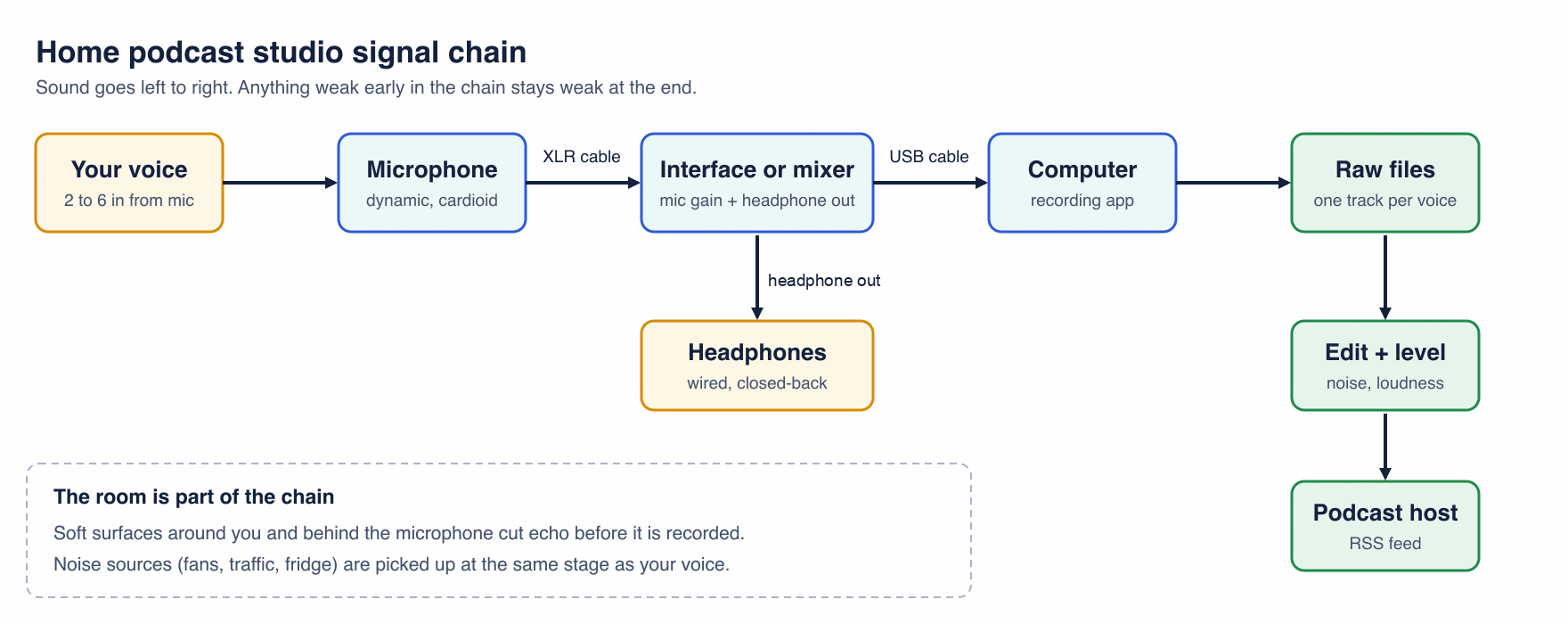
- The chain is voice, microphone, interface or mixer, computer, recording app. Headphones plug into the interface so you monitor with no delay.
- Run a 30 second clap and noise test before every new setup. It finds problems that no spec sheet shows.
What does a home podcast studio actually consist of?
Two things: a room that adds as little as possible, and a short signal chain that carries your voice into a recording app. The diagram shows the chain from your mouth to the host that publishes the episode.
- Room: the biggest variable, and free to improve.
- Microphone and technique: distance, angle and pattern decide how much room you capture.
- Interface or mixer: gives the microphone gain and the headphone feed. A USB microphone has this built in.
- Computer and recording app: stores one clean track per voice.
Free tool:Podcast equipment by budget
Which room in your home should you use?
The enemies of podcast sound are outside noise and reverb, according to Spotify for Creators. That makes the choice simple: pick the room that is quietest and softest, not the one that looks best on camera. Libsyn suggests a room without windows, such as a walk-in closet or an interior room full of fluffy furniture and low ceilings, because those spaces already contain absorption and diffusion.
| Room | Why it works or fails | Verdict |
|---|---|---|
| Walk-in closet with clothes | Clothes absorb reflections on every side; usually interior and quiet | Best free start for a solo host |
| Bedroom with bed, rug and curtains | Soft surfaces everywhere; check the window side for street noise | Good for one or two people |
| Living room with sofa and rug | Soft, but bigger, so more echo and more household noise | Fine after adding blankets or curtains |
| Home office with desk and bookshelf | Bookshelves scatter sound; bare walls and a hard desk add reflections | Good if you hang fabric on the bare wall |
| Kitchen or bathroom | Tile, glass and steel reflect sound; appliances hum | Avoid |
| Garage or basement with concrete | Hard, parallel surfaces ring; far from household noise | Only with heavy treatment |
Pick the room, then sit where you will record and listen for two minutes with the microphone off. Write down every sound you hear: the fridge, an air conditioner, a neighbor. You will deal with each one in the problem table below.
How do you treat a room for a podcast without spending much?
Start with absorption, because it removes the echo that makes a voice sound distant. Spotify for Creators calls moving blankets cheap and dense, and says covering doors and windows both softens reverb and absorbs exterior sound. Towels work too, but they are thinner.
- Hang blankets or heavy curtains on the wall behind the microphone and the wall you face.
- Put a rug on hard floors and a closed bookshelf or sofa against a bare wall.
- Close blinds and hang a blanket over windows.
- Stuff a rolled-up towel along the bottom of the door if the rest of the house is noisy.
- Turn off fans, air conditioning and heating while you record; computers with loud fans belong outside the room or on a long cable.
Acoustic panels are the next step. GIK Acoustics notes that thicker absorbers extend into lower frequencies and that thick broadband absorption at the reflection zones helps clean up muddiness. Panels go where sound bounces between you and the microphone, not on the whole room. Bass traps in corners add low-frequency control. Diffusers scatter sound and matter mainly in larger rooms; a small home studio gets more from absorption.
How do you check your room before you record?
Run this test from the exact seat you will use. It takes 30 seconds and needs only your recording app.
- Record 10 seconds of silence with the gain you will use. Play it back with headphones and note any hum, hiss or traffic.
- Clap once, sharply, and let the room answer. A short dry tap means a controlled room; a ringing or flutter after the clap means hard parallel walls or a bare ceiling.
- Speak a few sentences at the normal distance, then repeat 4 inches closer. If the second take sounds clearer, your room is the problem, not your microphone.
- Use the mirror method that GIK Acoustics describes for loudspeakers, adapted to a microphone: a helper slides a mirror along the wall while you sit in position. Wherever you can see the microphone in the mirror, that is a first reflection point worth covering.
What gear does a home podcast studio need, and in what order?
Buy in this order: wired headphones, a dynamic microphone, then an interface or mixer when you add a second voice, then a boom arm and pop filter. The sibling page lists three complete kits and a component table, so this page does not repeat it.
Specs below come from each manufacturer page, read on October 20, 2026. The examples are not a ranking.
| Model | Type and pattern | What it gives a home studio | Source |
|---|---|---|---|
| Samson Q2U | Dynamic, cardioid; USB-C and XLR outputs | 3.5 mm zero-latency headphone output with level control, so it works as a USB microphone now and an XLR microphone later | Samson product page |
| RØDE PodMic | Dynamic, cardioid; XLR | Tight cardioid pattern for room noise rejection; needs an interface or mixer | RØDE product page |
| Shure MV7+ | USB and XLR podcast microphone | 3.5 mm headphone jack for real-time monitoring and a touch panel on the microphone | Shure product page |
| Focusrite Vocaster Two | Interface, two XLR mic inputs | 70 dB gain range, phantom power control and separate Host and Guest headphone outputs for two people | Focusrite product page |
RØDE recommends 2 to 6 inches from the grille for dynamic microphones. Hold that distance and speak slightly across the capsule rather than into it to tame plosives. If you share the table with a guest, use one microphone, one pair of headphones and one input per person so each voice lands on its own track.
Free tool:Podcast equipment by budget
What common room problems sound like, and how do you fix them?
| What you hear | Likely cause | Fix, cheapest first |
|---|---|---|
| Hollow, distant voice, a slap after each word | Reflections from bare walls and ceiling | Blankets behind you and on the wall you face; rug on the floor; move closer to the microphone |
| Boomy, muddy low end | Small room with hard parallel walls, or sitting close to a corner | Move away from the corner; add thick absorption on the walls; bass traps if it persists |
| Constant hiss | Gain too high or a noisy cable or input | Lower the gain and move closer; a dynamic microphone needs more gain, so consider an interface with a clean gain range |
| Steady hum or rumble | Fridge, air conditioner, fan or computer | Switch it off during takes; move the computer; use a boom arm and shock mount to isolate desk vibration |
| Traffic or neighbor noise | Windows, thin walls or door gaps | Choose an interior room; close blinds; blanket over window; towel at door |
| Loud pops on P and B | Plosives hitting the capsule | Pop filter; speak across the mic, not into it |
| Sharp "S" sounds | Close microphone on the sibilant axis | Angle the microphone slightly off-axis; edit with a de-esser |
| Clipping or distorted peaks | Gain too high | Lower gain until peaks stay below the red; see the clipping guide |
If room noise still appears in the file, remove it after recording. Noise removal helps with steady hiss and hum, but it cannot rebuild a voice buried in reverb, which is why the room comes first.
Free tools:Remove noiseNormalize audio
How is a video podcast studio different from an audio one?
A video studio adds a camera, light on your face and a backdrop, but everything above still applies. The microphone must stay just out of frame, and the room still needs soft surfaces, so hang fabric rather than leaving hard walls behind you. The sibling equipment guide covers a three-light plan for video.
Can you build a mobile or portable podcast studio?
Yes. The room is the only part that does not travel, so bring a rug, two moving blankets and the same microphone and interface. In a hotel room or an unfamiliar house, record in the closet or under a duvet draped over a chair and a table, and run the clap test before the guest arrives. A USB or USB/XLR dynamic microphone with a headphone jack, such as the Q2U above, removes the interface from the bag.
Do it in your browser
Free Koldflux tools, no account needed.
Questions people ask
What do you need to start a home podcast studio?
A quiet, soft-furnished room, a dynamic microphone, wired headphones, a computer and a recording app. Add an interface or mixer when you use an XLR microphone or record two people.
What is the best room for a podcast studio at home?
The quietest interior room with the most soft surfaces. A walk-in closet full of clothes or a bedroom with a bed, rug and curtains usually beats a kitchen, bathroom or empty office.
Do I need acoustic panels for a home podcast studio?
Not at first. Blankets, rugs, curtains and bookshelves cut most echo. Add panels where the clap test or the mirror method shows reflections between you and the microphone.
How far should the microphone be from my mouth?
RØDE recommends 2 to 6 inches from the grille for dynamic microphones. Closer than that raises plosives; farther lets in more room.
Can I record a video podcast in the same room?
Yes. Keep the microphone out of frame, light your face, and hang fabric on the wall behind you so the room stays soft.
How do I set up a portable podcast studio?
Carry a USB or USB/XLR dynamic microphone, wired headphones, a blanket and a pop filter. Record in a closet or soft room, and run the clap test first.
Where do headphones plug in?
Into the interface, mixer or microphone headphone jack, not the computer, so you hear yourself with no delay.
Related
Sources and how we checked
- Spotify for Creators: Podcast studio setup (checked 2026-10-20)
- Libsyn: How to set up a podcast studio (checked 2026-10-20)
- GIK Acoustics: Early reflection points (checked 2026-10-20)
- Samson Q2U product page (checked 2026-10-20)
- RØDE PodMic product page (checked 2026-10-20)
- Shure MV7+ product page (checked 2026-10-20)
- Focusrite Vocaster Two product page (checked 2026-10-20)
- RØDE: tips on microphone technique (checked 2026-10-20)
Product specs come from each manufacturer page, read on October 20, 2026; room advice follows Spotify for Creators, Libsyn and GIK Acoustics. The signal chain diagram was drawn by us in code and checked label by label. The room table and the clap test are our own practical guidance, not measurements, and we list no prices.