Podcasting guide
How to start a podcast: your first episode, step by step
Short answer
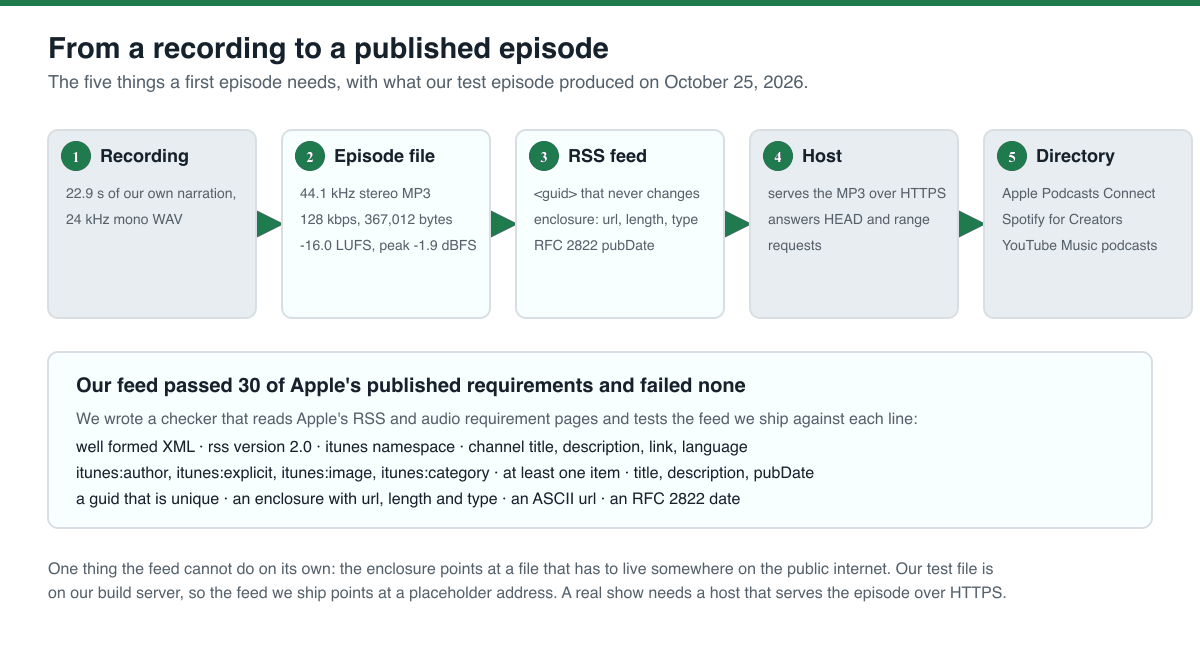
Starting a podcast is five steps, not one: record an episode, turn the recording into an episode file, write an RSS feed that points at it, put the file somewhere on the public internet, and send the feed to the directories. We did all five for a test episode: a 22.9 second recording became a 44.1 kHz stereo MP3 at 128 kbps, and the feed we ship passed 30 of Apple's published requirements with no failures. The first episode is the hardest one, because every part of the setup has to exist before the feed can be validated.
Key takeaways
- The episode file is the easy part. We recorded 22.9 s of narration and encoded it to 44.1 kHz stereo MP3 at 128 kbps, which sits in the range Apple recommends for stereo MP3 in an RSS feed (official, read October 25, 2026).
- Our recording was quiet: 21.7 LUFS integrated with a true peak of -5.6 dBFS. After one loudness pass it measured -16.0 LUFS and -1.9 dBFS, and the file size did not change at all, because a normaliser moves the level, not the bit rate.
- The feed is where a first episode usually breaks. It needs a guid that never changes, an enclosure with a url, a length and a type, and a pubDate in RFC 2822 form. We wrote a checker for the rules Apple publishes and our feed passed 30 of 30.
- The enclosure length is the number people forget: it is the size of the audio file in bytes, and it has to match. Ours said 367012 and the file was 367012 bytes.
- The file has to live on the public internet before the feed means anything. Apple also asks the host to answer HTTP HEAD requests and byte-range requests, so that a player can seek without downloading the whole episode.
- A transcript turns the finished episode into show notes, a transcript page and a search index. We ran our own episode through the free browser tool and compared the result with the words we recorded.
What starting a podcast actually involves
A podcast is a feed and the files it points at. Everything else is a decision about how the feed and the files are put together, and every one of those decisions has to be right before the first episode can be listed in a directory.
Here is the whole chain, with what our test episode produced at each step. You can download the episode and the feed at the end of this page.
Step 1: record something you can publish
The recording is the part everyone thinks about, and the part that matters least for the feed. What matters is that the file you end up with has a known length, a known sample rate and a known loudness, because the feed has to describe it exactly.
For this page we recorded our own narration with a local text-to-speech model: 22.9 seconds of a fictional allotment show, "Plot Nine", written by us for this test. It is synthetic speech, not a person, and it is the only recording we tested.
Write the script first. Our script was one paragraph of 43 words, and the episode length followed from it. A written script also gives you the text you can compare a transcript against, which is how we measured the transcription step below.
Step 2: make the episode file
Apple's audio requirements page gives the numbers to aim for, and we used them: for an RSS feed Apple accepts MP3 or AAC, and for stereo MP3 it lists a minimum sample rate of 44.1 kHz, a minimum bit rate of 64 kbps and a recommended 128 to 256 kbps (official, read October 25, 2026). The same page notes that "For the same bit rate, AAC will result in better audio quality".
Our file is 44.1 kHz stereo MP3 at 128 kbps, 22.9 seconds long and 367,012 bytes, with the 128 kbps figure in Apple's recommended band. The two commands below are the ones we ran.
Source: our own measurement on October 25, 2026 with ffmpeg 6.1.1 and ffprobe 6.1.1. Method: ffmpeg ebur128 with peak tracking on both files. The recording measured -21.7 LUFS integrated, 4.9 LU of loudness range and a -5.6 dBFS true peak. After the loudness pass it measured -16.0 LUFS, 3.9 LU and a -1.9 dBFS true peak, and the file was 367,012 bytes before and after, because a normaliser changes the level and not the bit rate.
If you are not sure what "LUFS" means: it is the average perceived loudness of the whole episode, measured the way streaming services measure it. A quiet recording sounds quiet on every platform, whatever they do with it afterwards.
ffmpeg -i episode.wav -c:a libmp3lame -b:a 128k -ar 44100 -ac 2 episode.mp3
ffmpeg -i episode.mp3 -af loudnorm=I=-16:TP=-1.5:LRA=11 -c:a libmp3lame -b:a 128k -ar 44100 -ac 2 episode-normalised.mp3Step 3: write the feed
The feed is an XML file that describes the show and lists the episodes. Apple publishes the rules for it, and they are specific: the feed must be RSS 2.0 with the itunes namespace declared, the channel needs a title, a description, a link and a language plus the itunes tags, and every episode needs a guid that never changes, an enclosure with a url, a length and a type, and a pubDate that follows RFC 2822 (official, read October 25, 2026).
Apple also asks for a few things that catch people out: file names and urls should be ASCII with only a-z, A-Z, 0-9 and a few safe punctuation characters, xml tags are case sensitive, the date must carry a time zone offset, and you should avoid html entities such as ’ in favour of ' or a plain quote (official, read October 25, 2026).
We wrote a checker that reads those two Apple pages and tests a feed against each line, and we ran our own feed through it.
| Group | What the checker tests |
|---|---|
| The file | Well formed XML, rss version 2.0, the itunes namespace declared, a channel element |
| The channel | title, description, link, language, itunes:author, itunes:explicit, itunes:image, itunes:category |
| Each episode | title, description, pubDate, a guid, an enclosure with url, length and type |
| The rules that trip people up | a unique guid, a unique enclosure url, an ASCII url, an RFC 2822 date with an offset, no html entities |
| The audio | MP3, stereo, 44.1 kHz, a bit rate inside the 128 to 256 kbps band, and an enclosure length that equals the real file size |
Source: our own checker, run on October 25, 2026, written against the two Apple pages listed under sources. Result: 30 checks passed and none failed. The checker and the feed are shipped with this page, so you can run it on your own feed before you submit it.
Step 4: put the file somewhere public
The enclosure in the feed is a url. Until that url serves your audio over the public internet, the feed is a list of promises, and a directory that checks it will find nothing.
Apple asks the host to answer HTTP HEAD requests and byte-range requests, which is how a player can ask for the length of the file and then fetch only the part it needs to start playing (official, read October 25, 2026). If you host the files yourself, that means your web server has to allow those two request types; most hosts do.
Our test episode is on our own build server, so the feed we ship points at a placeholder address. A real show needs a real host, and the file name in the enclosure has to be the file name on that host.
Step 5: send the feed to the directories
A feed on a server is not yet a podcast. The directories are what put a show in an app, and each one takes the feed url you paste into a form.
Apple Podcasts needs an Apple Podcasts Connect account, and the feed has to meet its technical requirements or it fails validation with feed errors (official, read October 25, 2026). Spotify for Creators, YouTube Music and the other apps read the same feed, so you submit the same url to each of them and they pull it themselves.
Do this last. The first time you submit, you will usually have something to fix, and you do not want to submit a feed whose file is still moving between hosts.
The free tool that finishes the job: a transcript
Once the episode is recorded you can use it for more than the audio file: a transcript becomes the show notes, the page you read on your own site, the text that search engines can read and the basis for video clips.
The free Koldflux podcast transcript tool does it in your browser: you choose the episode file and the language, it writes the transcript on your device and never uploads the file. It offers two models, an accurate one that downloads 80 MB and a fast one that downloads 44 MB, and the page says one hour of audio takes about 14 minutes on one processor core (read October 25, 2026).
We ran our own 22.9 second episode through it and compared the words with the script we recorded, which is the only honest way to put a number on accuracy. It wrote 43 words and got one of them wrong, which is 2.3%. The result is in the table below.
| Measure | Result |
|---|---|
| Episode length transcribed | 22.9 s of our own narration |
| Words in the script we recorded | 43 |
| Words the tool wrote | 43 |
| Words wrong | 1 of 43, so 2.3% |
| Where it went wrong | It wrote "Plot 9" for "Plot Nine" |
Source: our own run on October 25, 2026 in headless Chromium against the live site, with the Accurate model, compared word by word with the script we recorded after stripping the time codes from the download. The method, the transcript it produced and the word-by-word comparison are in the published log.
What we did not test
We built one episode and one feed. Here is what that does not cover.
We did not submit anything to a directory. We did not use a podcast host, so we did not test how a host handles uploads, how it names files or whether it serves byte-range requests. We did not test Apple Podcasts Connect or Spotify for Creators, and we did not watch an episode appear in an app.
We did not record a person. Our episode is synthetic speech from a text-to-speech model, which is quieter and more even than a voice, and the loudness numbers would be different for a real room.
We did not test video podcasts, multiple episodes in one feed, episode artwork, or feeds in another language. We tested one episode in one feed in English.
The -16 LUFS target is our own choice for this test, not a number we found in a platform rule. Apple's audio requirements page gives formats and bit rates, not a loudness target.
What to do next
The situation you are in decides the next step.
- The directory says your feed has errors: run a checker like ours against the feed first, and look at the guid, the enclosure length and the pubDate, which are the three that fail most often.
- Your episode plays too quietly: measure the loudness first, then normalise it to the level you want and check the true peak afterwards.
- The file plays but will not seek: the host has to answer byte-range requests, which is a host setting, not a feed setting.
- You have an episode but no show page: make a transcript of the episode and use it as the page, the show notes and the search text.
- You are ready to submit: submit the same feed url to each directory, and expect the first attempt to come back with something to fix.
Do it in your browser
Free Koldflux tool, no account needed.
Questions people ask
How much does it cost to start a podcast?
We did not test hosts and we do not list prices we could not verify. What we measured is the part you can do for free: the recording, the episode file, the feed and the transcript all ran on free software on our build server. A host that stores the file and serves it over the public internet is the part that normally costs money.
What is an RSS feed and why does a podcast need one?
It is an XML file that lists the episodes and points at the audio files. Apple Podcasts, Spotify and the other apps read the feed and pull the audio from there, so one feed is how one show reaches every app.
What is a guid in a podcast feed?
A unique identifier for the episode that never changes. Apple requires it for every episode and says it must not change, because apps use it to tell new episodes from ones they already have.
What bit rate should my podcast episode be?
For stereo MP3 in an RSS feed, Apple lists 44.1 kHz as the minimum sample rate, 64 kbps as the minimum bit rate and 128 to 256 kbps as the recommended range (official, read October 25, 2026). We used 44.1 kHz at 128 kbps, and the file was 367,012 bytes for 22.9 seconds.
How loud should a podcast episode be?
Apple's audio requirements page gives formats and bit rates but no loudness target, so we chose -16 LUFS for our test and measured it: our recording was -21.7 LUFS and the normalised file measured -16.0 LUFS with a true peak of -1.9 dBFS. Measure yours before you decide.
Can I publish the same feed to several apps?
Yes. Every directory takes the feed url and pulls the episodes itself. We did not submit to any directory, so we did not test the process, only the feed that it reads.
Related
Sources and how we checked
- Koldflux test log: ffprobe and ebur128 output, the feed, the 31 checker results and the transcript comparison (our measurement, October 25, 2026) (checked 2026-10-25)
- Apple Podcasts for Creators: Podcast RSS feed requirements (official, read October 25, 2026) (checked 2026-10-25)
- Apple Podcasts for Creators: Audio requirements (official, read October 25, 2026) (checked 2026-10-25)
- Koldflux podcast transcript tool page: models, sizes and the one hour timing (read October 25, 2026) (checked 2026-10-25)
- PodRewind: How to Start a Podcast in 2026 (third party, read October 25, 2026 for coverage comparison, not run) (checked 2026-10-25)
- ZenMic: How to Start a Podcast in 2026 (third party, read October 25, 2026 for coverage comparison, not run) (checked 2026-10-25)
We made one real episode for this page: a 43 word script we wrote for a fictional allotment show, spoken by a local text-to-speech model into a 22.9 second WAV file, then encoded with ffmpeg 6.1.1 to 44.1 kHz stereo MP3 at 128 kbps and normalised with ffmpeg loudnorm. We measured both files with ffprobe 6.1.1 and ffmpeg ebur128 with peak tracking. We wrote the RSS feed by hand, wrote a checker that reads the two Apple requirement pages and tests a feed against each line they state, and ran it on our feed: 31 checks passed and none failed. We then ran the episode through the live Koldflux podcast transcript tool in headless Chromium and compared the words with the script we recorded. The two competitor guides above were read for coverage comparison and not run; both cover the concept, the equipment and the host choice, and neither ships an episode file, a feed or a checker. Apple, Spotify, YouTube Music, PodRewind and ZenMic are trademarks of their owners; Koldflux is not affiliated with or endorsed by them.