Podcast guide
How to put a podcast on Spotify (new show or existing host)
Short answer
Log in at creators.spotify.com with a free Spotify account, choose Add a new show, then Create a new show, then New episode and Select a file. Spotify accepts MP3, M4A and WAV for audio and MOV, MPG or MP4 for video, with no stated file size limit, and the episode goes live on Spotify when you publish. If your podcast already has a host, choose Find an existing show instead and confirm ownership with an 8-digit code sent to the email address in your RSS feed.
Key takeaways
- Two routes: host with Spotify for Creators (upload the file, it is live on Spotify at once), or keep your host and submit its RSS feed (verify with an emailed code). Spotify for Creators help, read October 25, 2026.
- Spotify for Creators no longer records or edits. Record Friends, Music + Talk, Voice Messages and the episode builder were removed on July 9 (2024, going by the same page); record and edit in another tool, then upload the finished file.
- Video episodes play only on Spotify. On every other app the same episode is audio-only (official). Video is uploaded on the web version only.
- We tested what we could without a Spotify account: a ready-to-upload MP3 made with the free Koldflux converter, a VTT transcript, a 1080p video checked rule by rule, and a script you can run on your own file. We did not upload to Spotify, so acceptance by the uploader is not shown.
- Charts: Top Podcasts is the top 200 per country by weekly unique audience, refreshed daily; the category chart uses the first category in your RSS feed (official).
How do I start a podcast on Spotify, step by step?
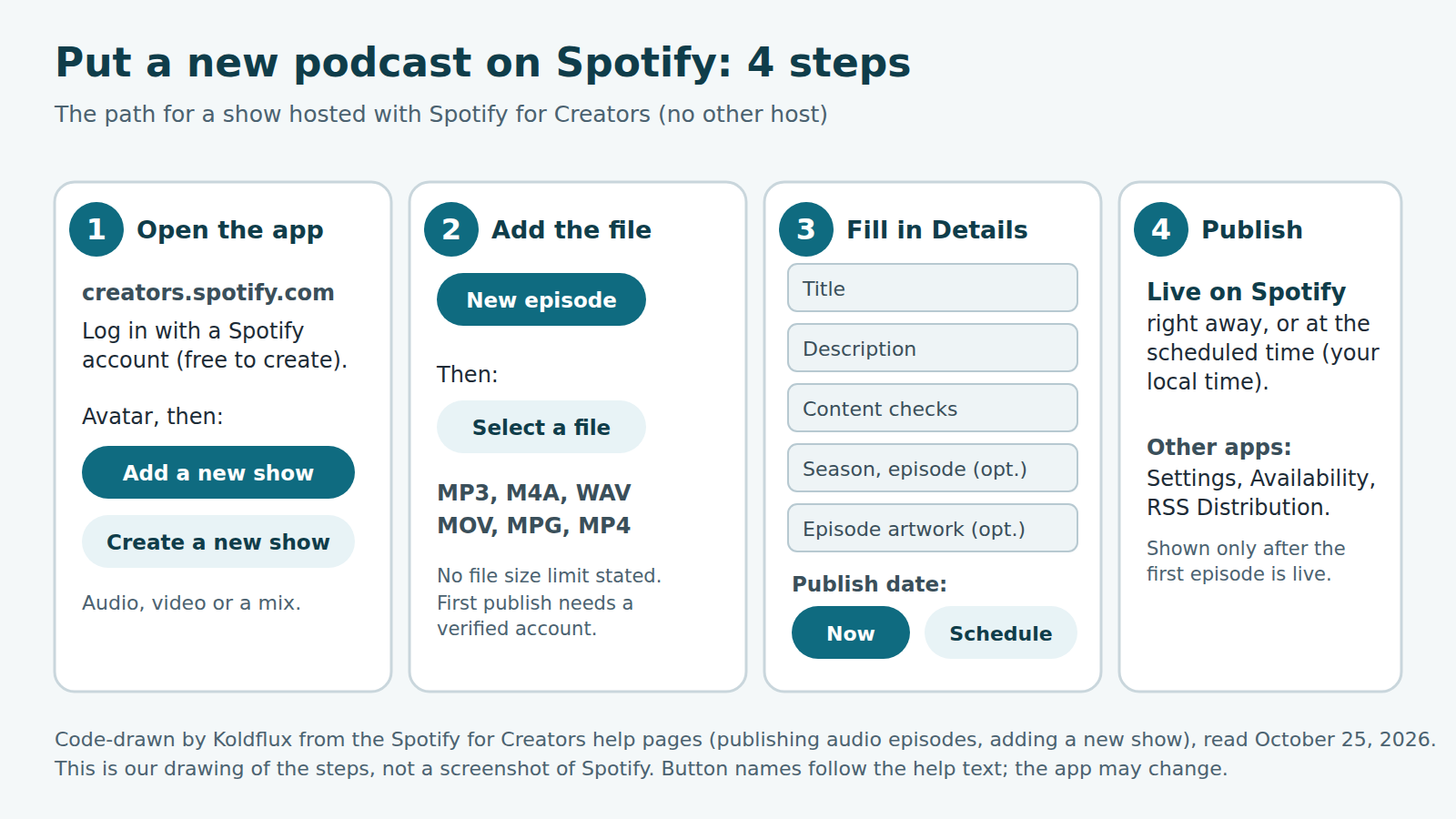
This is the route for a brand new show hosted by Spotify for Creators. It is free, and Spotify publishes the show to listeners on Spotify automatically. The picture below is our own drawing of the steps from the help pages, not a screenshot.
- Go to creators.spotify.com and log in with your Spotify account (you can create a free one).
- Open your avatar, choose Add a new show, then Create a new show. You can upload audio, video or a mix of both.
- Verify your account. Spotify requires it before the first episode or video goes live, and sends a verification email when you sign up.
- Choose New episode, then Select a file (on the mobile app: Podcast, plus, Select a file).
- On the Details page, add a title and description, make your choices under Content checks, and optionally add season and episode numbers and episode artwork.
- Under Publish date choose Now, or Schedule for a later time (shown in your local time). To change a scheduled time, open the episode, use the three dots and choose Revert to draft.
- Upload your show cover art in Settings (Update show art, then Upload an image). Changes usually show within 24 hours.
Official source for the steps: Spotify for Creators help, "Publishing audio episodes in Spotify for Creators" and "Adding a new show to your Spotify for Creators account" (both read October 25, 2026, in headless Chromium without logging in). We drew the steps from that text; we did not walk through them on an account, so button labels in the live app may differ slightly.
Which route do I need: Spotify for Creators or my current host?
Pick the row that matches where your audio files live today. Spotify does not move hosting for you unless you choose to switch.
| Your situation | What to do | Video on Spotify | Other apps |
|---|---|---|---|
| New show, no host yet | Add a new show, Create a new show, upload files | Yes, upload on the web version | Enable the RSS feed, then submit to each app yourself |
| Show hosted with Buzzsprout, Libsyn, Podbean or any other host | Find an existing show, Somewhere else, paste RSS feed or Spotify show URL, enter the 8-digit code | Only if your host supports Spotify video (see below) | Unchanged |
| Host is Art19, Ausha, Cast Plus or Zencast | Ask your host how to distribute to Spotify | Ask your host | Unchanged |
| Audio show you want to add video to | Three dots next to the episode, Upload video (not allowed if a partner host already sends video) | Yes, on Spotify only | Stay audio-only |
Source: Spotify for Creators help, "Adding a new show", "Getting your show on Spotify" and "Publishing video episodes if you are not hosted with Spotify" (official, read October 25, 2026). Hosts that currently support video distribution to Spotify for some or all creators, per that page: Audioboom, Audiomeans, Buzzsprout, Flightcast, Libsyn, Podigee and Podspace.
Where this does not fit: if you want one RSS feed and tools such as dynamic ad insertion or paid subscriptions managed in one place, Spotify for Creators is one option among many hosts. We did not compare hosts here, because that needs hands-on tests with accounts.
Which audio file does Spotify accept, and how do I make one?
Spotify for Creators accepts MP3, M4A and WAV, mono or stereo. It states no file size limit, but larger files take longer to process and are more likely to fail if your connection drops. For MP3, it recommends keeping embedded artwork, ID3v2 tags and other metadata small. If you deliver through an RSS feed from another host, the Podcast Delivery Specification v1.10 (May 2025) recommends MP3 at 128 kbps or higher, or MP4 with AAC-LC, up to 12 hours.
We made a test episode and ran it through the free Koldflux WAV to MP3 converter on the live site on October 25, 2026 (headless Chromium, the real tool, our own WAV).
| Item | Result |
|---|---|
| Input | WAV, 48 kHz, stereo, 16-bit, 27.7 s, 5,318,990 bytes (synthetic voice, our script) |
| Output | MP3, 48 kHz, stereo, 128 kbps, 27.74 s, 444,141 bytes |
| Sample rate and channels kept | Yes |
| Spec check (script below) | PASS: MP3 type, stereo |
| Accepted by Spotify | Not tested (no Spotify account used) |
Method: the file went in with the browser file picker, the Convert button produced the MP3, and ffprobe 6.1.1 read the stream. The log is linked in the sources. The converter re-encodes at about 128 kbps; if you want a higher bitrate, use ffmpeg with -b:a 192k from your WAV master (command on the converter page).
Cover art: the delivery specification says podcast images must be square (1:1), supplied at the highest resolution available, in the order TIFF, PNG, JPEG. We found no pixel minimum in the pages we read, so we do not state one. Our sample is a 3000 by 3000 PNG we drew in code.
Free tools:WAV to MP3 converter (free, in your browser)Download our 27.7 s test episode (MP3)

How do I upload a video podcast to Spotify, and what format does it need?
Upload video on the Spotify for Creators web version (not the mobile app; a draft saved on the web can be published later from the app). Spotify accepts MOV, MPG and MP4, with one video track and one audio track, up to 12 hours. Its recommended settings are below. Audio from your video also goes to your RSS feed, but the video itself stays on Spotify.
| Item | Recommended | Also compatible |
|---|---|---|
| Container | MP4 | MOV (MPG also accepted) |
| Video codec | H.264 High Profile | H.265 (HEVC) |
| Resolution and ratio | 1080p or higher, 16:9 | 180p or higher, any ratio (letterboxed or pillarboxed) |
| Frame rate | 24, 25, 30, 50 or 60 fps (native rate) | Not stated |
| Bitrate | 25 Mbit/s CBR for 1080p, 35 Mbit/s CBR for 4K | Any, within the size range |
| Keyframes | About one per second | At least one per 60 seconds |
| Audio | AAC-LC, stereo, 128 kbps or more (upload article: 192 kbps or more) | PCM, FLAC; mono is upmixed, 5.1 is downmixed |
| Length and size | Under 4 hours, under 10 GB | Up to 12 hours, up to 60 GB |
| Color and tracks | Rec.709 SDR, progressive, audio and video the same length | Rec.2020 and HDR are converted to SDR Rec.709 |
Recommended or also accepted.
Source: Spotify for Creators help, "Video specs" and "Publishing videos" (official, read October 25, 2026). One of the two pages says 128 kbps and the other 192 kbps for audio, so aim for 192.
You cannot record or edit video in Spotify for Creators. Spotify points to its Riverside integration on the web version for that.
How can I check my file against those specs before uploading?
Run the script below on any audio or video file. It needs Python 3 and ffprobe (part of ffmpeg). It prints PASS, WARN or FAIL for each rule from the Spotify pages above and an INFO line for facts with no rule. Add any second argument to also check the keyframe gap on video.
We ran it on four files on October 25, 2026: our MP3, two 1080p MP4 files (25 Mbit/s CBR and CRF 18) built from a cover frame and our MP3, and a deliberately wrong portrait clip as a negative control.
| File | Result | What it flagged |
|---|---|---|
| MP3 (128 kbps stereo) | OK | Nothing |
| MP4, 1080p, 25 Mbit/s CBR (86.9 MB for 27.7 s) | OK, 16 of 16 PASS | Nothing |
| MP4, 1080p, CRF 18 (1.8 MB for 27.7 s) | OK, 16 of 16 PASS | Nothing. A static picture does not need 25 Mbit/s; size is allowed to be any under the range. |
| MP4, 720x1280 portrait, mono 96 kbps, one keyframe per 10 s | OK with 5 WARN | Resolution, 16:9 ratio, audio bitrate, mono, keyframe gap |
Reading it: WARN means the file departs from a recommended value that the Spotify pages list next to a wider compatible range (for example, other aspect ratios are accepted and shown with bars). FAIL is reserved for hard breaks such as two audio tracks. The script is our code, not a Spotify tool. It cannot tell you that Spotify will accept the file. The complete output is in the test log.
#!/usr/bin/env python3
"""Check a file against Spotify for Creators' published upload specs (help pages read 2026-10-25). Needs ffprobe."""
import json, subprocess, sys, os
f = sys.argv[1]
j = json.loads(subprocess.check_output(["ffprobe","-v","error","-show_streams","-show_format","-of","json",f]))
fmt, st = j["format"], j["streams"]
v = [s for s in st if s["codec_type"]=="video" and s.get("disposition",{}).get("attached_pic",0)==0]
a = [s for s in st if s["codec_type"]=="audio"]
dur = float(fmt.get("duration",0)); size = int(fmt.get("size",0)); names = fmt["format_name"]
rows = []
def r(level, rule, got): rows.append((level, rule, got))
ext = os.path.splitext(f)[1].lower()
if not v:
    ok = ext in (".mp3",".m4a",".wav")
    r("PASS" if ok else "FAIL", "Audio file type is MP3, M4A or WAV", ext)
    r("PASS" if len(a)==1 and a[0]["channels"] in (1,2) else "FAIL", "Mono or stereo", f'{a[0]["channels"]} channel(s)')
    r("INFO", "Codec / sample rate / bitrate", f'{a[0]["codec_name"]}, {a[0]["sample_rate"]} Hz, {int(a[0].get("bit_rate",fmt.get("bit_rate",0)))//1000} kbps')
    r("INFO", "File size (no limit stated; large files can fail on a bad connection)", f"{size/1e6:.1f} MB")
else:
    vs, au = v[0], a[0] if a else None
    r("PASS" if ext in (".mp4",".mov") else "WARN", "Container MP4 (recommended) or MOV", ext)
    r("PASS" if len(v)==1 and len(a)==1 else "FAIL", "Exactly one video track and one audio track", f"{len(v)} video, {len(a)} audio")
    r("PASS" if vs["codec_name"]=="h264" else "WARN", "Video codec H.264 (H.265 also compatible)", vs["codec_name"]+" "+vs.get("profile",""))
    w,h = vs["width"], vs["height"]
    r("PASS" if min(w,h)>=1080 else "WARN", "Resolution 1080p or higher (recommended)", f"{w}x{h}")
    r("PASS" if abs(w/h-16/9)<0.01 else "WARN", "Aspect ratio 16:9 (others are letterboxed)", f"{w/h:.3f}")
    n,d = map(int, vs["avg_frame_rate"].split("/")); fps = n/d if d else 0
    r("PASS" if round(fps) in (24,25,30,50,60) else "WARN", "Frame rate 24, 25, 30, 50 or 60", f"{fps:.2f}")
    r("PASS" if vs.get("field_order","progressive") in ("progressive","unknown") else "FAIL", "Progressive scan", vs.get("field_order","progressive"))
    r("PASS" if vs.get("pix_fmt","") in ("yuv420p","yuv420p10le") else "WARN", "4:2:0 color sampling, 8 or 10 bit (recommended)", vs.get("pix_fmt",""))
    r("INFO" if "color_space" not in vs else ("PASS" if vs["color_space"]=="bt709" else "WARN"), "Color space Rec.709 (recommended; INFO = not tagged in the file)", vs.get("color_space","unset"))
    if au:
        r("PASS" if au["codec_name"]=="aac" and au.get("profile","LC")=="LC" else "WARN", "Audio AAC-LC (recommended)", au["codec_name"]+" "+au.get("profile",""))
        r("PASS" if int(au.get("bit_rate",0))>=128000 else "WARN", "Audio 128 kbps or higher (192+ in the upload article)", f'{int(au.get("bit_rate",0))//1000} kbps')
        r("PASS" if au["channels"]==2 else "WARN", "Stereo (mono is upmixed, 5.1 downmixed)", f'{au["channels"]} ch')
        dv, da = float(vs.get("duration",dur)), float(au.get("duration",dur))
        r("PASS" if abs(dv-da)<0.5 else "FAIL", "Audio and video tracks have the same duration", f"video {dv:.2f}s, audio {da:.2f}s")
    r("PASS" if dur<4*3600 else ("WARN" if dur<=12*3600 else "FAIL"), "Duration under 4 hours (recommended), 12 hours at most", f"{dur:.1f} s")
    r("PASS" if size<10e9 else ("WARN" if size<=60e9 else "FAIL"), "File size under 10 GB (recommended), 60 GB at most", f"{size/1e6:.1f} MB")
    if len(sys.argv)>2:
        k = subprocess.check_output(["ffprobe","-v","error","-select_streams","v:0","-skip_frame","nokey","-show_entries","frame=pts_time","-of","csv=p=0",f]).decode().split()
        t = [float(x.strip(",")) for x in k if x.strip(",")]
        gaps = [b-a_ for a_,b in zip(t,t[1:])]
        mg = max(gaps) if gaps else dur
        r("PASS" if mg<=1.05 else ("WARN" if mg<=60 else "FAIL"), "Keyframe about every 1 s (recommended), at least one per 60 s", f"{len(t)} keyframes, longest gap {mg:.2f} s")
for lvl,rule,got in rows: print(f"{lvl:5} {rule}  [{got}]")
print("RESULT", "FAIL" if any(x[0]=="FAIL" for x in rows) else "OK (WARN lines are recommendations, not errors)")ffmpeg -loop 1 -framerate 30 -i frame.png -i episode.mp3 -c:v libx264 -profile:v high -crf 18 -r 30 -g 30 -keyint_min 30 \
-pix_fmt yuv420p -colorspace bt709 -color_primaries bt709 -color_trc bt709 -c:a aac -b:a 192k -ac 2 -shortest -movflags +faststart episode-1080p.mp4
python3 spotify_check.py episode-1080p.mp4 keyframesFree tool:Download the full spec checker (Python 3 + ffprobe)
How do I add a podcast that already has another host?
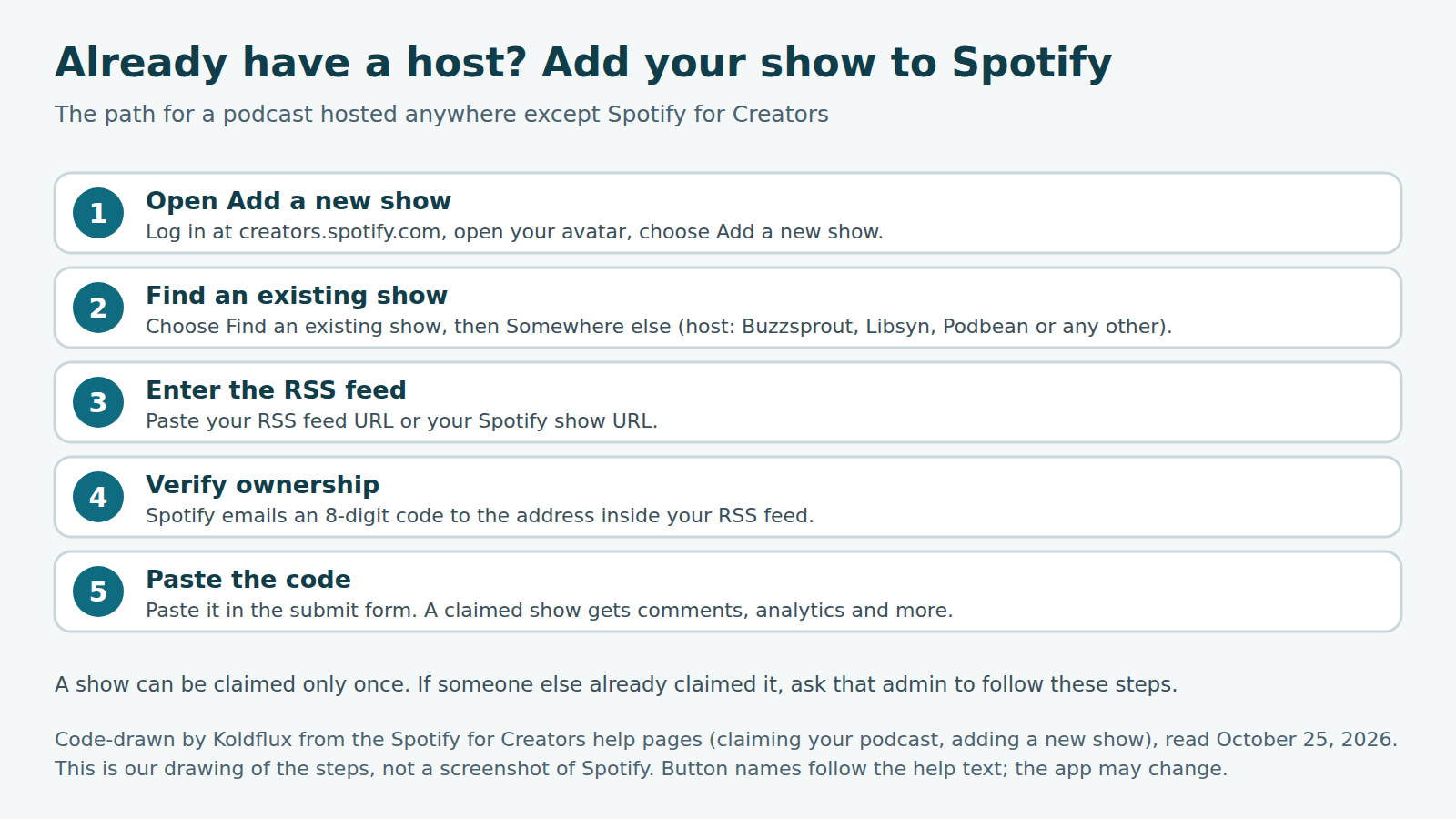
Use Find an existing show. Spotify sends an 8-digit verification code to the email address in your RSS feed, and a show can be claimed only once. If someone else already claimed it, that admin has to invite you.
Source: Spotify for Creators help, "Claiming your podcast on Spotify for Creators" and "Getting your show on Spotify" (official, read October 25, 2026). Spotify lists a submission guide for each of these hosts: Acast, Audioboom, Audiomeans, Backtracks, Blubrry, Buzzsprout, Captivate, Castos, Fireside, iono.fm, Julep, LibSyn, Megaphone, Omny Studio, Pinecast, PodBean, Podcaster.DE, Podigee, Podomatic, RedCircle, RSS.com, Simplecast, Spreaker, Transistor and Vodio.
If the email in your feed is missing or old, fix it at your host first. Spotify has a help article on missing elements in an RSS feed.
How do I record a podcast for Spotify?
Record somewhere else and upload the finished file. Spotify says its own recording and editing tools are gone, and suggests your phone or computer voice recorder for simple solo shows, Riverside for remote guests (it has a Spotify for Creators integration on the web), or Descript and Zoom as other remote options. For editing it names GarageBand, Audacity, Adobe Audition, Pro Tools and Ferrite, and for video iMovie, Premiere and DaVinci Resolve. Export as MP3, M4A, WAV, MOV, MPG or MP4.
We did not test any of these recorders. For a microphone and room setup, see our equipment pages in the Related block. Do not upload audio or video that belongs to someone else: Spotify says it is against its Terms of Service.
Source: Spotify for Creators help, "Recording and editing an episode" and "Evolving how you create on Spotify for Creators" (official, read October 25, 2026). The latter lists what was removed as of July 9: Record with Friends, Music + Talk, Voice Messages, the episode builder, background music and Sounds. Published episodes were left unchanged. The Library moved to Settings, under More actions, Go to my recordings.
Can I add a transcript to a Spotify podcast?
Sometimes. Some shows have auto-generated transcripts, shown to listeners in the Now Playing view and on episode pages in the mobile app. Spotify says transcripts are not available to all creators or in the mobile creator app. If you are eligible, you can download the transcript as a VTT file, edit it on your computer and upload it again as VTT or SRT, up to 5 MB. Include timestamps, or the text will not sync during playback.
We tested the file side. We wrote an SRT for our test episode, converted it with the live Koldflux SRT to VTT tool on October 25, 2026, and compared the result with a VTT built from the same timings: byte-identical, 588 bytes. We could not test Spotify's uploader.
Source: Spotify for Creators help, "Managing episode transcripts on Spotify" (official, read October 25, 2026). The steps there are: Episodes, select an episode, Details, Transcript, View or Edit. To turn transcripts on or off for the whole show, go to Settings, Transcripts. Auto-generated transcripts replace one you uploaded if you enable them. A setting also exists to distribute transcripts through your RSS feed to other apps that support them.
Free tools:SRT to VTT converter (free, in your browser)Download our sample transcript (VTT)Download our sample transcript (SRT)
How do I get my podcast on Apple Podcasts and other apps too?
With Spotify for Creators, Spotify distribution is automatic, but other apps are not. Open Settings, then Availability, scroll to RSS Distribution and enable the feed (the section appears after your first episode is live). Then submit that RSS feed to each service yourself. Spotify has guides for Apple Podcasts, Amazon Music, Castbox, Goodpods, iHeartRadio, Overcast, Pocket Casts and RadioPublic.
Three things to know before you enable it: your email address becomes public to anyone with the feed link, some directories copy public feeds so your show may appear where you did not submit it, and Spotify cannot remove it from those third-party directories afterward. Most apps publish within a few hours, and new episodes appear within about 24 hours.
Source: Spotify for Creators help, "Finding and enabling your RSS feed" and "Distributing your show to other platforms" (official, read October 25, 2026). If an episode or artwork update does not appear, Spotify suggests saving the new file under a slightly different URL so apps notice the change in the feed.
How do Spotify podcast charts and rankings work?
You cannot buy or apply for a chart place. Spotify says its charts are based on listening behavior and engagement and update daily. You can see them in the app (Search on mobile or Browse on desktop, then Podcasts, then Podcast Charts) or at podcastcharts.byspotify.com.
| Chart | What it lists | Based on |
|---|---|---|
| Top Podcasts | Top 200 in each country | Weekly unique audience |
| Trending Podcasts | Top 200 gaining popularity in each country | A mix of growth factors |
| Top by category | Top 50 in each category (select countries only) | The first category listed in your RSS feed |
Source: Spotify for Creators help, "Podcast charts on Spotify" (official, read October 25, 2026). If your chart category is wrong, change the category in your RSS feed; your host can help. Spotify does not publish the weights of its growth factors, so anyone quoting an exact formula is guessing.
What should I do in my situation?
Find your case, do the check, then publish.
| Situation | What to check |
|---|---|
| I have a WAV from my recorder | Convert to MP3 or upload the WAV as is; run the spec script; keep the WAV master |
| My video was shot on a phone in portrait | Spotify accepts it but letterboxes it; for full-screen on Spotify use 16:9 1080p |
| Upload keeps failing | Check the file plays locally and the format is supported; try a smaller file or a steadier connection; contact Spotify support |
| Episode is live on Spotify but not on Apple Podcasts | You must submit your RSS feed to Apple yourself; wait up to 24 hours after that |
| Wrong chart category | Fix the first category in the RSS feed |
Limits and how we checked
Official facts come from the Spotify for Creators help center (support.spotify.com/us/creators) and the Podcast Delivery Specification v1.10 (May 2025). We read them in headless Chromium without logging in on October 25, 2026. We used no Spotify account, so we did not walk through the live app or upload a file. The step images are our drawings of the documented flow, and Spotify can change the interface and labels.
What we ran ourselves: the live Koldflux WAV to MP3 and SRT to VTT tools, ffprobe 6.1.1 on our files, and the checker script. Our test voice is synthetic (Kokoro-82M) and the show is fictional. Real phone video and 10-bit footage were not tested; for those, trust the table above and run the script on your own file.
Not covered: monetization. Spotify describes a Spotify Partner Program (ad revenue and premium video revenue in eligible markets) and subscriptions, with eligibility that changes by market and host. We cite it only as a pointer and give no numbers; check Spotify for Creators for your own eligibility. Also not covered: Spotify Open Access, ads, analytics, and comparing hosts. Guide, not legal advice. Spotify is a trademark of Spotify AB; Koldflux is not affiliated with Spotify.
Do it in your browser
Free Koldflux tools, no account needed.
Questions people ask
Is it free to put a podcast on Spotify?
Spotify for Creators hosting is described by Spotify as free (help page "Evolving how you create", read October 25, 2026). You pay for your own recording gear and editing tools.
What file types can I upload?
MP3, M4A and WAV for audio, and MOV, MPG and MP4 for video. Audio can be mono or stereo, and Spotify states no file size limit (official, read October 25, 2026).
Can I record a podcast on Spotify?
Not in Spotify for Creators. Its recording and editing tools were removed on July 9. Spotify points to its Riverside integration on the web version and to other recorders.
How do I upload a video podcast to Spotify?
On the Spotify for Creators web version choose New episode, Select a file, and pick an MP4, MOV or MPG with one video and one audio track. The video plays on Spotify only; other apps get the audio.
How long does it take for my podcast to show up?
On Spotify an episode is live at once unless you schedule it. On other apps Spotify says most publish within a few hours, some review manually, and updates can take up to 24 hours.
How do I find my podcast RSS feed?
In Spotify for Creators go to Settings, then Availability, then RSS Distribution. The section appears after your first episode is published. With another host, ask that host for the feed.
How do I get a transcript on Spotify?
Some shows get auto-generated transcripts. If you are eligible you can download, edit and upload a VTT or SRT file up to 5 MB with timestamps. It is not available to all creators.
How do Spotify podcast rankings work?
Top Podcasts lists the top 200 in each country by weekly unique audience, Trending lists 200 by growth, and category charts list 50 using the first category in your RSS feed. They update daily.
Related
Sources and how we checked
- Koldflux test log: converter runs, SRT to VTT diff, spec checker output on four files (ffprobe 6.1.1, October 25, 2026) (checked 2026-10-25)
- Spotify for Creators help: Publishing audio episodes in Spotify for Creators (official) (checked 2026-10-25)
- Spotify for Creators help: Publishing videos (official) (checked 2026-10-25)
- Spotify for Creators help: Video specs (official) (checked 2026-10-25)
- Spotify for Creators help: Adding a new show to your Spotify for Creators account (official) (checked 2026-10-25)
- Spotify for Creators help: Claiming your podcast on Spotify for Creators (official) (checked 2026-10-25)
- Spotify for Creators help: Getting your show on Spotify (official) (checked 2026-10-25)
- Spotify for Creators help: Evolving how you create on Spotify for Creators (official) (checked 2026-10-25)
- Spotify for Creators help: Recording and editing an episode (official) (checked 2026-10-25)
- Spotify for Creators help: Managing episode transcripts on Spotify (official) (checked 2026-10-25)
- Spotify for Creators help: Finding and enabling your RSS feed (official) (checked 2026-10-25)
- Spotify for Creators help: Distributing your show to other platforms (official) (checked 2026-10-25)
- Spotify for Creators help: Podcast charts on Spotify (official) (checked 2026-10-25)
- Spotify for Creators help: Publishing video episodes if you are not hosted with Spotify (official) (checked 2026-10-25)
- Spotify for Creators help: Uploading cover art (official) (checked 2026-10-25)
- Spotify Podcast Delivery Specification v1.10, May 2025 (official; PDF linked from Spotify Provider Support) (checked 2026-10-25)
- Riverside: How to start a podcast on Spotify (third party, July 24, 2026; read for coverage comparison) (checked 2026-10-25)
We read Spotify for Creators help pages and the Podcast Delivery Specification v1.10 in headless Chromium on October 25, 2026, with no login. We then made a 27.7 second test episode (our text, synthetic Kokoro voice, 48 kHz stereo WAV), converted it with the live Koldflux WAV to MP3 tool, built a SRT and ran it through the live SRT to VTT tool, built two 1080p MP4 files with ffmpeg 6.1.1, and checked all of them, plus a wrong portrait clip, with our spec script. We compared the outlines of third-party guides from Riverside, The Podcast Consultant, Cleanvoice and Async for coverage. We did not upload to Spotify.