Podcast clips guide
What is an audiogram, and how do you make one for free?
Short answer
A podcast audiogram is a short video built from an audio clip: a moving waveform, a title and burned-in captions over a plain background. It exists because the official upload pages of Instagram, TikTok, YouTube, LinkedIn and X all describe video files, not bare MP3 or WAV files. It is not the hearing test chart that shares the name. You can make one free with a single ffmpeg command: ours turned a 14 second clip of our own script, read by a synthetic voice, into a 1080 by 1920 MP4 of 2.2 MB in 6.7 seconds.
Key takeaways
- Every platform page in our table specifies a video file with an audio track. An audiogram is how audio-only content gets into that format.
- The whole job is three inputs (an audio clip, a waveform and captions) and one ffmpeg command. Our run is below with its measured output.
- Cut at a sentence boundary, burn the captions in above the bottom 35% of the frame, and proofread them: automatic captions can drop or misread words.
- If you also filmed the conversation, cut the real video instead. An audiogram is for the audio you have no picture for.
What is an audiogram?
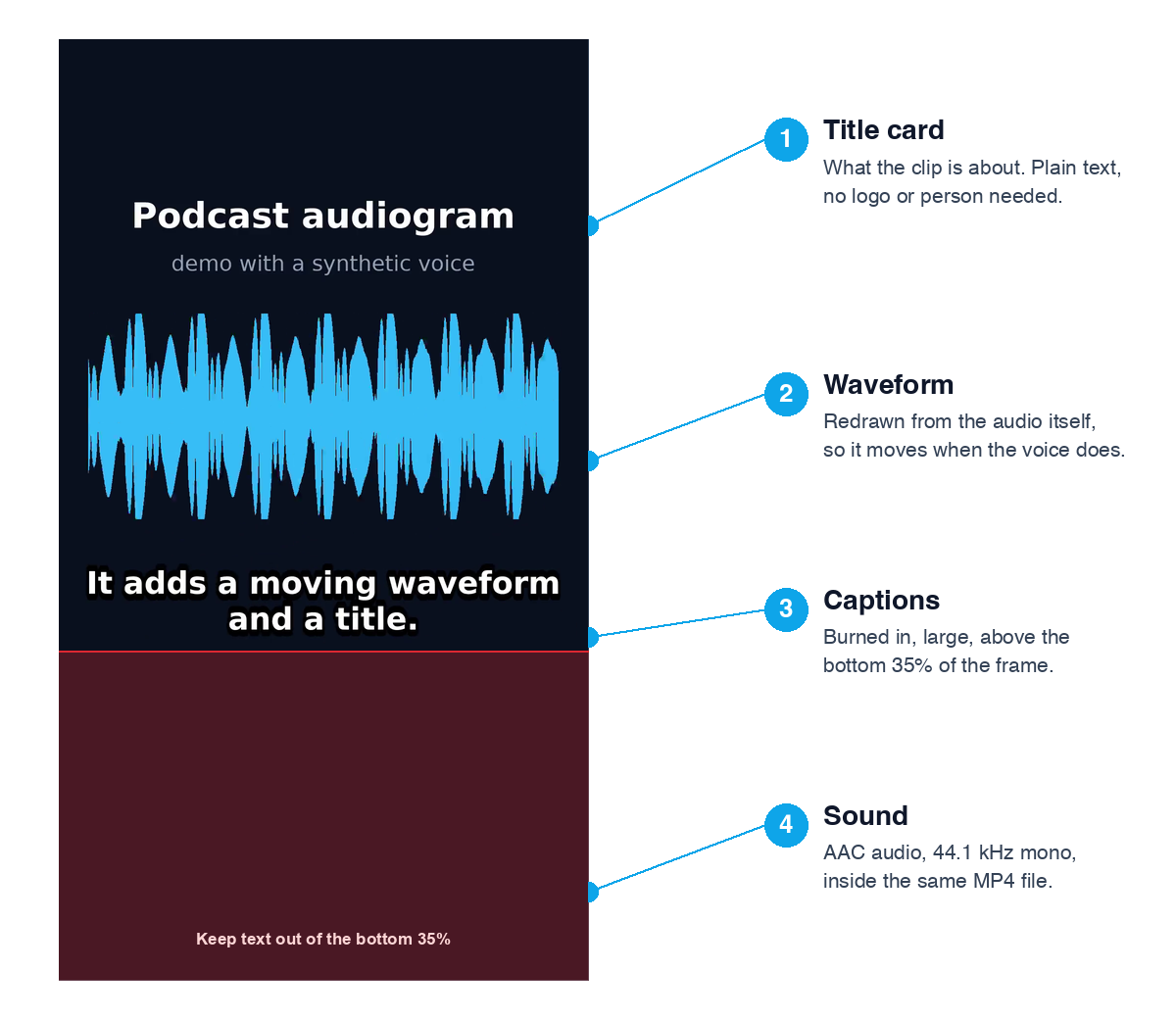
In content marketing, an audiogram is a short clip of audio, usually from a podcast, turned into a video so it can be posted where video is expected. It has three visible parts: a title card that says what the clip is, a waveform that moves with the voice, and captions that show the words. The sound plays from the same file.
The word has a second meaning that is unrelated: in medicine, an audiogram is the chart a hearing test produces. This page is only about the podcast and social video kind.
When does an audiogram help, and when should you skip it?
It helps when the only thing you have is sound. If you filmed the conversation, a real clip of the people talking is the stronger post, and our podcast-to-shorts workflow covers that. An audiogram is the fallback that still gives the feed something to see.
| What you recorded | Best format | Why |
|---|---|---|
| Audio-only podcast, voice memo, phone call, radio | Audiogram | There is no picture, and the platforms below take video files. |
| Video podcast or interview with faces on camera | Real video clip, vertical, captioned | The viewer sees the actual people, which no waveform can replace. |
| Screen recording with a voiceover | Captioned screen clip | The screen is already the visual. |
| A single quote you want to feature | Audiogram or a quote card | A moving waveform shows there is sound to unmute for. |
We found no official platform source that says audiograms get more reach than other video, so we do not claim it. What the sources do show is the narrower, checkable point in the next section.
Can you post audio on Instagram, TikTok, YouTube, LinkedIn and X?
Not as a bare audio file. In every official page below, the thing you upload is a video file with an audio track, and none of them lists a plain MP3 or WAV as a post type. That is the practical reason an audiogram exists: you put the audio inside a video.
The table gives the file rules from each platform page, read on October 21, 2026. The Instagram and TikTok rows come from developer documentation for publishing through their APIs, which is where those platforms publish exact file specs; the app can be more forgiving.
| Platform | Container and codecs | Frame rate and size | Length and file size |
|---|---|---|---|
| Instagram Reels | MOV or MP4 with the moov atom at the front; H.264 or HEVC, 4:2:0; AAC audio, mono or stereo, up to 48 kHz | 23 to 60 fps; up to 1920 pixels wide; any ratio from 0.01:1 to 10:1, 9:16 recommended | 3 seconds to 15 minutes; up to 300 MB; video up to 25 Mbps |
| TikTok (Content Posting API) | MP4 (recommended), WebM or MOV; H.264 recommended, also H.265, VP8, VP9 | 23 to 60 fps; 360 to 4096 pixels per side | Up to 4 GB |
| YouTube | MP4, H.264 video, AAC-LC or Opus audio (recommended upload settings) | Not stated on that page | Not stated on that page |
| LinkedIn (feed video) | MP4, MOV, WEBM on desktop and Android, MP4 and MOV on iOS | 10 to 60 fps; 256 by 144 to 4096 by 2304; ratio from 1:2.4 to 2.4:1; 192 Kbps to 30 Mbps | 3 seconds on desktop (2 on the mobile app) to 15 minutes; 75 KB to 5 GB |
| X (API media docs) | H.264 High Profile, AAC LC, mono or stereo, YUV 4:2:0, progressive, no open GOP | 60 fps or less; 720 by 1280 recommended for portrait; ratio from 1:3 to 3:1 | 0.5 seconds to 20 minutes and 8 GB (Premium: 125 minutes and 16 GB) |
Official pages, read October 21, 2026.
Our demo file is H.264, AAC, 30 fps, 1080 by 1920, with the moov atom at the front, which fits the Instagram, TikTok, YouTube and LinkedIn rows as written. X documents 720 by 1280 as its portrait size, so for X we also scaled the same file down: 720 by 1280, 1.18 MB, with the audio copied unchanged.
What do you need to make an audiogram?
- An audio clip you have the right to post. Use your own episode, and ask guests before you cut their words. The narration in our demo is synthetic: we wrote the script ourselves and made the voice with flite, a free speech engine that ships inside ffmpeg (voice slt), The voice is a synthetic one (flite, slt) built from a licensed speech database; no real person is named or shown.
- A waveform. ffmpeg draws one from the audio itself with its showwaves filter, so you need no image editor.
- Captions as an SRT file. Captions keep the clip readable with the sound off, and the words are the hook. Our free subtitle generator writes an SRT from an audio file in your browser.
- ffmpeg, free and open source, on Windows, macOS or Linux. Our run used version 6.1.1 on Linux.
Free tools:Subtitle generator (audio to SRT, free, no upload)Trim a video or audio clip
How do you make an audiogram for free with ffmpeg?
These are the exact steps we ran on October 21, 2026, from a four-sentence script to a finished vertical MP4. With a real episode, only step 2 differs.
- Find the sentence you want. Play the episode, or run ffmpeg -i episode.webm -vn -af silencedetect=noise=-35dB:d=0.35 -f null - to list the pauses, and cut at pauses so the clip starts and ends on a whole thought.
- Get the clip. For a real episode, cut it with ffmpeg -ss START -t LENGTH -i episode.mp3 -vn -ac 1 -ar 44100 clip.wav, where START and LENGTH are in seconds. Ours had no episode: we wrote four sentences and spoke each one with ffmpeg -f lavfi -i "flite=text='SENTENCE':voice=slt", then joined them with 0.3 seconds of silence between. That gave a 14.02 second clip.wav, and because each sentence was its own file we know every cue time exactly.
- Write the captions. Save an SRT with one short cue per sentence or breath, at most two lines. We wrote four cues, from "A podcast audiogram turns a short audio clip into a video." to "Cut at a full sentence, then proofread the captions." Start and end times came from the lengths of the four sentence files (0 to 3.935 s, 4.235 to 6.610 s, 6.910 to 10.170 s, 10.470 to 14.020 s).
- Render. Put clip.wav and captions.srt in one folder and run the command below (also saved as a text file under Download the files). It makes a dark 1080 by 1920 canvas, draws the waveform from the audio, adds the title lines, burns the captions in and encodes H.264 plus AAC with faststart.
- Check the result in a player, scrub to the first and last caption, and upload the MP4 like any other video.
The render command:
ffmpeg -y -i clip.wav -f lavfi -i "color=c=0x0b1220:s=1080x1920:r=30" -filter_complex "[0:a]volume=3,showwaves=s=960x420:mode=cline:rate=30:colors=0x38bdf8:scale=sqrt:draw=full[w];[1:v]format=rgb24[bg];[bg][w]overlay=60:560:shortest=1,drawtext=fontfile=/usr/share/fonts/truetype/dejavu/DejaVuSans-Bold.ttf:text='Podcast audiogram':fontcolor=white:fontsize=72:x=(w-text_w)/2:y=330,drawtext=fontfile=/usr/share/fonts/truetype/dejavu/DejaVuSans.ttf:text='demo with a synthetic voice':fontcolor=0x94a3b8:fontsize=44:x=(w-text_w)/2:y=440,subtitles=captions.srt:force_style='FontName=DejaVu Sans,FontSize=11,Bold=1,Alignment=2,MarginV=105,Outline=2'[v]" -map "[v]" -map 0:a -c:v libx264 -preset slow -crf 30 -pix_fmt yuv420p -r 30 -c:a aac -b:a 64k -movflags +faststart audiogram-demo.mp4On Windows or macOS, change the two fontfile paths to any .ttf font on your computer. Two details cost us a failed first render each: draw=full in showwaves, because without it the waveform came out as a faint green smear instead of the color we set, and the MarginV value, which libass counts on a 288 pixel scale, so 105 means roughly 700 pixels from the bottom of a 1920 pixel frame. Change colors, the title text and the canvas size freely.
Download the files
Everything behind the demo is published so you can reproduce it: the finished MP4, the SRT captions, the 14 second narration (WAV), the script, a text file with the exact command and the measurement log behind the file sizes. The demo voice is synthetic, so you can reuse these files to test your own setup.
Free tools:audiogram-demo.mp4 (2.2 MB)audiogram-demo.srt (captions)audiogram-demo-command.txt (exact ffmpeg command)audiogram-demo-clip.wav (narration)audiogram-demo-script.txt (script)audiogram-demo-measurements.txt (sizes and ffprobe)
No command line? What you can do in Koldflux today
Koldflux has no waveform maker yet, so it cannot build the whole audiogram for you. It does cover the caption half, in your browser with no upload. The subtitle generator turns an audio or video file into an SRT. The Add captions tool burns captions, from your SRT or written from the speech, onto a video you already have.
In practice: if you have a video of the recording, use Add captions on it and skip the waveform. If you only have audio, make the SRT with the subtitle generator, then put the audio and the SRT into a video editor or one of the audiogram apps in the table below, which draw the waveform for you.
Free tools:Subtitle generator (audio or video to SRT)Add captions to a video (burn in)
What did the finished file measure?
We read these back with ffprobe on the finished file. Nothing here is an estimate.
| Property | Result |
|---|---|
| Input clip | 14.02 seconds of mono audio, 44.1 kHz, synthetic voice (flite, voice slt) |
| Output container and video | MP4, H.264, yuv420p, 1080 by 1920 (9:16), 30 fps |
| Output audio | AAC, 44.1 kHz, mono, 63 kbps (ffprobe 63,148 bps; 64k requested) |
| Duration | 14.07 seconds (video), 14.02 seconds (audio) |
| File size | 2,198,116 bytes (2.20 MB), about 1,250 kbps overall |
| Render time | 6.7 seconds |
| moov atom position | At the front of the file (faststart) |
| Same file scaled to 720 by 1280 for X | 1,181,364 bytes (1.18 MB) |
Koldflux measurement, October 21, 2026, ffmpeg 6.1.1 on Linux.
The file size is set by -crf. We viewed a frame at -crf 34 (1.61 MB) and saw a faint halo and softened edges around the white caption letters, so we used -crf 30, where the letters are crisp, for 2.20 MB; -crf 28 gave 2.55 MB with no visible gain. Both test renders used a slightly larger caption size than the final one. Raise the number to shrink the file, lower it for crisper text.
Where do the captions go, and can you trust automatic ones?
Put them in the middle of the frame, not the bottom. Our free Add captions tool keeps vertical captions above the bottom 35% of the frame (the largest bottom safe zone in our aspect ratio guide's safe-zone table) because that is where the TikTok, Reels and Shorts buttons sit, and the command above does the same, which is why the annotated frame shades that zone. Burned-in captions cannot be switched off by the viewer, which is the point for a muted feed; our guide on closed versus open captions explains the trade.
Proofread every cue. Our captions came from our own script, so they match the words exactly. Captions from speech recognition do not have that guarantee: they can drop a word, misspell a name or mishear a number. Captions are the only text in an audiogram, so a wrong one is the first thing a viewer sees.
Free tools:Add captions to a video (burn in, above the app buttons)Audio or video to text
Which audiogram makers are free, and when is ffmpeg the wrong choice?
ffmpeg is the free route, but it is a command, not a template library. If you make audiograms every week with brand colors, a logo and animated captions, a dedicated app saves time. We have not tested them, and their free plans, watermarks and limits change, so check the current terms before you commit.
| Option | Cost | Good for | Limit |
|---|---|---|---|
| ffmpeg command on this page | Free | One-off or scripted clips, full control, no watermark, no upload | No templates, you type the command and write the SRT |
| Koldflux subtitle generator plus Add captions | Free, in your browser | The caption half: audio to SRT, then captions burned onto a video | We do not draw a waveform today, so the visual comes from ffmpeg or another editor |
| Dedicated audiogram apps and editors (for example Adobe Podcast, Descript, Canva, Headliner, Wavve) | Check each current plan | Their own pages say they offer templates and waveform video; we did not test them | Free tiers vary; we did not test them |
How long should an audiogram be?
The platform pages above set ceilings and floors, not an ideal: LinkedIn needs at least 3 seconds, and X and LinkedIn allow far longer than a clip needs. We found no official source for a best length, so choose by content. Ours is 14 seconds because that is four short sentences that each stand alone; with a real episode, pick one complete thought whose first words give the reason to keep listening.
Start on the sentence that makes sense without the rest of the episode. If you need a longer-form route from a full recording to several short clips, follow our podcast-to-shorts workflow.
Limits and how we checked
- Tested by us: we ran the command shown above on Linux with ffmpeg 6.1.1 on October 21, 2026, read the file properties back with ffprobe and viewed one frame at two quality settings to judge caption sharpness. We did not run it on macOS or Windows.
- Only read: the platform limits in the table come from the official pages under Sources, read on October 21, 2026. Instagram, TikTok and X were read from developer documentation, so the apps themselves may accept more.
- The demo voice is synthetic (the flite engine), so the loudness and caption timing show how the command behaves, not how a real recorded voice would sound.
- We did not upload the demo to any platform and did not test the third party audiogram makers named in the comparison; their descriptions come from their own pages.
Do it in your browser
Free Koldflux tools, no account needed.
Subtitle generator (audio to SRT)Add captions to a videoTrim a videoCompress a video
Questions people ask
What is a podcast audiogram?
A short video made from an audio clip, with a moving waveform, a title and captions, so the clip can be posted as a video. The sound plays from the same file.
What is an audiogram maker?
Any tool that builds that video from audio: a dedicated app with templates, a general video editor, or a command such as the free ffmpeg one on this page.
Can I post an MP3 directly to Instagram, TikTok, LinkedIn or X?
The official pages we read describe a video file with an audio track, and none lists a plain MP3 or WAV as a post type. Put the audio in an MP4 first.
How do I make an audiogram for free?
Cut your clip, get an SRT, and run one ffmpeg command that draws the waveform, burns the captions in and encodes an H.264 plus AAC MP4. Ours took 6.7 seconds and produced 2.2 MB.
What size should an audiogram be?
Vertical 1080 by 1920 (9:16) fits Instagram, TikTok, YouTube and LinkedIn as documented. For X, 720 by 1280 is its documented portrait size.
Do I need captions on an audiogram?
Yes in practice: the words are the only text the viewer can read before unmuting. Burn them in above the bottom 35% of the frame and proofread them.
Is a hearing-test audiogram the same thing?
No. That is a medical chart of what you can hear. This page is about the social video made from an audio clip.
Can I use any audio for an audiogram?
Only audio you have the right to post. Use your own recording and get guests' permission. The demo here uses a synthetic voice (flite, slt, built from a licensed speech database) reading our own script; no real person is named or shown.
Related
Sources and how we checked
- Instagram Platform: Reel specifications (Meta developer documentation) (checked 2026-10-21)
- TikTok for Developers: Content Posting API media transfer guide (last updated August 4, 2026) (checked 2026-10-21)
- YouTube Help: Recommended upload encoding settings (checked 2026-10-21)
- LinkedIn Help: Video sharing troubleshooting (file requirements) (checked 2026-10-21)
- LinkedIn Help: Media file types supported on LinkedIn (checked 2026-10-21)
- X Developer Platform: Media upload best practices (checked 2026-10-21)
- FFmpeg Filters Documentation (showwaves, drawtext, subtitles, silencedetect, flite) (checked 2026-10-21)
- Adobe Podcast: Audiograms 101 (an example of a dedicated audiogram maker) (checked 2026-10-21)
We wrote a four-sentence script about podcast audiograms, spoke each sentence with the free flite speech engine inside ffmpeg 6.1.1 (voice slt; the voice is synthetic), joined them with 0.3 seconds of silence, built the SRT from the exact sentence lengths, and ran the command shown on this page on Linux. File properties were read back with ffprobe and the file sizes with ls on October 21, 2026, and a frame at -crf 34 and -crf 30 was extracted and viewed to judge caption sharpness. The platform rules in the table were read from the official pages listed under sources on the same date; Instagram, TikTok and X were read from developer documentation, and the app may accept more. Instagram, TikTok, YouTube, LinkedIn, X, Adobe, Canva, Descript, Headliner and Wavve are trademarks of their owners; Koldflux is not affiliated with or endorsed by them.