Phone video comparison
Free video editing apps for Android and iPhone: which fits which task, per their own pages
Short answer
We installed none of these apps and exported nothing from them, so this is a documented comparison of what their store listings and help pages say (read October 21 and 22, 2026), not a tested ranking. The only thing we ran ourselves is Koldflux's in-browser trim tool. By their own pages, Edits targets Instagram Reels, YouTube Create targets YouTube and Shorts, CapCut offers captions and templates, VN and Adobe Premiere advertise watermark-free export, and the table below shows which of them your phone can even install.
Key takeaways
- Nothing here is a tested verdict: we installed none of the seven apps. Every app fact is dated and attributed to the store listing or help page that states it.
- Instagram Reels: Edits. Its listing says "Export your videos in 4K with no watermark". Needs iOS 16.3 or newer on iPhone and Android 9 or newer.
- YouTube and Shorts: YouTube Create. Google says it is "free of charge and without ads" and needs Android 8.0 with at least 4 GB of RAM, or an iPhone XR or newer on iOS 17.
- Captions and templates: CapCut. Its help center says a free export can be blocked when a project uses Pro items. Installs on iOS 15 or newer and Android 6.0 or newer.
- Adobe Premiere mobile on Android needs Android 13 or later and at least 5 GB of RAM (Adobe, September 22, 2026); on iPhone the listing requires iOS 18.
- No app needed for a single trim, crop or join: Koldflux browser tools, with one trim run tested by us (see the separate section).
Which free editor fits which task, according to their own pages?
Pick the task, then check the requirements table that follows. The "Basis" column says which page backs each line. The pairing of task and app is our reading of those pages, not a quality ranking.
| Your task | iPhone | Android | Basis (what the page says) |
|---|---|---|---|
| Instagram Reels, vertical, no watermark | Edits | Edits | Store listing: "Export your videos in 4K with no watermark and share to any platform" (App Store, Google Play). |
| YouTube long videos and Shorts | YouTube Create | YouTube Create | Google Help: free of charge and without ads. Android 8.0 or later with 4 GB RAM; iPhone XR or newer on iOS 17. |
| Auto captions, templates, effects | CapCut | CapCut | Google Play listing names auto captions, text-to-speech and background removal. CapCut help: Pro assets can block a free export. |
| Multi-track timeline, no-watermark claim | VN | VN | App Store title line: "Free with No Watermark". Both stores label in-app purchases; Google Play also labels ads. |
| AI-assisted editor, clean-export claim | Adobe Premiere (iOS 18 or newer) | Adobe Premiere (Android 13 or later, 5 GB RAM) | Store text: "entirely free export without watermarks" (Google Play), "without ads or watermarks" (App Store). Adobe blog for the requirements. In-app purchases labeled. |
| Simple Apple editor | iMovie (iOS 17.6 or newer) | Not offered by Apple on Android (not checked on Google Play) | App Store listing: free, no in-app purchases entry. Last release shown: December 16, 2024. |
| Older phone (iOS 15 or 16, Android 6 to 8) | CapCut, InShot (iOS 15); VN (iOS 16) | CapCut (Android 6.0), VN (7.0), InShot (8.0) | Minimum versions in the requirements table below. |
| Free logo or watermark removal | Unclear: InShot terms tie "InShot logo and ads removal" to a paid subscription | Same | InShot terms of use. We found no official page describing its free export. |
Read October 21 and 22, 2026.
What does each app need: iOS, Android and RAM?
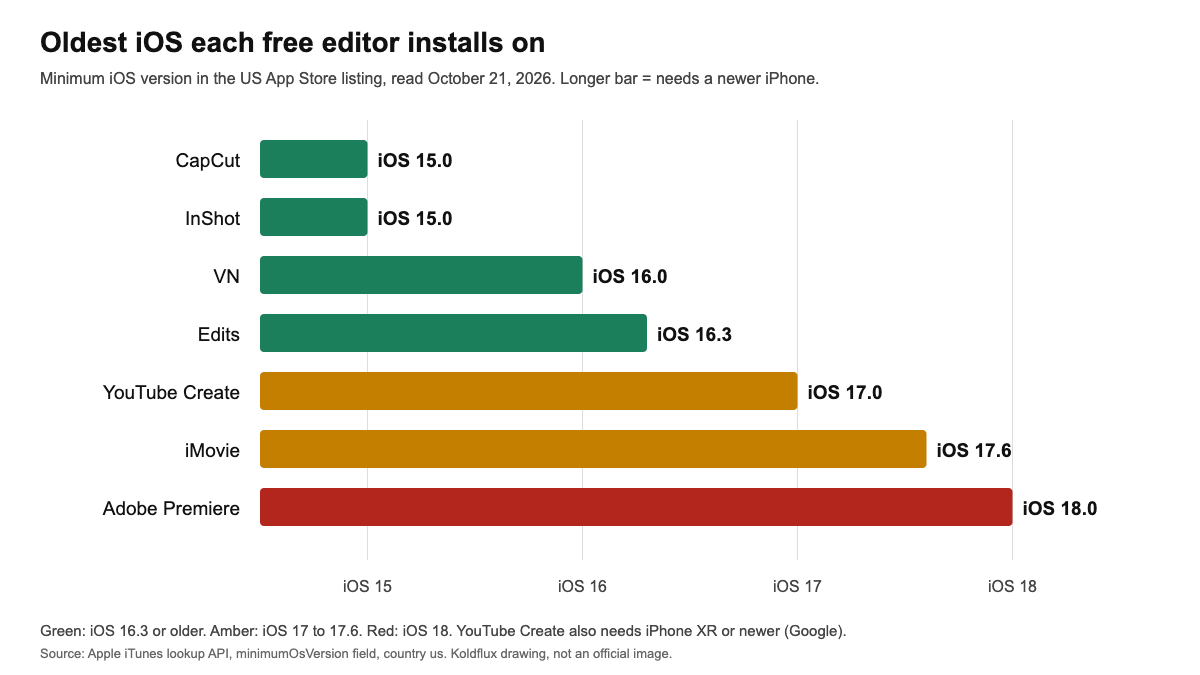
Most lists skip this, and it decides whether an editor installs. iOS minimums come from the App Store lookup, Android minimums from the Google Play "About this app" dialog, and the RAM figures from Google's and Adobe's own statements. Values are for the US storefronts.
| App | iPhone minimum | Android minimum | RAM |
|---|---|---|---|
| CapCut | iOS 15.0 | Android 6.0 and up | Not stated on the pages we read |
| InShot | iOS 15.0 | Android 8.0 and up | Not stated on the pages we read |
| VN | iOS 16.0 | Android 7.0 and up | Not stated on the pages we read |
| Edits (Instagram) | iOS 16.3 | Android 9 and up | Not stated on the pages we read |
| YouTube Create | iOS 17.0, iPhone XR or newer (Google Help) | Android 8.0 or later (Google Play dialog) | At least 4 GB (Google Help and Google Play) |
| Adobe Premiere | iOS 18.0 | Android 13 or later (Adobe blog, September 22, 2026) | At least 5 GB (Adobe blog; Google Play also says 5 GB or more to download) |
| iMovie | iOS 17.6 | Not offered by Apple on Android (not checked on Google Play) | Not stated |
App Store lookup October 21, 2026; Google Play and Adobe October 22, 2026.
Adobe's helpx pages for Premiere mobile refused our headless browser (Access Denied) on October 22, 2026, so for Adobe we cite its own blog post and the Google Play listing instead. Google Play is the final check for your own model.
Which free video editors add a watermark to exports?
The honest answer is what each publisher says, because we did not export from the apps. The table separates the statement from its source. A store listing is the publisher advertising its own app.
| App | What the source says | Source type |
|---|---|---|
| Edits (Instagram) | "Export your videos in 4K with no watermark and share to any platform." | Publisher store listing (App Store and Google Play) |
| Adobe Premiere | "Entirely free export without watermarks" (Google Play); "without ads or watermarks" (App Store) | Publisher store listing |
| VN | App Store title line: "Professional Video and Photo Editing, Free with No Watermark" | Publisher store listing |
| CapCut | Help center: in most cases a free export has no watermark, but one can come from a template ending clip. A prompt to join Pro appears when the project has Pro elements, and watermark removal on videos using Pro materials always requires Pro. | Official help pages (capcut.com/help) |
| InShot | Terms: a paid subscription includes "InShot logo and ads removal". Nothing on the pages we read says what the free export looks like. | Official terms (inshot.cc) |
| YouTube Create | Help: "free of charge and without ads". The two help pages we read do not mention a watermark on exports, which is not a statement that there is none. | Official help (support.google.com/youtube) |
| iMovie | Free listing, no in-app purchases entry. The listing does not mention a watermark. | Publisher store listing (Apple) |
Read October 21, 2026.
Do not treat user reviews as the rule. Google Play reviews of InShot mention removing a watermark by watching ads, but we found no official page that says so, so we did not use it.
What do the store pages say about price, ads and purchases?
"Free" in a store means the download is free. The labels below are what each page shows, not what is locked behind them.
| App | App Store (iPhone) | Google Play (Android) |
|---|---|---|
| CapCut | Free, in-app purchases, 4.61 from 1.12M ratings, v19.8.0 released Oct 20, 2026 | In-app purchases, 3.5 from 13.1M reviews, 1B+ downloads, updated Oct 19, 2026 |
| InShot | Free, in-app purchases, 4.85 from 2.51M ratings, v2.0.2 released Oct 1, 2026 | Contains ads, in-app purchases, 4.8 from 24.7M reviews, 500M+ downloads, updated Sep 21, 2026 |
| VN | Free, in-app purchases, 4.76 from 321K ratings, v2.23.0 released Oct 19, 2026 | Contains ads, in-app purchases, 4.7 from 5.54M reviews, 100M+ downloads, updated Oct 19, 2026 |
| Edits | Free, in-app purchases, 4.79 from 96K ratings, v452.0 released Oct 19, 2026 | In-app purchases, 4.7 from 1.88M reviews, 100M+ downloads, updated Oct 19, 2026 |
| YouTube Create | Free, no in-app purchases entry, 4.61 from 3.8K ratings, v0.147.945 released Oct 15, 2026 | No ads or purchase label shown, 4.6 from 179K reviews, 10M+ downloads, updated Oct 19, 2026 |
| Adobe Premiere | Free, in-app purchases, 4.82 from 26K ratings, v26.22.1 released Oct 20, 2026 | In-app purchases, 4.5 from 14.4K reviews, 1M+ downloads, updated Oct 13, 2026 |
| iMovie | Free, no in-app purchases entry, 4.42 from 318K ratings, v3.0.5 released Dec 16, 2024 | Not checked |
App Store pages and Google Play pages, October 21, 2026; ratings change daily.
Play and App Store ratings are different pools of people and are not comparable. CapCut shows 3.5 on Google Play and 4.61 on the App Store; we do not know why and draw no conclusion. Which features sit behind the purchases is not on the store pages, and we did not check it in the apps.
Do I need an app at all, or is a browser tool enough?
Separate from the apps above, Koldflux offers a no-install option for one narrow job. It is not a phone editor: it has single-purpose tools that run in the browser (trim, crop, merge, speed, compress). Its trim page says the file is processed on your device, with no upload, up to 100 MB per file, and that the first run loads an engine of about 30 MB.
We ran the trim tool in desktop Google Chrome on October 21, 2026: a synthetic 6 second 640 by 360 test clip, Start 1, End 4, produced a 3.000 second H.264 and AAC file. We did not run it in a phone browser, and we did not run crop or merge; we only checked that their pages load.
| Koldflux browser tools | A full editor app | |
|---|---|---|
| Install | None, runs in the browser | Download from the store (listings show 220 to 829 MB on iPhone) |
| Trim, crop, join | Yes, separate tools | Yes, on a timeline |
| Captions, music, effects, templates | No | Yes, this is where the apps earn their size |
| Where it is worse | One job at a time, 100 MB limit, no timeline, phone browser not tested by us | Heavier, account and ad prompts in some apps |
Our reading of the tool pages and the store pages.
Free tools:Trim a video by timestamp (free, in your browser)Crop a video by exact pixelsMerge video clips
How can I test an editor myself in 10 minutes?
This is our suggestion, not a procedure we ran on a phone. Use only the free parts of the app and write down what you find; publishers change free limits, which is why every fact above carries a date.
- Import (1 minute): add one 10 second clip from your own gallery. Note whether the app asks for an account or shows an ad first.
- Timeline edit (2 minutes): split the clip, delete a piece, change the speed. Check that the edits are as easy to reach as you need.
- Captions (2 minutes): run auto captions if the app has them. Note the language options and whether it is marked Pro.
- Music (1 minute): add a track from the app's library. Note whether free tracks are labeled for commercial use if you publish for a business; the app's license text is the source, not us.
- Watermark (1 minute): start from a blank project, not a template (CapCut help says a template can add an ending clip), and use no Pro-labeled items.
- Export (2 minutes): export at 1080p and, if offered, 4K. Write down which resolutions are locked on the free plan, then play the last two seconds and each corner for a logo or outro.
- Free-tier limits (1 minute): note export length limits, ad prompts, and any "Pro" prompt at the export step. Repeat after an app update.
Limits and how we checked
- What we ran: the Koldflux trim tool, in desktop Google Chrome, October 21, 2026, on a synthetic test clip. Command and output are in the test log. Crop and merge were checked for HTTP 200 only.
- What we only read: App Store listings (US storefront, public lookup API and web pages), Google Play pages (US, English, including the About this app dialog on October 22, 2026) and the official help pages and Adobe blog post in Sources. We did not install, open or export from any app, so how a watermark looks in practice is not covered.
- Region and version: store text, minimum versions and ratings change by country and by release. All values are for the US storefront on the dates shown.
- Not covered: KineMaster, PowerDirector, Filmora, Splice, Canva, Google Photos and other editors; iPad-only or desktop editors; paid plans and what Pro unlocks; export quality and speed. We did not search Google Play for an iMovie Android app, and Adobe's helpx pages were not readable to us.
- Publisher statements in store listings are advertising by the publisher. The task pairings in the first table are our reading of their pages, not a quality ranking.
- Trademarks belong to their owners. Koldflux is not affiliated with any app named here.
Do it in your browser
Free Koldflux tools, no account needed.
Trim a video by timestampCrop a video by exact pixelsMerge video clips
Questions people ask
Which free video editing app fits Android best, per its own pages?
Nobody can rank them without exporting from each, and we did not. Per their pages: YouTube Create targets YouTube and Shorts (Android 8.0 or later with 4 GB RAM, Google), Edits targets Reels (Android 9 or later, store listing), CapCut offers captions and templates (Android 6.0 or later). Adobe Premiere needs Android 13 and 5 GB RAM (Adobe, September 22, 2026).
Which free video editing app fits iPhone best, per its own pages?
Per their pages: Edits and YouTube Create for social video, CapCut for captions and templates, iMovie if your iPhone runs iOS 17.6 or newer. Minimum iOS ranges from 15 (CapCut, InShot) to 18 (Adobe Premiere), App Store, October 21, 2026. We did not test the apps.
Which free video editing apps have no watermark?
Publisher statements: Edits ("no watermark"), Adobe Premiere ("without watermarks") and VN ("Free with No Watermark"). CapCut says free exports are usually watermark-free but a template ending clip or Pro assets can add one or block the export. InShot ties logo removal to a subscription. We did not export from the apps.
Is CapCut still free?
The download is free, with in-app purchases listed on both stores. CapCut help says free users can preview many advanced features, but exporting a project that uses Pro items requires a Pro subscription.
Can I edit a video on my phone without installing an app?
For trimming, cropping or joining clips, the free Koldflux browser tools run in the browser with no upload. We tested the trim tool on a desktop browser only, not a phone browser.
Does an older phone run these editors?
iPhone: CapCut and InShot list iOS 15.0, VN iOS 16.0, Edits iOS 16.3, YouTube Create iOS 17.0, iMovie iOS 17.6, Adobe Premiere iOS 18.0. Android: CapCut 6.0, VN 7.0, InShot 8.0, YouTube Create 8.0 with 4 GB RAM, Edits 9, Adobe Premiere 13 with 5 GB RAM. Sources: App Store and Google Play, October 21 and 22, 2026, and Adobe.
Related
Sources and how we checked
- Apple App Store lookup API (US): CapCut, InShot, VN, YouTube Create, Edits, Adobe Premiere, iMovie, minimum iOS, version, rating, description (checked 2026-10-21)
- Apple App Store listing, Edits: Video Editor (Instagram) (checked 2026-10-21)
- Google Play listing, Edits: Video Editor (Instagram) (checked 2026-10-21)
- Google Play listing, Adobe Premiere: Video Editor (checked 2026-10-21)
- Google Play listing and About this app dialog, CapCut, InShot, VN and YouTube Create (package ids in the test log; Android minimums read October 22, 2026) (checked 2026-10-22)
- Adobe blog: Adobe Premiere expands to Android (September 22, 2026), Android 13 or later and 5 GB RAM (checked 2026-10-22)
- CapCut Help: How can I export a video from CapCut without a watermark? (checked 2026-10-21)
- CapCut Help: Why am I prompted to join CapCut Pro when exporting? (checked 2026-10-21)
- YouTube Help: Learn more about YouTube Create (checked 2026-10-21)
- YouTube Help: Preview, upload, or save videos with YouTube Create (Android requirements) (checked 2026-10-21)
- InShot Terms of Use (subscription and logo removal) (checked 2026-10-21)
On October 21 and 22, 2026 we read the App Store listings through Apple's public lookup API and web pages, the Google Play pages for each app in headless Chromium (including the About this app dialog for Android minimums), Adobe's blog post on the Android launch, and the CapCut, YouTube and InShot help pages named in Sources. We ran the Koldflux trim tool on a synthetic test clip in desktop Google Chrome. We did not install or export from any of the apps and did not use user reviews as facts. Commands and outputs are in the linked test log; the chart is our drawing from the listed numbers.